How to Add Dispersion (Rainbow Edges) to Glass in Blender 5.3
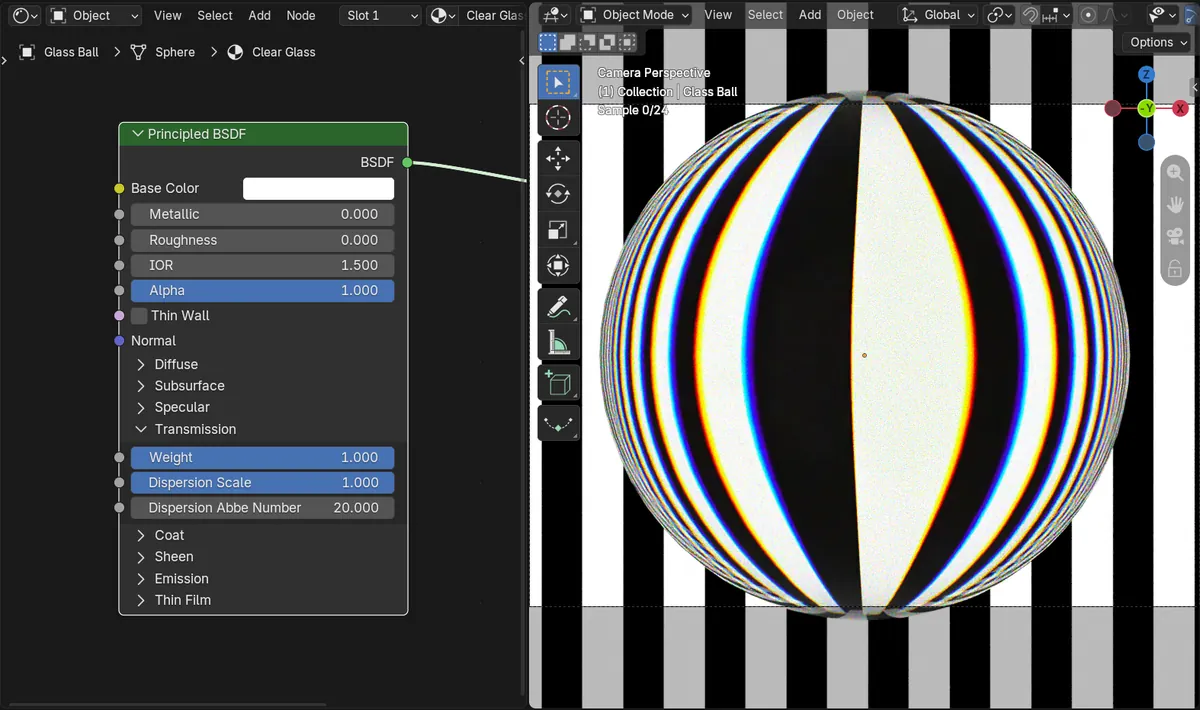
In Blender 5.3, open the Transmission panel of the Principled BSDF node and set Dispersion Scale above 0, for example 1. Rendered in Cycles, the glass splits light into rainbow-colored edges; Dispersion Abbe Number sets how strongly the colors separate.
- Mode
- Shader Editor or Material Properties, with Cycles
- Shortcut
- F12
Transmission panel
Dispersion Scale and Dispersion Abbe Number sit under Weight in the Principled BSDF's Transmission panel.
Rainbow edges
With Dispersion Scale 1, the color fringes in the render grew about 36 times stronger than at 0.
New in 5.3
Blender 5.2 LTS has no dispersion settings on the Principled BSDF; its glass bends every color the same way.
Before and after

AI Scene Builder is a Blender add-on. You type what you want, and it builds it in your scene: buildings, neon signs, wet pavement, fog and lights. Nothing in this picture was modeled by hand.
On a phone now? The add-on runs in Blender on a computer. Send yourself the link and open it there.
Step by step (Blender 5.3)
- Set Render Engine to Cycles in the Render Properties.
- Select the glass object and open the Shader Editor, or the Material Properties tab.
- On the Principled BSDF node, set Transmission Weight to 1 so the material is clear glass, with Roughness low and IOR around 1.5.
- Open the Transmission panel of the node and set Dispersion Scale to 1.
- Leave Dispersion Abbe Number at 20 to start, then lower it for stronger color splitting or raise it for a subtler effect.
- Switch the viewport to Rendered shading or press F12 to see the rainbow edges.
Other ways to do it
- Set the same values in the Properties editor, Material tab, where the Surface panel lists the Principled BSDF sockets
- Set Dispersion Scale back to 0 to turn the rainbow edges off again
Blender 5.2 LTS vs Blender 5.3
| What | Blender 5.2 LTS | Blender 5.3 |
|---|---|---|
| Glass dispersion | Not in Blender 5.2 LTS. The Principled BSDF has no Dispersion Scale or Dispersion Abbe Number. | Blender 5.3 adds Dispersion Scale and Dispersion Abbe Number to the Transmission panel of the Principled BSDF. |
Common snags
No rainbow shows up
Dispersion only shows on light that passes through the material, so Transmission Weight must be high (1 for clear glass), and Dispersion Scale must be above 0.
The effect is too faint
Lower Dispersion Abbe Number. Smaller numbers split the colors further apart. A busy, high-contrast background also makes the fringes easier to see.
The fringes look noisy
Color splitting needs more samples to clear up. Raise the render samples or keep denoising on.
An AI add-on for Blender
AI Scene Builder is a Blender add-on that builds and edits your scene from one typed request, such as “a small wooden table with two chairs”. Each request can be undone in one click.
 A lighthouse island at sunset built with the add-on from 10 typed requests. See every request →
Questions
How do I make glass show a rainbow in Blender?
In Blender 5.3, set Dispersion Scale above 0 in the Transmission panel of the Principled BSDF and render in Cycles.
What does Dispersion Abbe Number do?
It sets how far the colors spread. Lower numbers give stronger rainbow edges, higher numbers give a subtler effect.
Can I use it in Blender 5.2 LTS?
No, the dispersion settings on the Principled BSDF are new in Blender 5.3.
What the pictures show
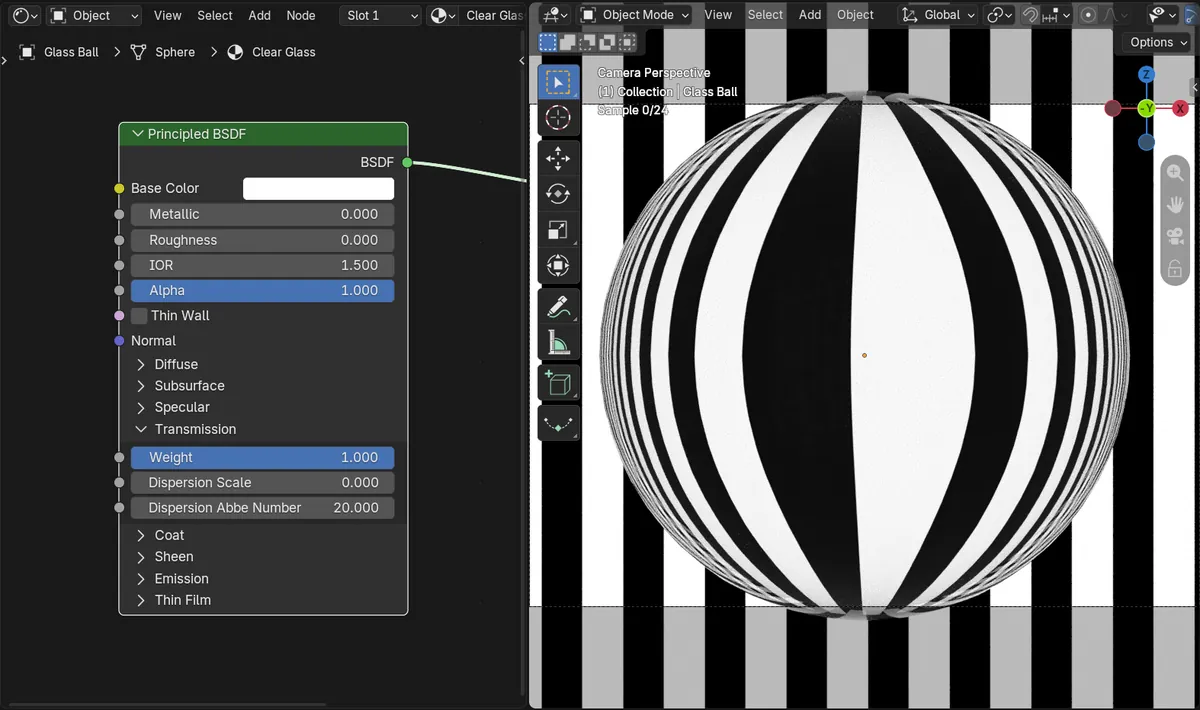
- Before: a clear glass ball (Transmission Weight 1, IOR 1.5) in front of a striped light panel, rendered in Cycles with Dispersion Scale 0, had almost no color fringes (color spread 0.0025).
- After setting Dispersion Scale to 1 with Abbe Number 20: the same render showed rainbow edges along the stripes, with the color spread rising to 0.0915.
- In Blender 5.2 LTS the Principled BSDF had no dispersion settings, and the same scene stayed at 0.0025.