How to Use a Repeat Zone in the Blender 5.4 Compositor
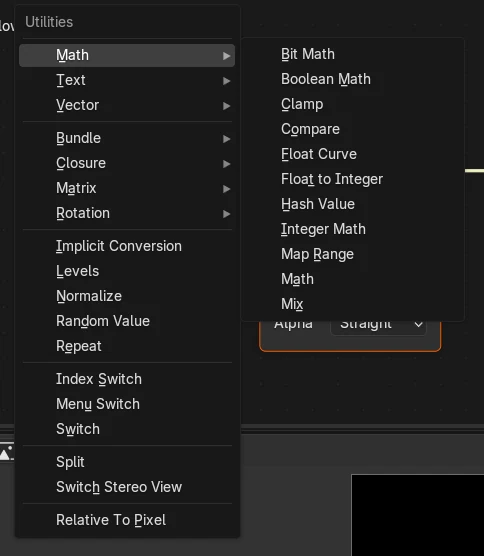
In Blender 5.4, open the compositor node tree, press Shift A and choose Utilities › Repeat. Blender adds a Repeat Input and a Repeat Output node; put the nodes you want to run again (for example a Blur) between them and set Iterations on Repeat Input. Blender 5.3 cannot add Repeat Zones to a compositor tree.
- Mode
- Compositor (Node Editor)
- Menu
- Add › Utilities › Repeat
Where it is
Add › Utilities › Repeat in the compositor's Node Editor. Shift A opens the same Add menu.
One node, many passes
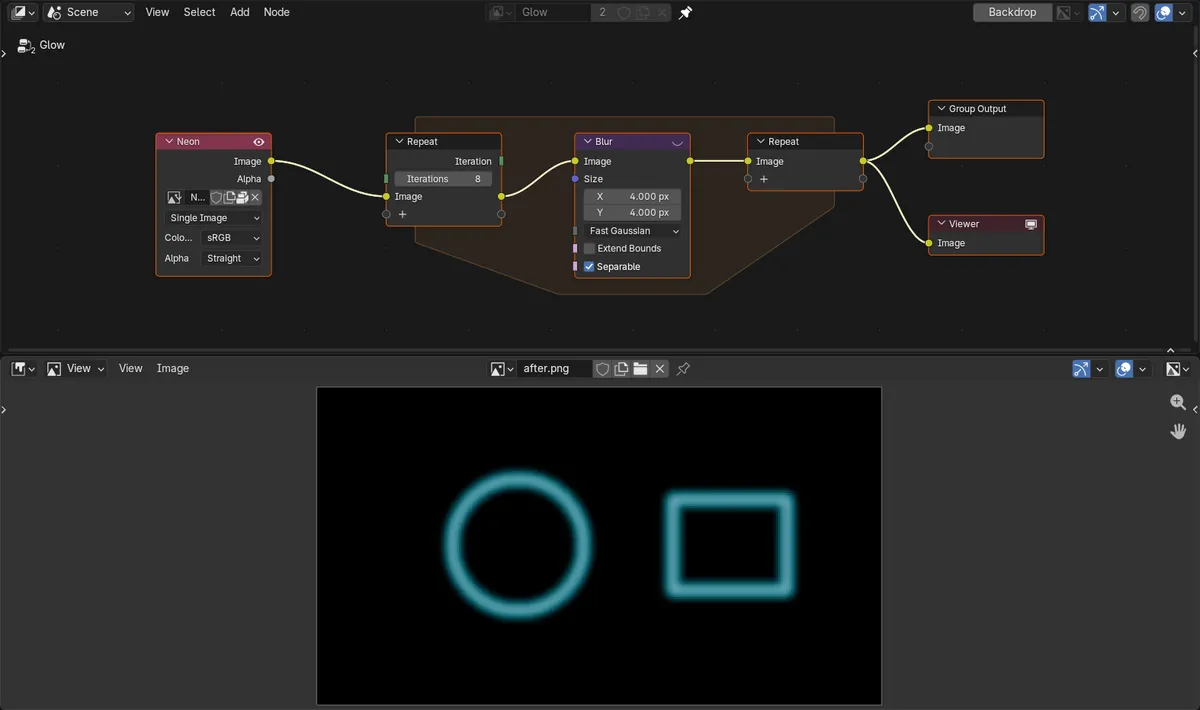
The nodes between Repeat Input and Repeat Output run once per iteration, so one Blur can work like eight.
New in 5.4
Blender 5.3 refuses to add Repeat nodes to a compositor tree. The zone only exists in 5.4.
Before and after

AI Scene Builder is a Blender add-on. You type what you want, and it builds it in your scene: buildings, neon signs, wet pavement, fog and lights. Nothing in this picture was modeled by hand.
On a phone now? The add-on runs in Blender on a computer. Send yourself the link and open it there.
Step by step (Blender 5.4 Alpha)
- Open a Node Editor and switch it to the Compositor, with your compositing node tree showing.
- Press Shift A (or click Add in the header) and choose Utilities › Repeat.Blender 5.3: Blender 5.3 has no Repeat entry in the compositor's Utilities menu.
- Place the zone, then drag the image you want to process into the empty socket of Repeat Input. This adds an Image item to the zone.
- Put the node you want to repeat, such as Blur, between Repeat Input and Repeat Output and connect Image through it.
- Set Iterations on Repeat Input, then connect Repeat Output's Image to the Group Output or a Viewer node and render with F12.
Other ways to do it
- Shift A in the Node Editor opens the Add menu, where Utilities › Repeat adds the zone.
- The Add menu in the Node Editor header shows the same Utilities › Repeat entry.
Blender 5.3 vs Blender 5.4 Alpha
| What | Blender 5.3 | Blender 5.4 Alpha |
|---|---|---|
| Repeat Zone in the compositor | Not available. Adding a Repeat Input node to a compositor tree fails with an error. | Add › Utilities › Repeat adds a Repeat Input and Repeat Output pair with an Iterations setting. |
| Release status | Blender 5.3.0 is the current stable release. | Blender 5.4 is in Alpha until February 3, 2027, so menus and behaviour may still change before the final release. |
Common snags
There is no Repeat item in Utilities
You are on Blender 5.3 or older, or the Node Editor shows a Shader or other tree. Use Blender 5.4 and switch the editor to the Compositor.
Nothing changes when Iterations goes up
The image is not passing through the zone. Check that it enters Repeat Input, runs through your node and leaves from Repeat Output into the output.
The repeated effect is too strong
Every iteration applies the node again. Lower Iterations, or lower the node's own setting such as the Blur Size.
An AI add-on for Blender
AI Scene Builder is a Blender add-on that builds and edits your scene from one typed request, such as “a small wooden table with two chairs”. Each request can be undone in one click.
 A lighthouse island at sunset built with the add-on from 10 typed requests. See every request →
Questions
Can you use a Repeat Zone in the Blender compositor?
Yes, from Blender 5.4. Choose Add › Utilities › Repeat in the compositor. In our run, one Blur repeated 8 times spread the light over 2.2 times as many pixels.
Does Blender 5.3 have Repeat Zones in the compositor?
No. In Blender 5.3.0, adding a Repeat Input node to a compositor tree fails with an error, so the zone cannot be used there.
How do I repeat a blur many times in the compositor?
Put one Blur node inside a Repeat Zone and set Iterations on Repeat Input. Each iteration blurs the result of the last one.
What the pictures show
- Tested build: Blender 5.4.0 Alpha (f9495703eb0b, 2026-11-10 build), compared with Blender 5.3.0.
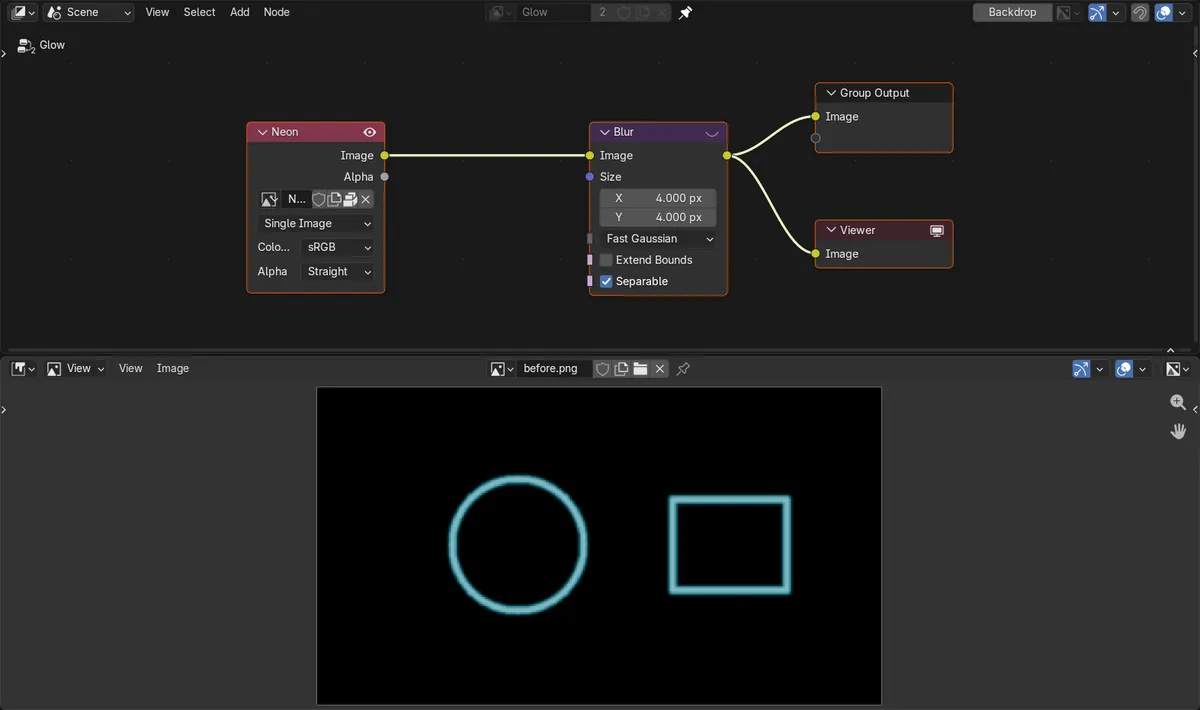
- Test image: 480 x 270 px, a thin cyan ring and rectangle outline on black. Blur node, Size 4 px, Fast Gaussian, rendered as a still image.
- 5.4, one Blur: 7,238 lit pixels, peak green 0.73. The same Blur inside a Repeat Zone with 8 iterations: 15,926 lit pixels (2.2 times as many), peak 0.62, so the glow spreads wider and softer.
- 5.3.0: adding the Repeat Input node to the compositor tree failed, and the render stayed at 7,235 lit pixels.