How to Use the Delaunay Triangulation Node in Blender 5.4
In Blender 5.4, open the Geometry Node Editor, press Shift + A and choose Geometry › Operations › Delaunay Triangulation, then connect your points to its Geometry input and its Mesh output to the Group Output. The node joins the points into a mesh made only of triangles, with one vertex for each point and no extra vertices. Blender 5.3 does not have this node.
- Mode
- Geometry Node Editor (Geometry Nodes modifier)
- Menu
- Add › Geometry › Operations › Delaunay Triangulation
- Shortcut
- Shift + A
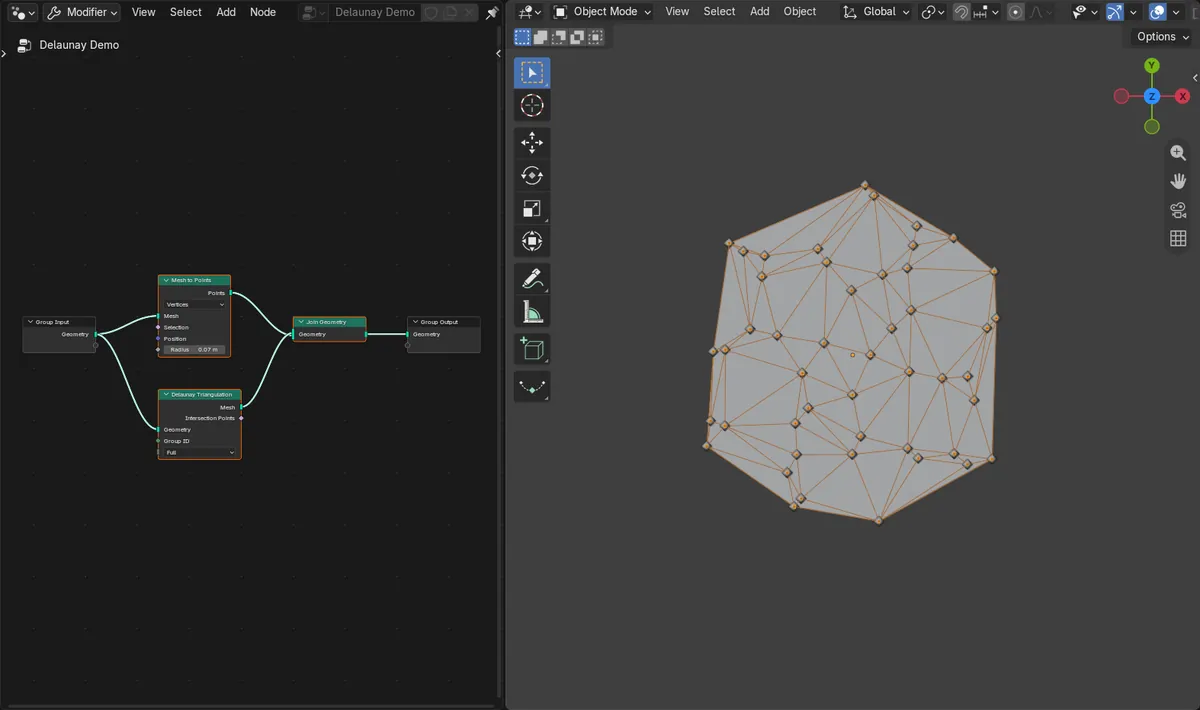
Where to find it
Shift + A in the Geometry Node Editor, then Geometry › Operations › Delaunay Triangulation.
Points in, triangles out
Loose vertices with no edges or faces become a mesh made only of triangles.
New in 5.4
Blender 5.3 has no Delaunay Triangulation node.
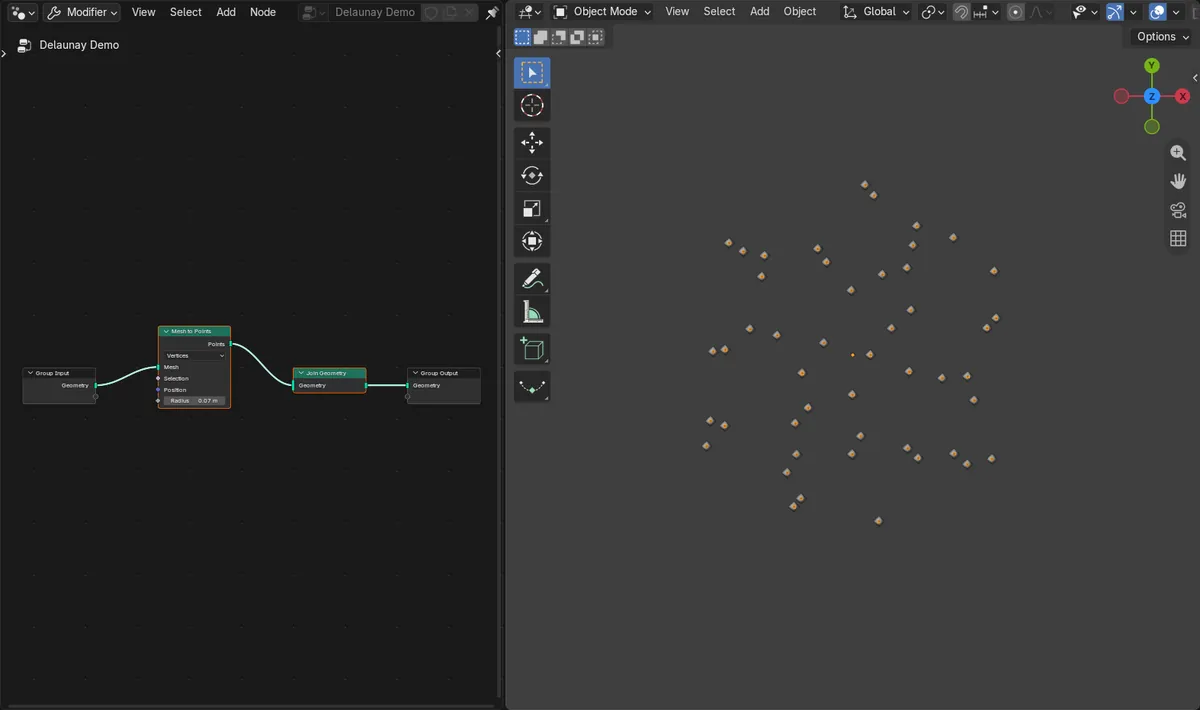
Before and after

AI Scene Builder is a Blender add-on. You type what you want, and it builds it in your scene: buildings, neon signs, wet pavement, fog and lights. Nothing in this picture was modeled by hand.
On a phone now? The add-on runs in Blender on a computer. Send yourself the link and open it there.
Step by step (Blender 5.4 Alpha)
- Select the object that holds your points (loose vertices are enough) and add a Geometry Nodes modifier to it. The Geometry Node Editor shows a Group Input and a Group Output node.
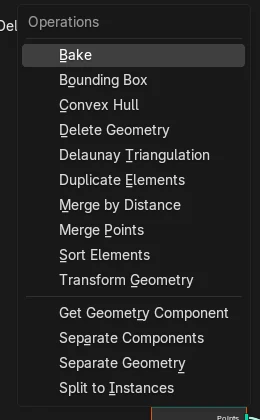
- With the mouse over the Geometry Node Editor, press Shift + A and choose Geometry › Operations › Delaunay Triangulation.Blender 5.3: Blender 5.3 has no Delaunay Triangulation entry in Geometry › Operations.
- Connect the Geometry output of the Group Input to the Geometry input of the new node.
- Connect the Mesh output of the node to the Group Output. The points are now joined by triangles in the 3D Viewport.
- To see the points and the triangles together, as in the pictures, send the points through a Mesh to Points node and join both results with Join Geometry before the Group Output.
Other ways to do it
- Add › Geometry › Operations in the header of the Geometry Node Editor opens the same list as Shift + A.
- The new node keeps its default Mode, Full, and also has a Group ID input and an Intersection Points output.
Blender 5.3 vs Blender 5.4 Alpha
| What | Blender 5.3 | Blender 5.4 Alpha |
|---|---|---|
| Delaunay Triangulation node | Not in Blender 5.3.0. Geometry › Operations goes from Delete Geometry straight to Duplicate Elements. | Blender 5.4 adds Delaunay Triangulation to Geometry › Operations, between Delete Geometry and Duplicate Elements. |
| Release status | Blender 5.3.0 is the current stable release. | Blender 5.4 is in Alpha until February 3, 2027, so menus and behaviour may still change before the final release. |
Common snags
Delaunay Triangulation is not in the menu
You are on Blender 5.3 or older, or the mouse is over another editor. Install Blender 5.4 and press Shift + A with the mouse over the Geometry Node Editor.
The points disappear after adding the node
Only the triangles reach the Group Output. To keep the dots visible, join the Delaunay Triangulation result with a Mesh to Points result using Join Geometry.
Nothing changes in the 3D Viewport
The Mesh output is not connected to the Group Output. Connect it directly or through Join Geometry.
An AI add-on for Blender
AI Scene Builder is a Blender add-on that builds and edits your scene from one typed request, such as “a small wooden table with two chairs”. Each request can be undone in one click.
 An evening market street built with the add-on from 11 typed requests. See every request →
Questions
How do I turn a point cloud into a triangle mesh in Blender?
In Blender 5.4, add the Delaunay Triangulation node (Add › Geometry › Operations, or Shift + A) in Geometry Nodes and connect the points to it. In our run, 48 points became 84 triangles.
Does Blender 5.3 have a Delaunay Triangulation node?
No. The node is new in Blender 5.4 and is not in the Geometry › Operations list of Blender 5.3.0.
Does Delaunay Triangulation add new vertices?
Not in our run: 48 points in, 48 vertices out, with 84 triangle faces between them.
Do the points need edges or faces first?
No. The input in our run was 48 loose vertices with no edges or faces.
What the pictures show
- Tested build: Blender 5.4.0 Alpha (f9495703eb0b, 2026-11-10 build), compared with Blender 5.3.0.
- Before: 48 loose points (vertices only) and 0 faces.
- After adding Delaunay Triangulation in 5.4: 84 faces, all of them triangles, 48 vertices (one per point, none added) and 131 edges.
- 10 of the 48 points lie on the outer boundary, and 2 x 48 - 10 - 2 = 84, the triangle count of a full triangulation of these points.
- In Blender 5.3.0 the node could not be added and the points stayed 48 loose points with 0 faces.