How to Reorder Objects in the Blender Outliner (Custom Sort in 5.3)
In Blender 5.3, keep the Outliner's Sort set to Custom and drag an object onto the top or bottom edge of another row. The object moves to that spot in the list instead of being parented, and the new order stays.
- Mode
- Outliner, View Layer display mode
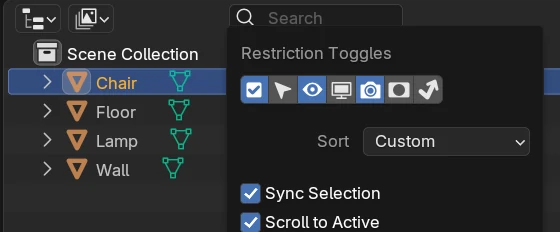
Sort: Custom
The Filter popover has a Sort menu, set to Custom in a new scene.
Drag to move
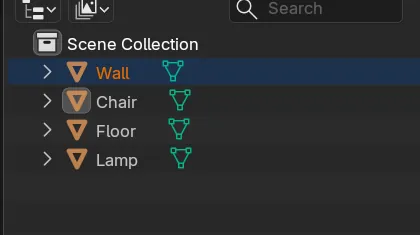
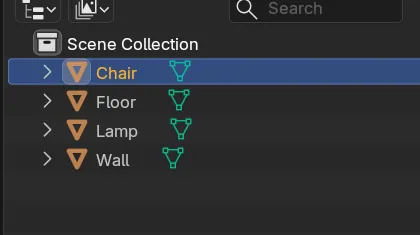
Dropping Wall on the top edge of the Chair row moved Wall from the bottom to the top.
New in 5.3
Blender 5.2 LTS only has Sort Alphabetically, so objects cannot be put in your own order.
Before and after

AI Scene Builder is a Blender add-on. You type what you want, and it builds it in your scene: buildings, neon signs, wet pavement, fog and lights. Nothing in this picture was modeled by hand.
On a phone now? The add-on runs in Blender on a computer. Send yourself the link and open it there.
Step by step (Blender 5.3)
- Open the Outliner in the View Layer display mode.
- Click the Filter popover (the drop-down button at the right of the Outliner header) and check that Sort is set to Custom.
- Drag the object you want to move up or down the list.
- Drop it on the top edge of a row to place it above that row, or on the bottom edge to place it below.
- Let go. The rows keep the new order.
Other ways to do it
- Drop an object in the middle of another row to make it a child of that row instead
- Drag an object onto a collection to move it into that collection
- Hold Alt while dropping on a row to set the parent without keeping transforms
Blender 5.2 LTS vs Blender 5.3
| What | Blender 5.2 LTS | Blender 5.3 |
|---|---|---|
| Outliner order | Blender 5.2 LTS has a Sort Alphabetically checkbox. With it on, rows go by name; there is no order of your own. | Blender 5.3 replaces it with a Sort menu, and Custom keeps the order you drag the rows into. |
Common snags
The object became a child
Dropping in the middle of a row parents the object to it. Drop on the top or bottom edge of the row to move it in the list.
The rows jump back by name
Check the Sort menu in the Filter popover. The order you drag is kept when Sort is set to Custom.
There is no Sort menu
The Sort menu is new in Blender 5.3. In Blender 5.2 LTS the Filter popover shows Sort Alphabetically instead.
An AI add-on for Blender
AI Scene Builder is a Blender add-on that builds and edits your scene from one typed request, such as “a small wooden table with two chairs”. Each request can be undone in one click.
 A lighthouse island at sunset built with the add-on from 10 typed requests. See every request →
Questions
Can I put objects in my own order in the Outliner?
Yes, in Blender 5.3. Keep Sort on Custom and drag a row onto the top or bottom edge of another row.
Why does dragging an object make it a child?
The drop landed in the middle of a row. Drop on the row's top or bottom edge to change the order instead.
Where is Sort Alphabetically in Blender 5.3?
It became the Sort menu in the Outliner's Filter popover.
What the pictures show
- Before: four objects in the Scene Collection, with Sort set to Custom, were listed as Chair, Floor, Lamp, Wall.
- After dragging Wall from the last row onto the top edge of the Chair row: the list read Wall, Chair, Floor, Lamp.
- No object was parented, and all four objects were still in the list.
- In Blender 5.2 LTS the Filter popover had Sort Alphabetically instead of Sort, and the same drag left the list as Chair, Floor, Lamp, Wall.