How to Select Grease Pencil Strokes by Color in Geometry Nodes (Blender 5.3)
In Blender 5.3, add a Geometry Nodes modifier to the Grease Pencil object and add Grease Pencil Color (press Shift + A, then Grease Pencil › Read). Its Point output is the stroke color. Send it through Separate Color and use a channel as a selection, for example Red into the Selection of Delete Geometry set to Spline: the red strokes are removed and the blue ones stay.
- Mode
- Geometry Nodes editor
- Menu
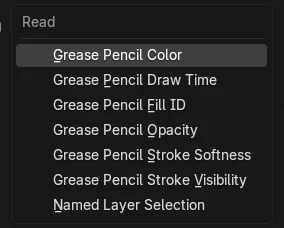
- Grease Pencil › Read › Grease Pencil Color
- Shortcut
- Shift + A
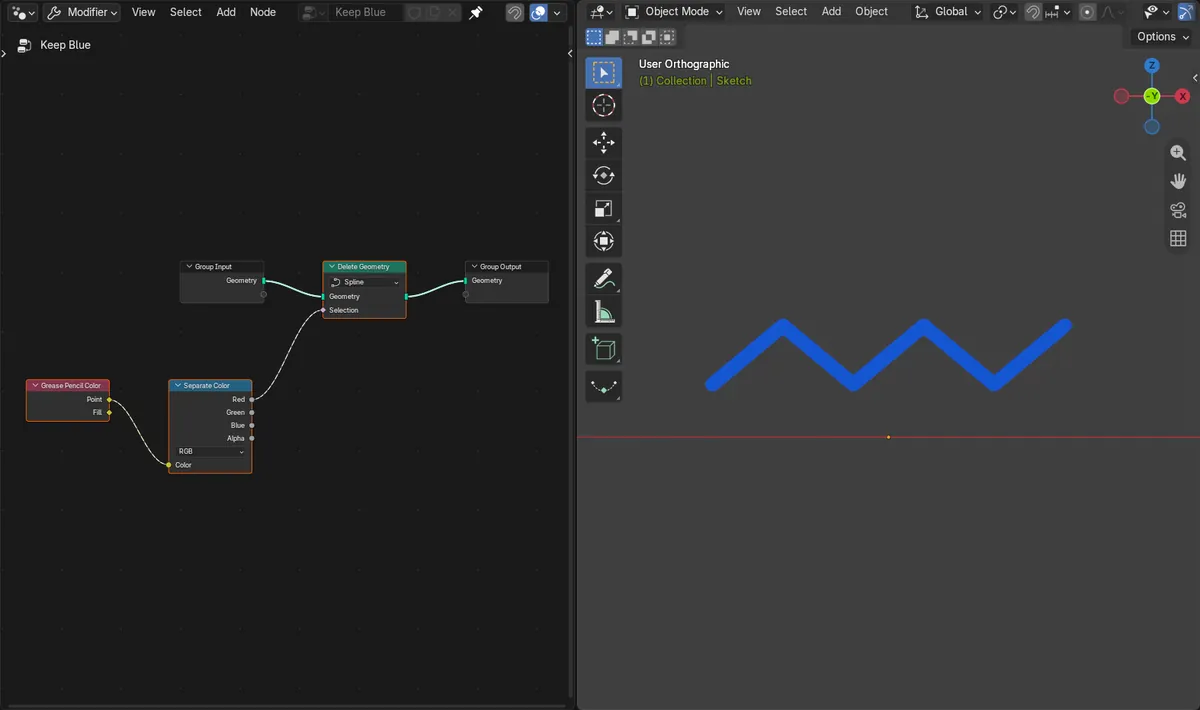
Strokes chosen by color
In a drawing with red, blue and red strokes, the Red channel as selection removed both red strokes and kept the blue one.
Swap the channel
Using the Blue channel instead removed the blue stroke and kept the two red ones.
New in 5.3
Blender 5.2 LTS has no Grease Pencil Color node, so Geometry Nodes cannot read stroke colors there.
Before and after

AI Scene Builder is a Blender add-on. You type what you want, and it builds it in your scene: buildings, neon signs, wet pavement, fog and lights. Nothing in this picture was modeled by hand.
On a phone now? The add-on runs in Blender on a computer. Send yourself the link and open it there.
Step by step (Blender 5.3)
- Select the Grease Pencil object and add a Geometry Nodes modifier, then open the Geometry Nodes editor.
- Add Delete Geometry between Group Input and Group Output and set its domain to Spline, so whole strokes are removed.
- Press Shift + A and choose Grease Pencil › Read › Grease Pencil Color.Blender 5.2 LTS: Not available in 5.2 LTS.
- Connect its Point output to a Separate Color node.
- Connect the channel you want to remove, for example Red, to the Selection input of Delete Geometry.
Other ways to do it
- Press Shift + A in the Geometry Nodes editor and type Grease Pencil Color in the menu search.
- To change colors instead of removing strokes, feed the same selection into Set Grease Pencil Color in Grease Pencil › Write.
Blender 5.2 LTS vs Blender 5.3
| What | Blender 5.2 LTS | Blender 5.3 |
|---|---|---|
| Grease Pencil Color node | Not in Blender 5.2 LTS. | In Grease Pencil › Read, with Point and Fill outputs. |
| Grease Pencil Opacity node | Not in Blender 5.2 LTS. | In Grease Pencil › Read next to Grease Pencil Color. |
Common snags
A little color still counts
A channel above 0 counts as selected. In a test, blue strokes with a small amount of red were removed along with the red ones. Put a Compare node (Greater Than 0.5) between Separate Color and Selection to set a threshold.
Everything disappears
The Selection of Delete Geometry is on when nothing is connected, which removes the whole drawing. Connect the color channel, or untick Selection while you build the tree.
Your drawing is not changed
The modifier only changes the result. The original drawing kept all three strokes; turn the modifier off to see them again.
An AI add-on for Blender
AI Scene Builder is a Blender add-on that builds and edits your scene from one typed request, such as “a small wooden table with two chairs”. Each request can be undone in one click.
 A lighthouse island at sunset built with the add-on from 10 typed requests. See every request →
Questions
How do I select Grease Pencil strokes by color in Blender?
In Blender 5.3, use the Grease Pencil Color node in Geometry Nodes. Split its Point output with Separate Color and use a channel as the selection for Delete Geometry or Set Grease Pencil Color.
Can Geometry Nodes read Grease Pencil vertex color?
Yes, in Blender 5.3. Grease Pencil Color in Grease Pencil › Read has a Point output with the color of the stroke points, plus a Fill output.
Does Blender 5.2 LTS have the Grease Pencil Color node?
No. Grease Pencil Color is new in Blender 5.3.
What the pictures show
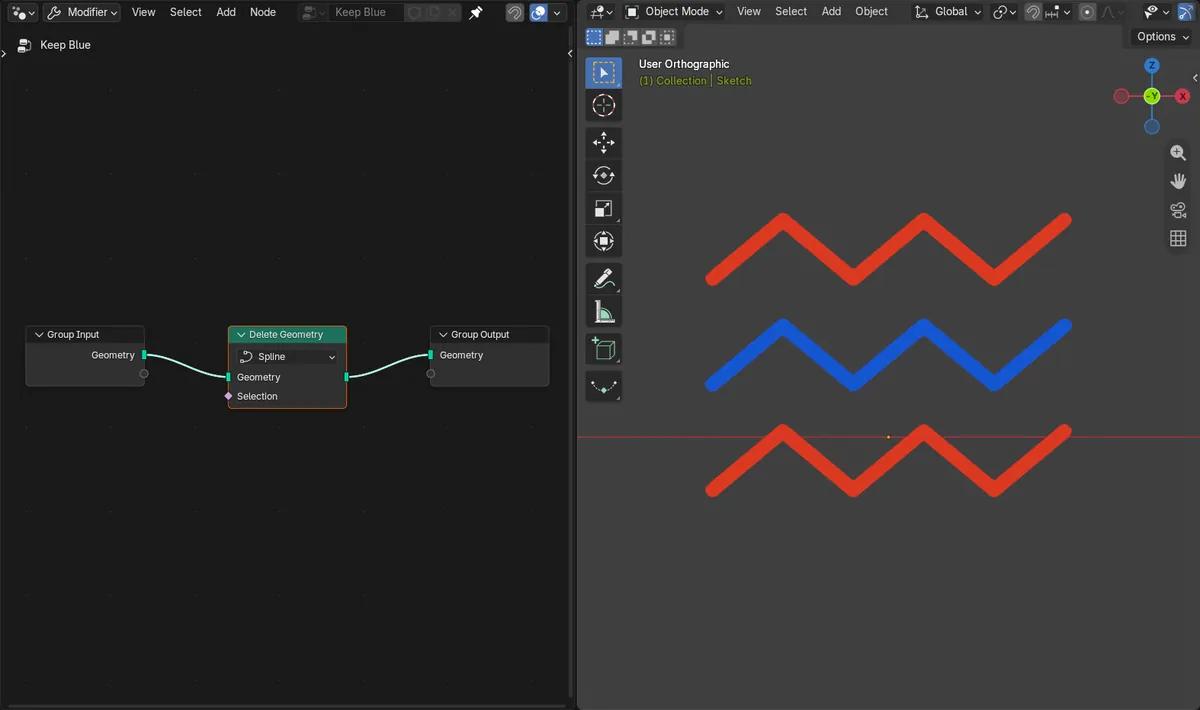
- Blender 5.3: before, the drawing had three strokes colored red, blue and red, and the node tree had no Grease Pencil Color node.
- Blender 5.3: Grease Pencil Color Point into Separate Color, with Red into the Selection of Delete Geometry (Spline), left only the blue stroke.
- Blender 5.3: with Blue connected instead, the two red strokes stayed and the blue one was removed; switching back to Red left the blue stroke again.
- Blender 5.3: the original drawing still had all three strokes.
- Blender 5.2 LTS: the Grease Pencil Color and Grease Pencil Opacity nodes do not exist, and the drawing kept all three strokes.