How to Show Thumbnails on Text Strips in the Video Editor (Blender 5.3)
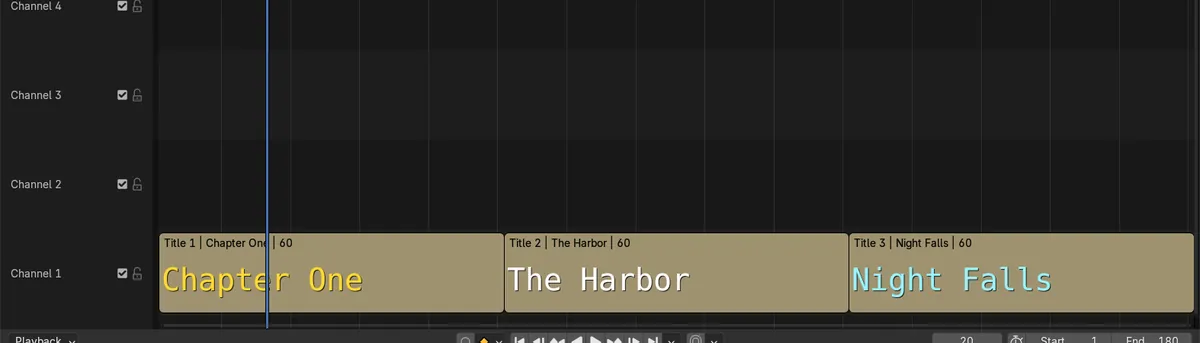
In Blender 5.3, open the Overlays dropdown in the Video Sequencer header and tick Thumbnails. Text strips now show a preview of their title text inside the strip, so each title card can be recognized on the timeline without selecting it.
- Mode
- Video Sequencer, timeline
- Menu
- Overlays › Thumbnails
Overlays > Thumbnails
In the Overlays dropdown of the Video Sequencer header.
Readable strips
Three title strips each showed their own text, like Chapter One and The Harbor, inside the strip.
New in 5.3
In Blender 5.2 LTS text strips stay plain bars with only their name.
Before and after

AI Scene Builder is a Blender add-on. You type what you want, and it builds it in your scene: buildings, neon signs, wet pavement, fog and lights. Nothing in this picture was modeled by hand.
On a phone now? The add-on runs in Blender on a computer. Send yourself the link and open it there.
Step by step (Blender 5.3)
- Open the Video Sequencer with your text strips on the timeline.
- Click the Overlays dropdown in the header.
- Tick Thumbnails.
- Make the channels tall enough to read: zoom in vertically or drag the view until the strips are larger.
Other ways to do it
- Untick Thumbnails in the same dropdown to go back to plain strips
- Name each text strip after its title so the label on the strip also tells them apart
Blender 5.2 LTS vs Blender 5.3
| What | Blender 5.2 LTS | Blender 5.3 |
|---|---|---|
| Text strip thumbnails | Not in Blender 5.2 LTS. Text strips show only their name and length. | Blender 5.3 draws the title text inside text strips when Thumbnails is on. |
Common snags
Nothing shows in the strip
Thumbnails needs strips tall enough to draw into. Zoom in vertically until the channel is taller.
Only the text shows, not the box
The preview draws the title text over the strip color. The final look, including any box, is in the Preview.
The option is missing
Text strip thumbnails are new in Blender 5.3.
An AI add-on for Blender
AI Scene Builder is a Blender add-on that builds and edits your scene from one typed request, such as “a small wooden table with two chairs”. Each request can be undone in one click.
 A lighthouse island at sunset built with the add-on from 10 typed requests. See every request →
Questions
How do I see what a text strip says on the timeline?
In Blender 5.3, tick Thumbnails in the Overlays dropdown of the Video Sequencer.
Why are my text strips blank?
Thumbnails are off or the strips are too short in height. Turn Thumbnails on and zoom in vertically.
Does Blender 5.2 LTS show text strip thumbnails?
No, they are new in Blender 5.3.
What the pictures show
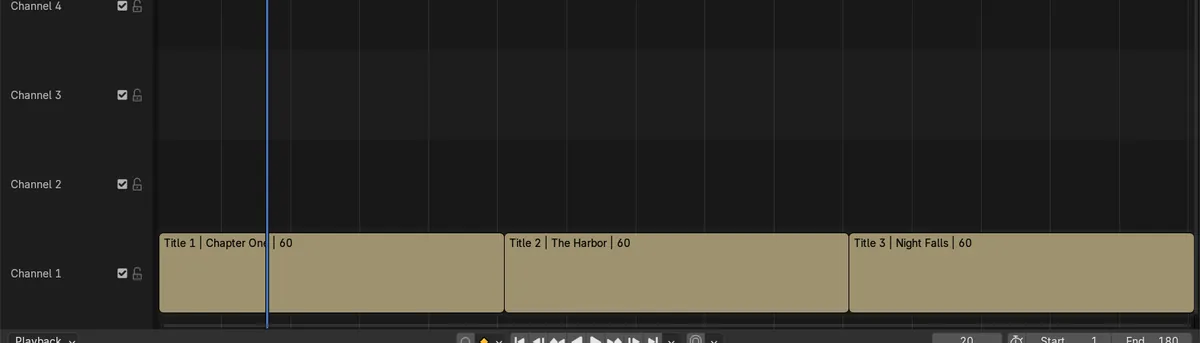
- Before: three text strips (Chapter One, The Harbor, Night Falls) on channel 1 with Thumbnails off were flat bars with only their names.
- After ticking Thumbnails: each strip showed its own title text, and the inside of every strip changed from flat to detailed.
- In Blender 5.2 LTS the same text strips stayed flat bars.