How to See the Vertex Count in Weight Paint Mode in Blender 5.3
In Blender 5.3, open the Viewport Overlays popover in the 3D Viewport header while in Weight Paint mode and tick Statistics in its Text section. The vertex and face count of the mesh you are painting appears at the top left of the viewport, under the object name.
- Mode
- Weight Paint mode, 3D Viewport
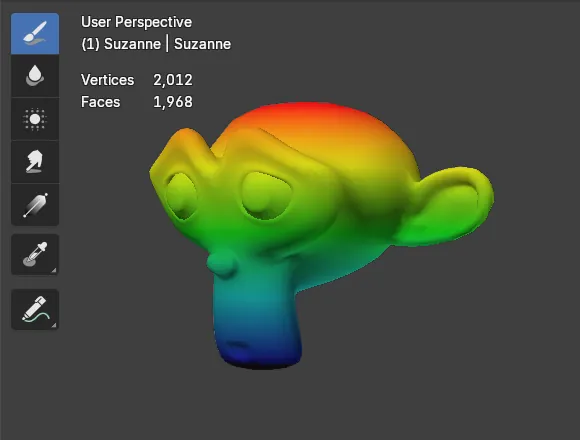
Statistics overlay
The same Statistics checkbox you use in Object and Edit Mode now shows mesh counts in Weight Paint mode.
Real counts
A subdivided Suzanne showed Vertices 2,012 and Faces 1,968 in Weight Paint mode.
New in 5.3
In Blender 5.2 LTS Statistics shows only the number of objects while in Weight Paint mode.
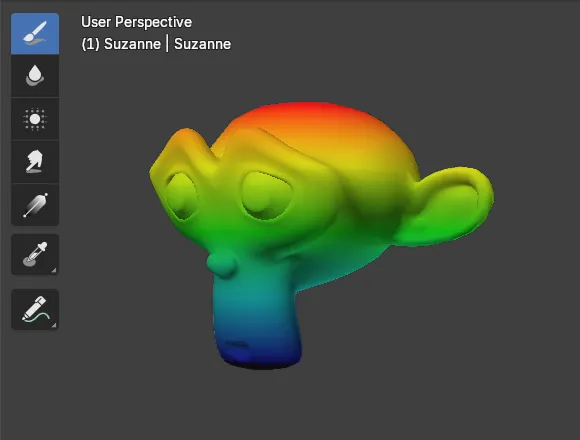
Before and after

AI Scene Builder is a Blender add-on. You type what you want, and it builds it in your scene: buildings, neon signs, wet pavement, fog and lights. Nothing in this picture was modeled by hand.
On a phone now? The add-on runs in Blender on a computer. Send yourself the link and open it there.
Step by step (Blender 5.3)
- Select the mesh and switch to Weight Paint mode with the mode menu in the 3D Viewport header.
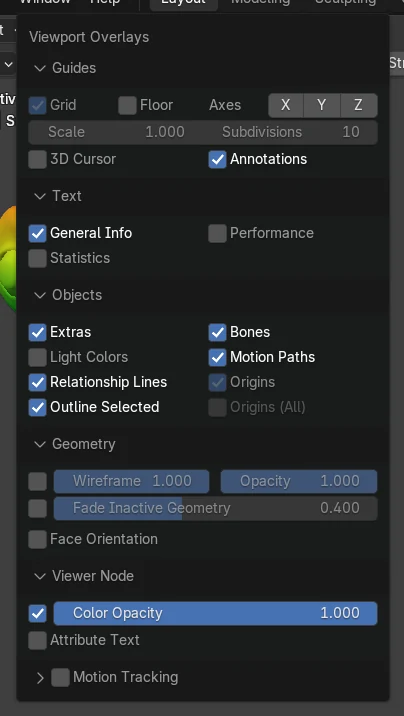
- Click the small arrow next to the overlays button in the header to open the Viewport Overlays popover.
- In the Text section, make sure General Info is ticked, then tick Statistics.
- Look at the top left of the viewport: Vertices and Faces now appear under the object name.
Other ways to do it
- Tick Statistics in Object Mode first; the setting belongs to the viewport and stays on when you switch to Weight Paint mode
Blender 5.2 LTS vs Blender 5.3
| What | Blender 5.2 LTS | Blender 5.3 |
|---|---|---|
| Statistics in Weight Paint mode | Not in Blender 5.2 LTS. With Statistics ticked, Weight Paint mode shows only Objects 1 / 1, without vertex or face counts. | Blender 5.3 shows the Vertices and Faces of the mesh in Weight Paint mode. |
Common snags
Statistics is ticked but nothing appears
General Info in the same Text section, or the whole overlays button, is off. Turn both on.
The numbers are for the wrong mesh
The counts are for the mesh you are painting. Leave Weight Paint mode, select the right object and enter it again.
Only Objects 1 / 1 is shown
That is how Blender 5.2 LTS draws it. Vertex and face counts in Weight Paint mode are new in Blender 5.3.
An AI add-on for Blender
AI Scene Builder is a Blender add-on that builds and edits your scene from one typed request, such as “a small wooden table with two chairs”. Each request can be undone in one click.
 An evening market street built with the add-on from 11 typed requests. See every request →
Questions
How do I see the vertex count while weight painting in Blender?
In Blender 5.3, open the Viewport Overlays popover and tick Statistics. Vertices and Faces appear at the top left of the viewport in Weight Paint mode.
Is the count for the whole scene?
No, in Weight Paint mode it is the count of the mesh you are painting.
Why do I only see Objects 1 / 1?
Blender 5.2 LTS shows only the object count in Weight Paint mode. Update to Blender 5.3 for vertex and face counts.
What the pictures show
- Before: Suzanne with one Subdivision level applied, in Weight Paint mode with Statistics off; the top left showed only the view name and the object name (2 lines).
- After ticking Statistics: two more lines appeared, Vertices 2,012 and Faces 1,968, matching the mesh.
- In Blender 5.2 LTS ticking Statistics in Weight Paint mode added only one line, Objects 1 / 1.