How to Change the Default Length of New Strips in the Blender Video Editor
In Blender 5.3, open Edit › Preferences › Editing › Video Sequencer › New Strips and change Strip Length. New color, text and image strips then get that duration, so with 4 s a new color strip is 96 frames long at 24 fps.
- Mode
- Preferences, Video Sequencer
- Menu
- Edit › Preferences › Editing › Video Sequencer › New Strips › Strip Length
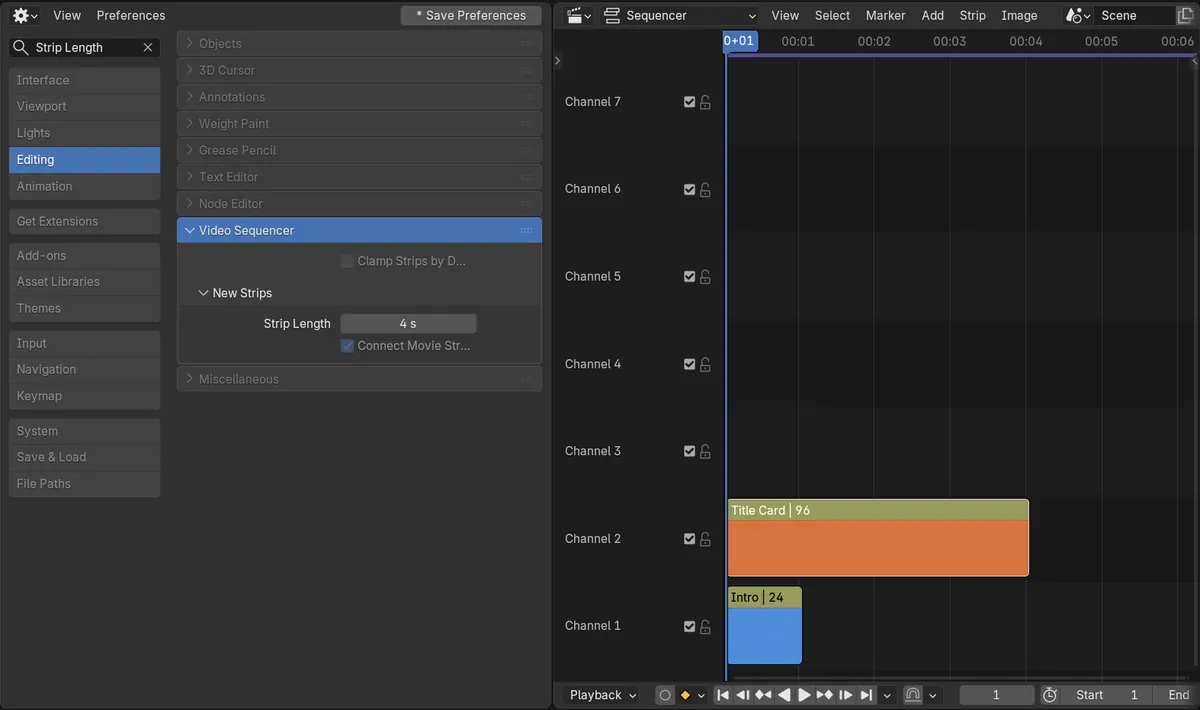
Strip Length
Preferences › Editing › Video Sequencer › New Strips.
Set in seconds
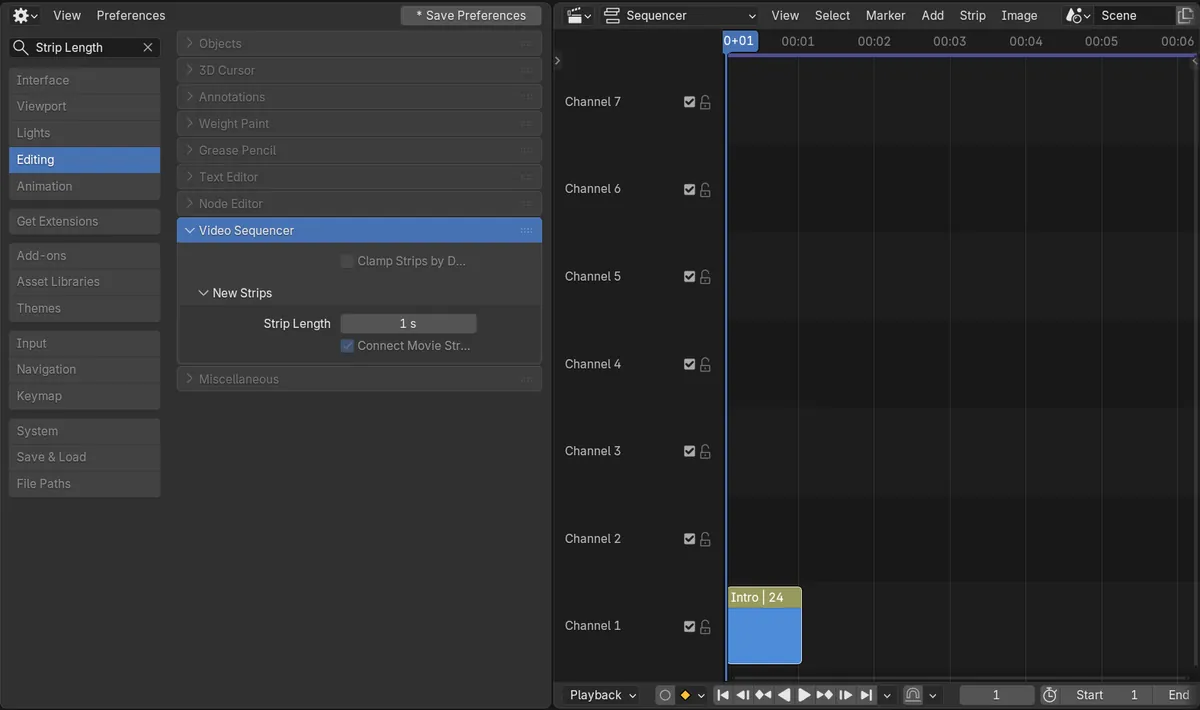
1 s is the default; 4 s makes a new color strip 96 frames at 24 fps.
New in 5.3
In Blender 5.2 LTS a new color strip is always 25 frames and there is no setting for it.
Before and after

AI Scene Builder is a Blender add-on. You type what you want, and it builds it in your scene: buildings, neon signs, wet pavement, fog and lights. Nothing in this picture was modeled by hand.
On a phone now? The add-on runs in Blender on a computer. Send yourself the link and open it there.
Step by step (Blender 5.3)
- Open Edit › Preferences.
- Go to the Editing section and open the Video Sequencer panel.
- Under New Strips, set Strip Length, for example to 4 s.
- In the Video Sequencer, add a color strip from the Add menu.
- The new strip has the length you set; strips you added before keep their length.
Other ways to do it
- Type Strip Length in the search box of the Preferences window to jump straight to the setting
- Strips already in the timeline do not change: drag their handles to make them longer or shorter
- Clamp Strips by Default sits in the same Video Sequencer panel of the Preferences
Blender 5.2 LTS vs Blender 5.3
| What | Blender 5.2 LTS | Blender 5.3 |
|---|---|---|
| Default Strip Length | Not in Blender 5.2 LTS. A new color strip is always 25 frames. | Blender 5.3 adds Strip Length under Preferences › Editing › Video Sequencer › New Strips. |
| Clamp Strips by Default | Not in Blender 5.2 LTS. | Blender 5.3 has Clamp Strips by Default in the same Video Sequencer panel. |
Common snags
My old strips did not get longer
Strip Length only applies to strips you add after changing it. Strips already in the timeline keep the length they had.
A movie strip ignored the setting
Strip Length is for strips that have no length of their own, such as color, text and image strips. Movie and sound strips use the length of their file.
I cannot find the Video Sequencer panel
It is closed by default in the Editing section. Click its header, or type Strip Length in the Preferences search box.
An AI add-on for Blender
AI Scene Builder is a Blender add-on that builds and edits your scene from one typed request, such as “a small wooden table with two chairs”. Each request can be undone in one click.
 An evening market street built with the add-on from 11 typed requests. See every request →
Questions
How do I make new color strips longer in Blender?
In Blender 5.3, raise Strip Length under Preferences › Editing › Video Sequencer › New Strips. New color strips get that length.
Is Strip Length set in frames or seconds?
In seconds. Blender turns it into frames using the scene frame rate, so 4 s is 96 frames at 24 fps.
Does it change the strips already in my edit?
No. Only strips added after the change get the new length.
What the pictures show
- Before: Strip Length was 1 s and a color strip added in the Video Sequencer (Intro) was 24 frames long at 24 fps.
- After setting Strip Length to 4 s: the next color strip added the same way (Title Card) was 96 frames long.
- The Intro strip kept its 24 frames.
- In Blender 5.2 LTS there was no Strip Length setting, and each new color strip was 25 frames.