How to Speed Up the Compositor Preview with Proxy in Blender 5.4
In Blender 5.4, open the Compositor, press N for the sidebar, go to the Options tab and, under Performance, tick Proxy and set its percentage (for example 25%). The Viewer and backdrop are then computed at that fraction of the render size, so heavy node trees update faster, while F12 renders are still written at full resolution. Blender 5.3 has no Proxy setting.
- Mode
- Compositor: Node Editor sidebar (N), Options tab, Proxy row of the Performance panel
- Menu
- Node Editor › Performance
- Shortcut
- N (sidebar), F12 (render)
Where to find it
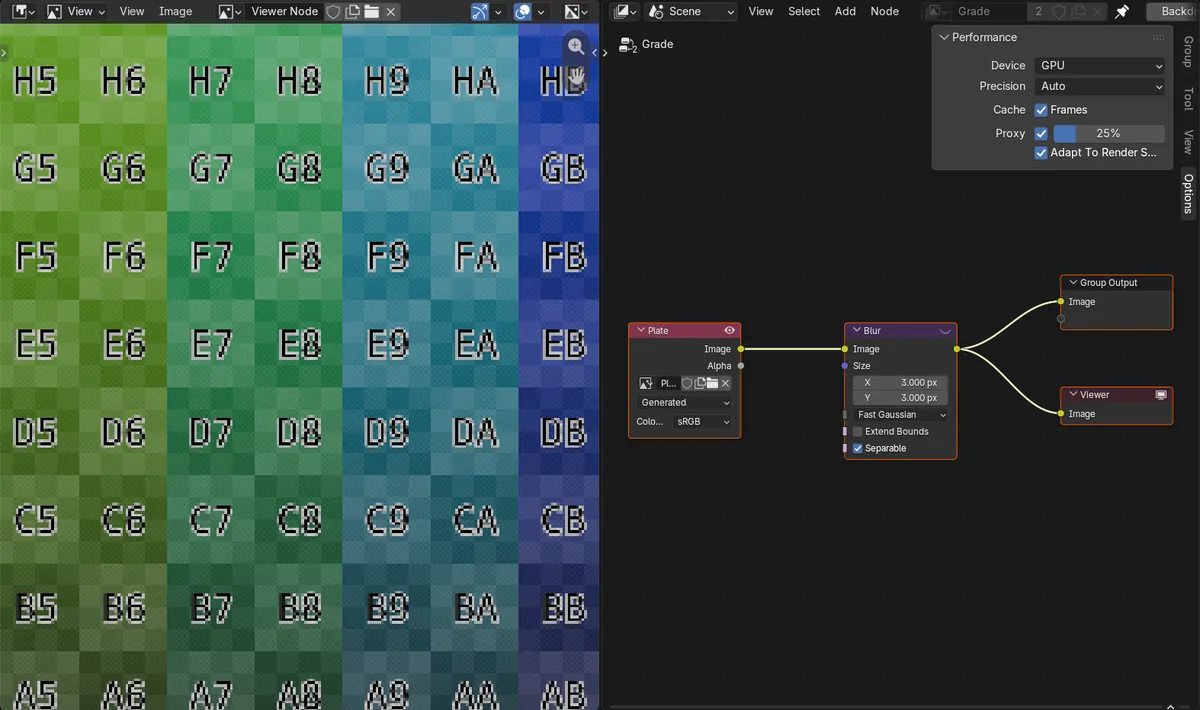
In the Compositor, press N for the sidebar and open the Options tab: the Proxy checkbox and its percentage are in the Performance panel.
Smaller preview, full-size render
At 25% our Viewer result was 480 x 270, while the F12 render saved to disk was still 1920 x 1080.
New in 5.4
Blender 5.3 has no Proxy option in the compositor's Performance settings.
Before and after

AI Scene Builder is a Blender add-on. You type what you want, and it builds it in your scene: buildings, neon signs, wet pavement, fog and lights. Nothing in this picture was modeled by hand.
On a phone now? The add-on runs in Blender on a computer. Send yourself the link and open it there.
Step by step (Blender 5.4 Alpha)
- Open the Compositing workspace, or switch any editor to the Compositor.
- With the mouse over the Node Editor, press N to show the sidebar and click the Options tab.
- In the Performance panel, tick Proxy.Blender 5.3: Blender 5.3 has no Proxy option in this panel.
- Set the percentage next to Proxy. 50% is the default; 25% gives a quarter-width preview that updates even faster.
- Keep tweaking nodes: the Viewer node and the backdrop now show the smaller result. Press F12 when you are done; the final render is still made at the full render size.
Other ways to do it
- Untick Proxy to go back to full-size previews. The setting belongs to the scene, so it is saved with the .blend file.
- Adapt to Render Scale, under Proxy, is on by default and is a separate setting from Proxy.
Blender 5.3 vs Blender 5.4 Alpha
| What | Blender 5.3 | Blender 5.4 Alpha |
|---|---|---|
| Compositor Proxy | Not in Blender 5.3.0. The Viewer always works at the full render size. | Blender 5.4 adds Proxy with a percentage to the compositor's Performance settings. |
| Release status | Blender 5.3.0 is the current stable release. | Blender 5.4 is in Alpha; the final release is planned for February 3, 2027. |
Common snags
The preview looks soft or blocky
That is the smaller proxy size. Raise the percentage or untick Proxy when you need to judge fine detail.
I can't find the Options tab
The sidebar belongs to the Node Editor. Hover the mouse over the Compositor and press N, then pick Options among the tabs on the right edge.
Will my final render be smaller?
No. In our test the F12 render with Proxy at 25% was saved at the full 1920 x 1080.
There is no Proxy checkbox
You are on Blender 5.3 or older. The option is new in Blender 5.4.
Questions
How do I make the Blender compositor preview faster?
In Blender 5.4, press N in the Compositor, open the Options tab and tick Proxy in the Performance panel, then pick a lower percentage. The Viewer is then computed at that fraction of the render size.
Does compositor Proxy change the final render?
No. In our test, with Proxy at 25%, the Viewer was 480 x 270 but the F12 render was still saved at 1920 x 1080.
Where is the compositor Proxy setting?
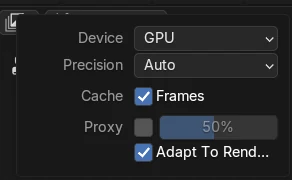
In the Compositor, press N, open the Options tab and look in the Performance panel, under Cache.
Does Blender 5.3 have a compositor Proxy option?
No. It is new in Blender 5.4.
What the pictures show
- Tested build: Blender 5.4.0 Alpha (f9495703eb0b, 2026-11-10 build), compared with Blender 5.3.0.
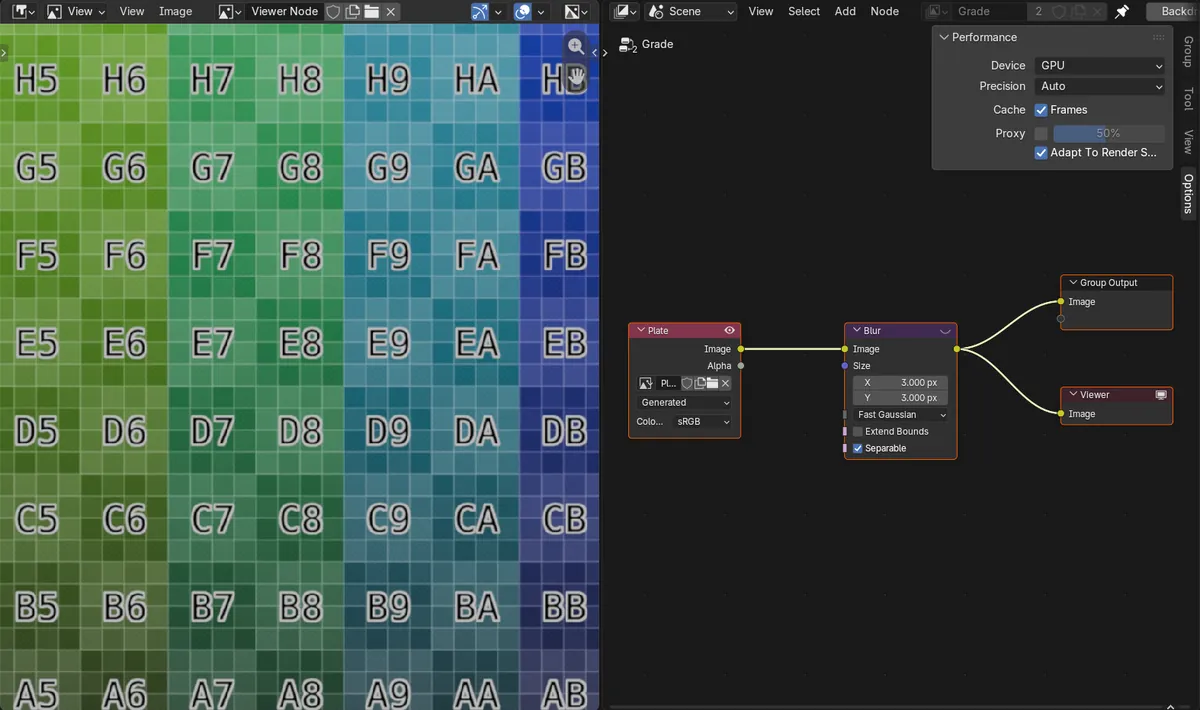
- Scene: a 1920 x 1080 image through a Blur node into the Group Output and a Viewer node; render size 1920 x 1080 at 100%.
- Before: Proxy off (default percentage 50%); the Viewer result was 1920 x 1080.
- After ticking Proxy at 25% in 5.4: the Viewer result was 480 x 270, and the F12 render saved to disk was 1920 x 1080.
- In Blender 5.3.0 the compositor has no Proxy setting, so it could not be turned on.