How to Keep Tubes Thick at Sharp Corners with Curve to Mesh (Blender 5.3)
In Blender 5.3, open the Curve to Mesh node in Geometry Nodes and tick Miter Scale. The profile is stretched at each corner so the tube stays the same thickness through sharp bends, and Limit (135 degrees by default) stops very sharp corners from spiking out.
- Mode
- Geometry Nodes editor (Curve to Mesh node)
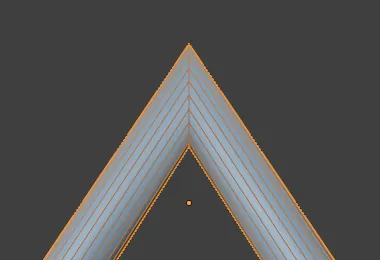
Miter Scale
A new checkbox panel on the Curve to Mesh node, under Fill Caps, with a Limit angle inside.
Full thickness
At a sharp V bend, the corner ring grew from 0.3 m to 0.59 m from the curve, so the tube no longer pinched.
New in 5.3
Blender 5.2 LTS has no Miter Scale; tubes always pinch thinner at sharp corners.
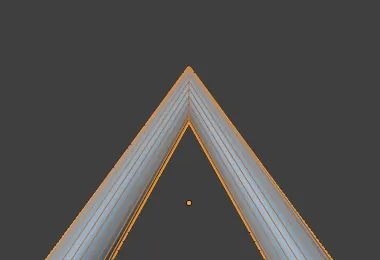
Before and after

AI Scene Builder is a Blender add-on. You type what you want, and it builds it in your scene: buildings, neon signs, wet pavement, fog and lights. Nothing in this picture was modeled by hand.
On a phone now? The add-on runs in Blender on a computer. Send yourself the link and open it there.
Step by step (Blender 5.3)
- Select the curve object and open the Geometry Nodes editor with its node group.
- Find the Curve to Mesh node that turns the curve into a tube with a Curve Circle profile.
- Tick Miter Scale on the node.
- Leave Limit at 135 degrees, or lower it if the sharpest corners spike out too far.
- Check the bends in the viewport: the tube now keeps its thickness through each corner.
Other ways to do it
- Untick Miter Scale to go back to the old pinched corners
- For gentle bends, adding more points to the curve also hides the pinching
Blender 5.2 LTS vs Blender 5.3
| What | Blender 5.2 LTS | Blender 5.3 |
|---|---|---|
| Curve to Mesh Miter Scale | Not in Blender 5.2 LTS. Curve to Mesh only has Scale and Fill Caps. | Blender 5.3 adds Miter Scale with a Limit angle to Curve to Mesh. |
Common snags
The corners still look thin
Miter Scale works on corners between straight segments. Make sure the checkbox is ticked on the Curve to Mesh node that builds the tube, not on another copy.
A very sharp corner sticks out
Lower Limit. Corners sharper than the limit are not stretched as far, so they stop spiking.
The option is missing
Miter Scale is new in Blender 5.3. Blender 5.2 LTS only shows Scale and Fill Caps.
An AI add-on for Blender
AI Scene Builder is a Blender add-on that builds and edits your scene from one typed request, such as “a small wooden table with two chairs”. Each request can be undone in one click.
 A lighthouse island at sunset built with the add-on from 10 typed requests. See every request →
Questions
Why does my curve tube get thin at corners?
Curve to Mesh places the same-sized profile at each corner, which looks thinner on a sharp bend. In Blender 5.3, tick Miter Scale to stretch it.
What does Limit do?
It is the angle up to which corners are stretched. Sharper corners are stretched less so they do not spike out.
Is Miter Scale in Blender 5.2 LTS?
No, it is new in Blender 5.3.
What the pictures show
- Before: a V-shaped poly curve turned into a 0.3 m tube with Curve to Mesh and a Curve Circle had every corner point 0.3 m from the bend, so the tube pinched at the corner.
- After ticking Miter Scale (Limit 135 degrees): the corner ring reached 0.59 m from the bend and the tube kept its thickness.
- In Blender 5.2 LTS the Curve to Mesh node had no Miter Scale and the corner stayed at 0.3 m.