How to Preview a Compositor Node Without a Viewer Node (Blender 5.3)
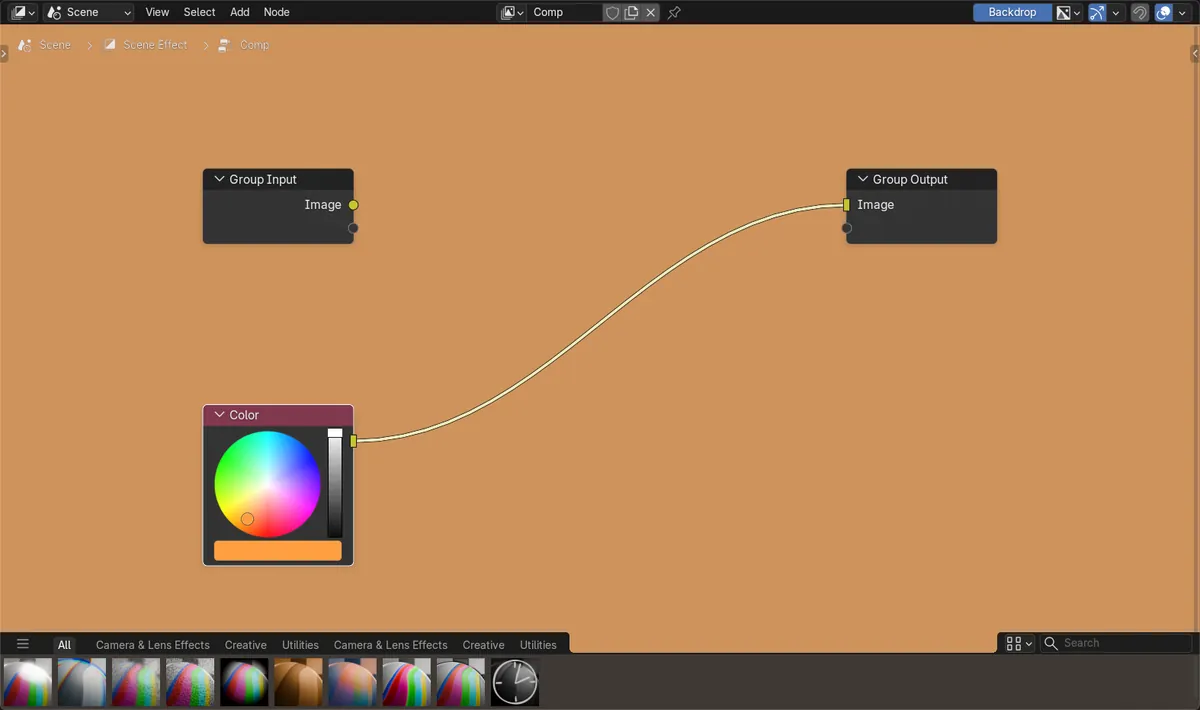
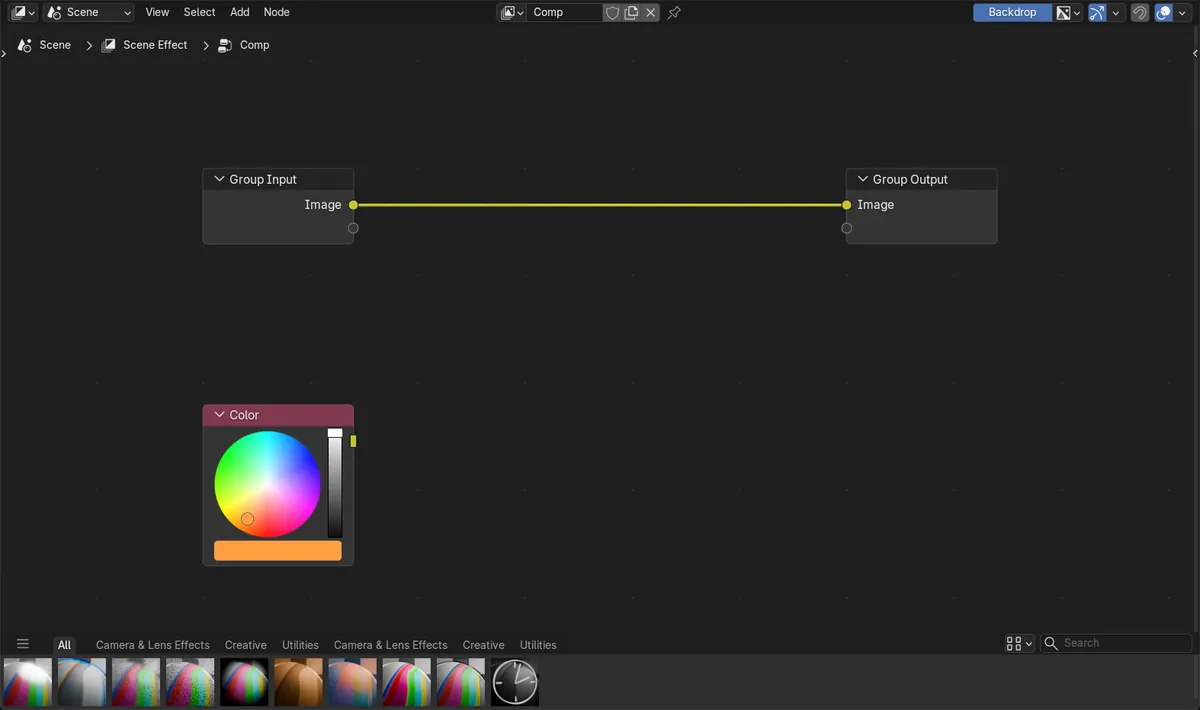
In Blender 5.3, Shift+Alt+click a node in the Compositor to connect it to the Group Output, and with no Viewer node in the tree the Group Output result is shown in the backdrop. In the test an orange Color node (red 1.0, green 0.35, blue 0.05) was not connected; after Shift+Alt+clicking it, a link to the Group Output appeared, no Viewer node was added and the backdrop turned the same orange. In Blender 5.2 LTS the same click did not connect the node and the backdrop stayed empty.
- Mode
- Compositor (node editor)
Connect to Output
Shift+Alt+click a node to run Connect to Output, which links the node to the active output node of the tree.
No Viewer node needed
When the tree has no Viewer node, the Group Output is used as the viewer, so the backdrop shows it straight away.
New in 5.3
In Blender 5.2 LTS Connect to Output does not work in the Compositor, and the backdrop needs a Viewer node.
Before and after

AI Scene Builder is a Blender add-on. You type what you want, and it builds it in your scene: buildings, neon signs, wet pavement, fog and lights. Nothing in this picture was modeled by hand.
On a phone now? The add-on runs in Blender on a computer. Send yourself the link and open it there.
Step by step (Blender 5.3)
- Open a Compositor node editor and make sure the scene uses a compositing node tree.
- Turn on Backdrop in the node editor header so the result is drawn behind the nodes.
- Hold Shift and Alt and click the header of the node you want to see.Blender 5.2 LTS: Blender 5.2 LTS does not connect the node in the Compositor with this click.
- A link from the node's output to the Group Output appears, and the backdrop shows that node's result.
- Shift+Alt+click another node to switch the preview to it; the link to the Group Output moves to that node.
Other ways to do it
- Drag a link from the node's output to the Group Output's Image socket by hand
- Add a Viewer node and connect it when the Group Output should keep the final result
Blender 5.2 LTS vs Blender 5.3
| What | Blender 5.2 LTS | Blender 5.3 |
|---|---|---|
| Group Output as viewer | Blender 5.2 LTS needs a Viewer node to show a node's result in the backdrop. | Blender 5.3 uses the Group Output as the viewer when the tree has no Viewer node. |
| Connect to Output in the Compositor | In Blender 5.2 LTS Shift+Alt+click does not connect nodes in the Compositor. | In Blender 5.3 Shift+Alt+click connects the clicked node to the Group Output in the Compositor too. |
Common snags
The backdrop stays empty
Backdrop is turned off in the node editor header, or the tree has a Viewer node, which then takes over the preview. Turn Backdrop on, or delete the Viewer node to preview through the Group Output.
The final render changed
Shift+Alt+click rewires the Group Output, which is also the result of the compositor. Reconnect the last node of your chain to the Group Output before rendering.
Nothing happens on the click
Shift and Alt must both be held while clicking the node. On Blender 5.2 LTS the Compositor does not support this click.
An AI add-on for Blender
AI Scene Builder is a Blender add-on that builds and edits your scene from one typed request, such as “a small wooden table with two chairs”. Each request can be undone in one click.
 A lighthouse island at sunset built with the add-on from 10 typed requests. See every request →
Questions
How do I preview a node in Blender's compositor?
In Blender 5.3, turn on Backdrop and Shift+Alt+click the node. It is linked to the Group Output, which is shown as the viewer when the tree has no Viewer node.
Do I still need a Viewer node in the compositor?
Not for a quick preview in Blender 5.3. Add one when you want to look at a node while the Group Output keeps the final result.
Why does my compositor backdrop show nothing?
Check that Backdrop is on in the node editor header and that a node is linked to the Group Output or to a Viewer node.
What the pictures show
- Before: a Compositor tree with Group Input linked to Group Output, a Color node set to red 1.0, green 0.35, blue 0.05 that was not connected, no Viewer node and Backdrop on.
- After Shift+Alt+clicking the Color node in Blender 5.3: a link from Color to the Group Output Image socket, still no Viewer node, and the backdrop image at 1920 x 1080 with the centre pixel at 1.0, 0.35, 0.05, the orange of the Color node.
- In Blender 5.2 LTS the same click made no link, and the backdrop image stayed an empty black placeholder.