How to Reorder Workspace Tabs in Blender 5.4 (Left / Right)
In Blender 5.4, right-click a workspace tab at the top of the window and choose Reorder to Left or Reorder to Right. The tab moves one place in that direction each time, so you can put Layout, Sculpting, Shading and the other tabs in any order. Blender 5.3 only has Reorder to Front and Reorder to Back, which jump a tab to the very start or end.
- Mode
- Workspace tabs at the top of the window (any mode)
- Menu
- Right-click a workspace tab › Reorder to Left / Reorder to Right
Where to find it
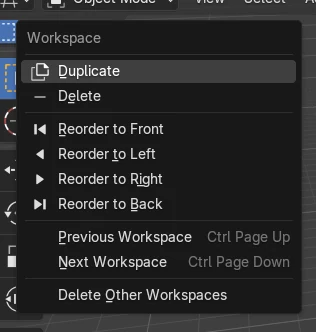
Right-click a workspace tab, then Reorder to Left or Reorder to Right.
One step at a time
Each click moves the tab one place. Reorder to Front and Reorder to Back are still there.
New in 5.4
Blender 5.3 has only Reorder to Front and Reorder to Back.
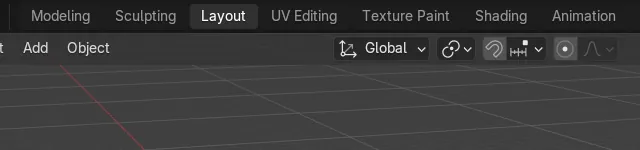
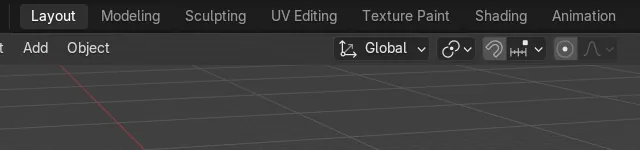
Before and after

AI Scene Builder is a Blender add-on. You type what you want, and it builds it in your scene: buildings, neon signs, wet pavement, fog and lights. Nothing in this picture was modeled by hand.
On a phone now? The add-on runs in Blender on a computer. Send yourself the link and open it there.
Step by step (Blender 5.4 Alpha)
- Click the workspace tab you want to move, for example Layout, so it is the active tab.
- Right-click the same tab. The Workspace menu opens with Duplicate, Delete and the Reorder commands.
- Click Reorder to Right to move the tab one place to the right, or Reorder to Left to move it one place to the left.Blender 5.3: Blender 5.3 has no Reorder to Left or Reorder to Right. Use Reorder to Front or Reorder to Back instead.
- Repeat until the tab sits where you want it. In the pictures, Reorder to Right was used twice and Layout moved from the first to the third place.
- To keep this order for new files, save your startup file with File › Defaults › Save Startup File.
Other ways to do it
- Reorder to Front and Reorder to Back in the same menu jump the tab straight to the first or last place.
- Previous Workspace and Next Workspace in the same menu switch tabs; their keys are Ctrl + Page Up and Ctrl + Page Down.
Blender 5.3 vs Blender 5.4 Alpha
| What | Blender 5.3 | Blender 5.4 Alpha |
|---|---|---|
| Reorder to Left / Right | Not in Blender 5.3.0. The Workspace menu has only Reorder to Front and Reorder to Back. | Blender 5.4 adds Reorder to Left and Reorder to Right next to Reorder to Front and Reorder to Back. |
| Release status | Blender 5.3.0 is the current stable release. | Blender 5.4 is in Alpha until February 3, 2027, so menus and behaviour may still change before the final release. |
Common snags
The menu has no Reorder to Left
You are on Blender 5.3 or older. Use Reorder to Front or Reorder to Back, or install Blender 5.4.
The tab does not move
The first tab cannot move further left and the last tab cannot move further right. Use the other direction, or Reorder to Front or Reorder to Back.
The order is lost in a new file
Tab order is saved with the .blend file. For new files, set the order in your startup file and save it with File › Defaults › Save Startup File.
An AI add-on for Blender
AI Scene Builder is a Blender add-on that builds and edits your scene from one typed request, such as “a small wooden table with two chairs”. Each request can be undone in one click.
 A lighthouse island at sunset built with the add-on from 10 typed requests. See every request →
Questions
How do I move a workspace tab one place to the left in Blender?
In Blender 5.4, right-click the tab and choose Reorder to Left. Each click moves it one place.
Can I reorder workspace tabs in Blender 5.3?
Only with Reorder to Front and Reorder to Back, which jump the tab to the first or last place. Reorder to Left and Reorder to Right are new in Blender 5.4.
Is there a shortcut for Reorder to Left or Right?
No key is assigned by default. Use the Workspace menu by right-clicking the tab.
What the pictures show
- Tested build: Blender 5.4.0 Alpha (f9495703eb0b, 2026-11-10 build), compared with Blender 5.3.0.
- Before: 11 workspace tabs, with Layout active and in the first place.
- After choosing Reorder to Right twice in 5.4: Layout was in the third place, still active, and there were still 11 workspaces.
- In Blender 5.3.0 the Workspace menu has Reorder to Front and Reorder to Back but no Reorder to Left or Reorder to Right, and Layout stayed in the first place.