How to Build a Curve from a List of Points in Geometry Nodes (Blender 5.3)
In Blender 5.3, add a Combine List node set to Vector with one position per point, and connect it to Positions on the new Construct Curves node. A second Combine List set to Integer gives Curve Offsets (0 and the number of points for one curve). Add Curve to Mesh with a Curve Circle profile to see the curve as a tube.
- Mode
- Geometry Nodes editor
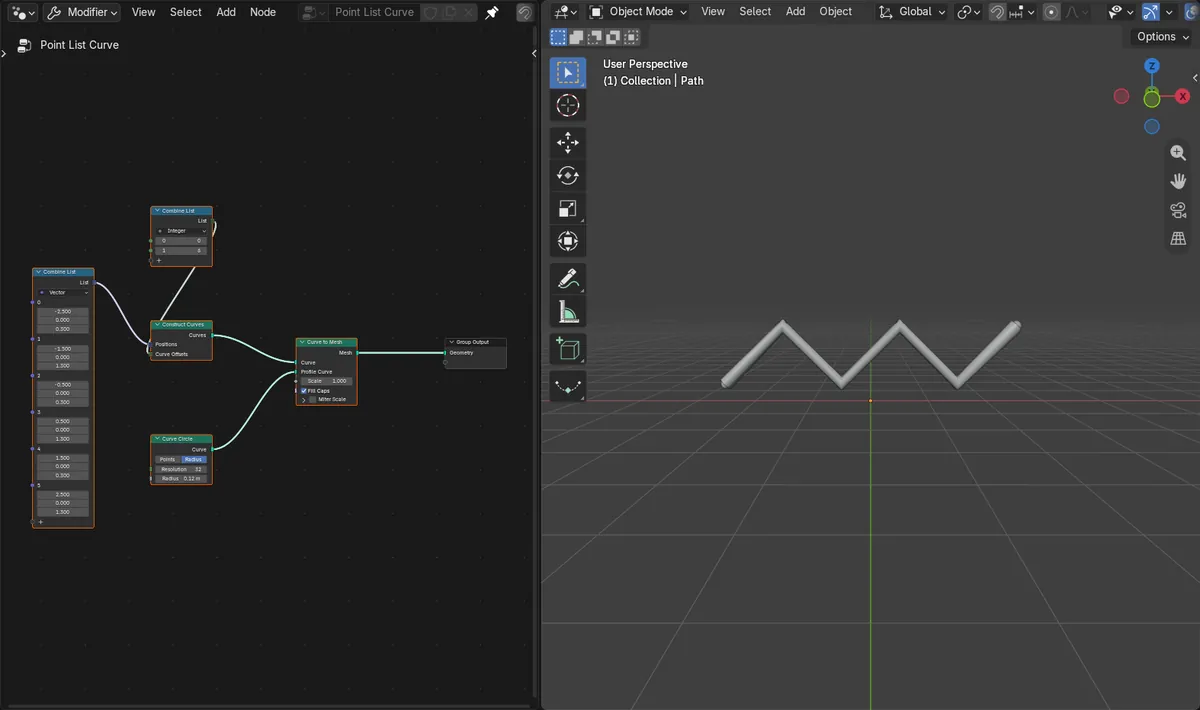
Construct Curves
A new node in the Curve section of the Add menu that makes curves from a list of positions and a list of curve offsets.
Through every point
Six positions gave a tube about 5.2 m wide and 1.24 m high that runs through all six points.
New in 5.3
Blender 5.2 LTS has neither Construct Curves nor Combine List.
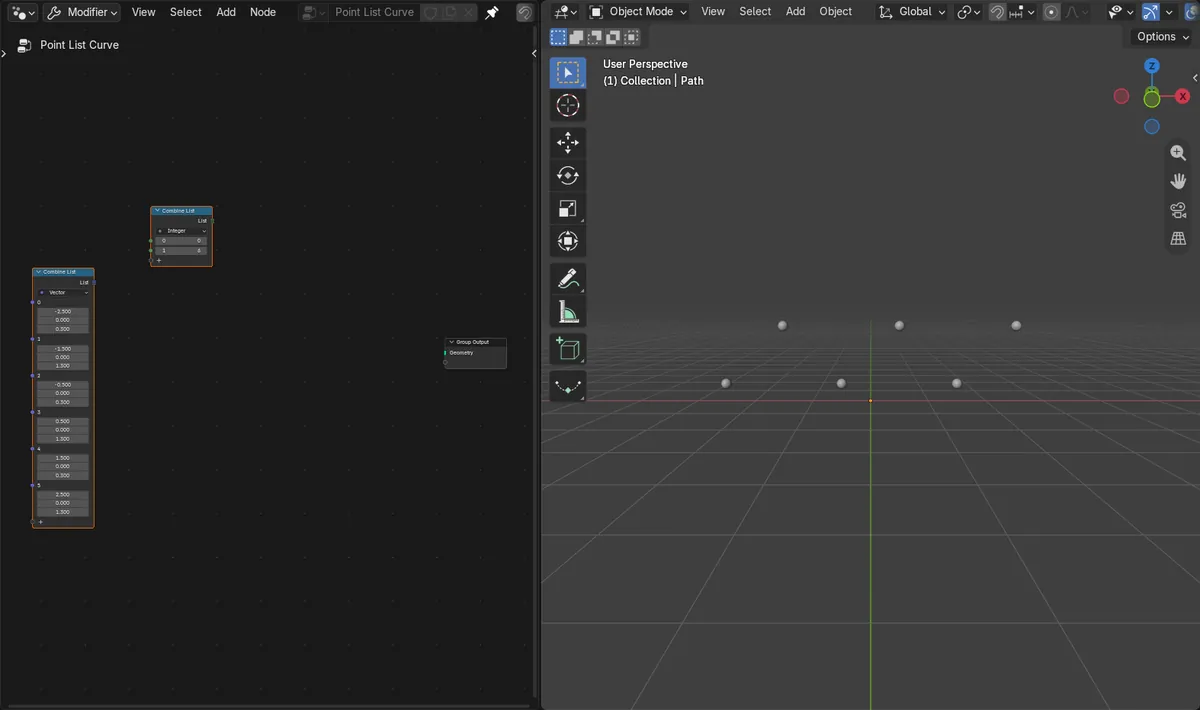
Before and after

AI Scene Builder is a Blender add-on. You type what you want, and it builds it in your scene: buildings, neon signs, wet pavement, fog and lights. Nothing in this picture was modeled by hand.
On a phone now? The add-on runs in Blender on a computer. Send yourself the link and open it there.
Step by step (Blender 5.3)
- Select the object and open the Geometry Nodes editor with its node group.
- Open the Add menu and add Combine List from the List submenu under Utilities; set its type to Vector and add one item per point.
- Type the X, Y and Z of each point into the items, in the order the curve should pass through them.
- Add a second Combine List set to Integer with two items: 0 and the number of points (6 for six points).
- Open the Add menu again and add Construct Curves from the Curve submenu; connect the Vector list to Positions and the Integer list to Curve Offsets.
- Add Curve to Mesh, connect Construct Curves to Curve and a Curve Circle to Profile Curve, then connect Mesh to the Group Output.
Other ways to do it
- Connect Construct Curves straight to the Group Output to keep it as a curve without a tube
- Add more numbers to the Integer list to split the points into several curves
Blender 5.2 LTS vs Blender 5.3
| What | Blender 5.2 LTS | Blender 5.3 |
|---|---|---|
| Construct Curves and Combine List | Not in Blender 5.2 LTS. There is no Construct Curves or Combine List node, so typed positions cannot be fed in as a list; draw the curve by hand, or turn existing points into a curve with Points to Curves. | Blender 5.3 adds Construct Curves and Combine List, so a list of positions becomes a curve in one step. |
Common snags
Nothing shows up
Curve Offsets needs at least two numbers: 0 and the point count. With only 0, no curve is made.
The curve zigzags in the wrong order
Points are joined in list order. Reorder the items in the Vector Combine List.
The tube is invisible or too thin
A curve has no surface on its own. Add Curve to Mesh with a Curve Circle profile and raise its Radius.
An AI add-on for Blender
AI Scene Builder is a Blender add-on that builds and edits your scene from one typed request, such as “a small wooden table with two chairs”. Each request can be undone in one click.
 A log cabin room built with the add-on from 9 typed requests. See every request →
Questions
How do I make a curve from a list of points in Geometry Nodes?
In Blender 5.3, put the positions in a Combine List set to Vector and connect it to Positions on Construct Curves, with Curve Offsets 0 and the point count.
What are Curve Offsets?
A list of where each curve starts in the positions list, plus the total at the end. 0 and 6 make one curve from six points.
Can I make several curves at once?
Yes. Add more numbers to Curve Offsets, for example 0, 3 and 6 make two curves of three points.
What the pictures show
- Before: six small dots marked the points, and a Geometry Nodes object held the six positions in a Combine List but output nothing (0 vertices).
- After adding Construct Curves (positions list and offsets list 0 and 6) and Curve to Mesh with a Curve Circle of radius 0.12 m: a tube with 192 vertices ran through all six points, 5.17 m wide and 1.24 m high.
- In Blender 5.2 LTS neither Construct Curves nor Combine List existed, and the object stayed empty.