How to Render a 360 Panorama with EEVEE in Blender 5.3
In Blender 5.3, select the camera, open Camera (Object Data) Properties › Lens, set Type to Panoramic and Panorama Type to Equirectangular, then render with F12 using EEVEE. The result is a full 360 by 180 degree image. Use a 2:1 resolution such as 4096 x 2048. EEVEE panoramic cameras are not in Blender 5.2 LTS, where only Cycles renders them.
- Mode
- Object Mode, Properties Editor
- Menu
- Camera Properties › Lens › Type: Panoramic
- Shortcut
- F12 (Render Image)
Lens > Panoramic
Then Panorama Type: Equirectangular.
F12 to render
Use a 2:1 resolution, e.g. 4096 x 2048.
New in 5.3
Blender 5.2 LTS EEVEE ignores Panoramic.
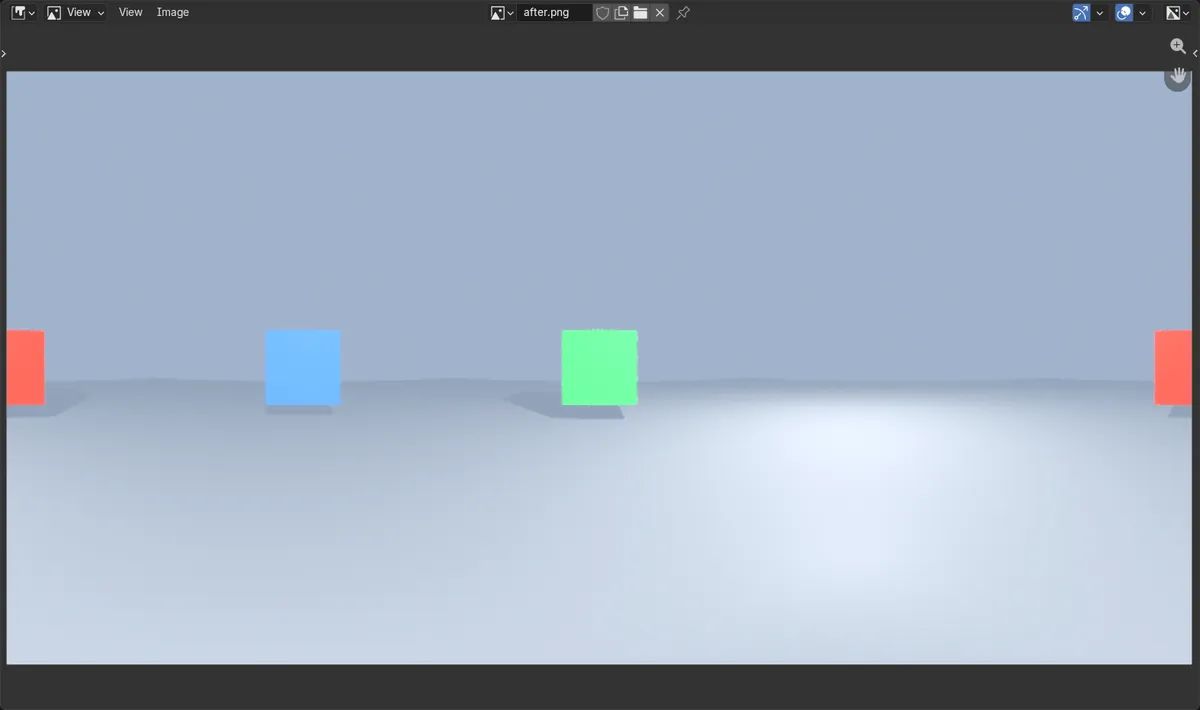
Before and after
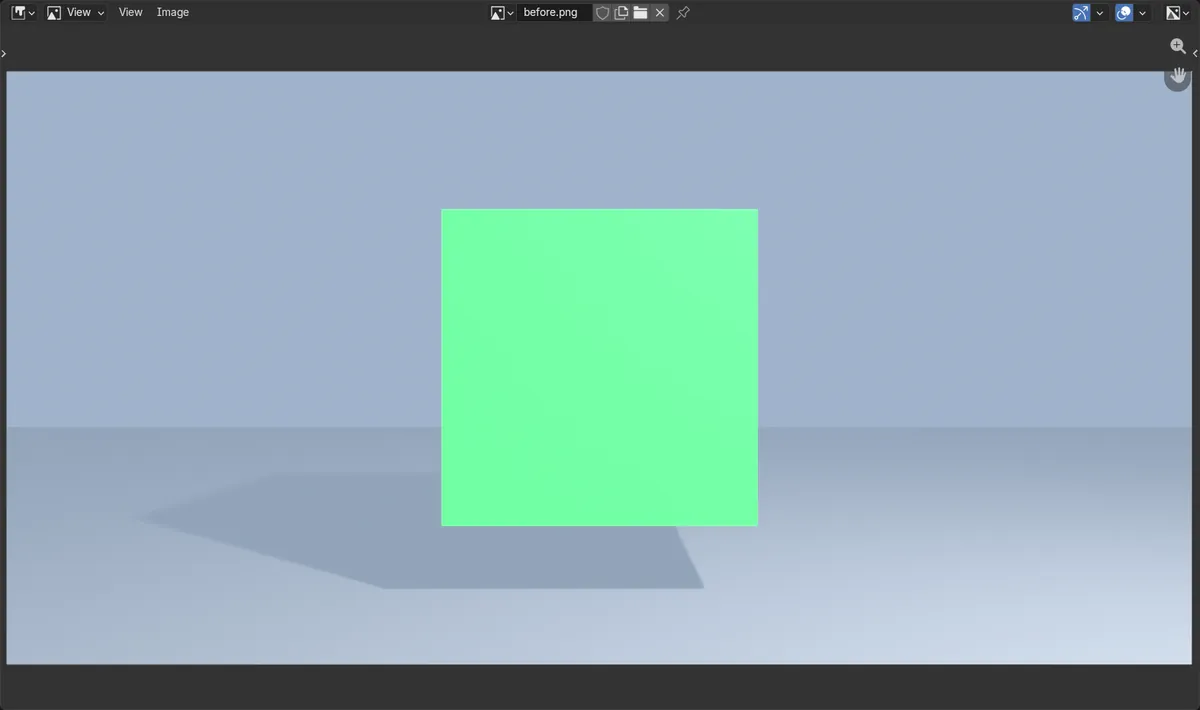

AI Scene Builder is a Blender add-on. You type what you want, and it builds it in your scene: buildings, neon signs, wet pavement, fog and lights. Nothing in this picture was modeled by hand.
On a phone now? The add-on runs in Blender on a computer. Send yourself the link and open it there.
Step by step (Blender 5.3)
- In Render Properties, set Render Engine to EEVEE.
- Select the camera and open the Camera (Object Data) Properties tab, the green camera icon.
- In the Lens panel, set Type to Panoramic.
- Set Panorama Type to Equirectangular (or a fisheye, Mirror Ball or Central Cylindrical type).
- In Output Properties, set a 2:1 resolution such as 4096 x 2048.
- Press F12, then save the result with Image › Save As.
Other ways to do it
- Render › Render Image in the top bar instead of F12
Blender 5.2 LTS vs Blender 5.3
| What | Blender 5.2 LTS | Blender 5.3 |
|---|---|---|
| Panoramic camera in EEVEE | Not in Blender 5.2 LTS. EEVEE renders a normal perspective view even when the camera Type is Panoramic; only Cycles renders panoramas. | Blender 5.3 EEVEE renders Equirectangular, Equiangular Cubemap Face, Fisheye Equidistant, Fisheye Equisolid, Fisheye Lens Polynomial, Central Cylindrical and Mirror Ball. |
Common snags
The image looks stretched
An equirectangular image must be twice as wide as it is tall. Set the resolution to 2:1 in Output Properties, for example 4096 x 2048.
Depth of field does nothing
Depth of field is not supported yet with panoramic cameras in EEVEE. The Depth of Field panel shows a warning. Switch to Cycles if you need it.
Reflections look different from the perspective render
Raytracing is not supported yet with EEVEE panoramic cameras. For exact reflections in a 360 image, render with Cycles.
An AI add-on for Blender
AI Scene Builder is a Blender add-on that builds and edits your scene from one typed request, such as “a small wooden table with two chairs”. Each request can be undone in one click.
 A log cabin room built with the add-on from 9 typed requests. See every request →
Questions
Can EEVEE render 360 panoramas?
Yes, from Blender 5.3. Set the camera Type to Panoramic and Panorama Type to Equirectangular, then render with F12.
What resolution should a 360 render use?
Use 2:1, for example 4096 x 2048 or 8192 x 4096 for VR viewers.
Does Blender 5.2 LTS EEVEE support panoramic cameras?
No. In Blender 5.2 LTS only Cycles renders panoramic cameras.
What the pictures show
- Before: an EEVEE render through a normal 24 mm camera showed only the green cube in front; the blue cube to the left and the red cube behind the camera were not in the picture.
- After switching the camera to Panoramic > Equirectangular, the same EEVEE render at 800 x 400 showed all three cubes.
- The green cube in front landed in the middle of the image, the blue cube on the left at one quarter of the width, and the red cube behind the camera split across the left and right edges.
- In Blender 5.2 LTS the same settings gave the same perspective image as before.