Why Is My H.265 Video Low Quality in Blender? (Output Quality in Blender 5.4)
Up to Blender 5.3, H.265 at a given Output Quality gave a softer picture than H.264 at the same setting, so Medium Quality H.265 videos looked worse than expected. Blender 5.4 rebalances the H.265 quality levels. In 5.3, pick one step higher Output Quality (for example High Quality) when you render H.265. Set it in Properties › Output › Output › Encoding › Video.
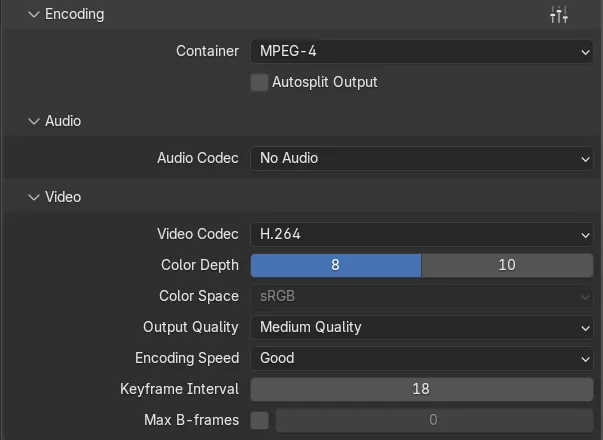
- Mode
- Properties editor, Output tab
- Menu
- Output › Encoding › Video › Video Codec: H.265 / HEVC, Output Quality
- Shortcut
- Ctrl + F12 (Render Animation)
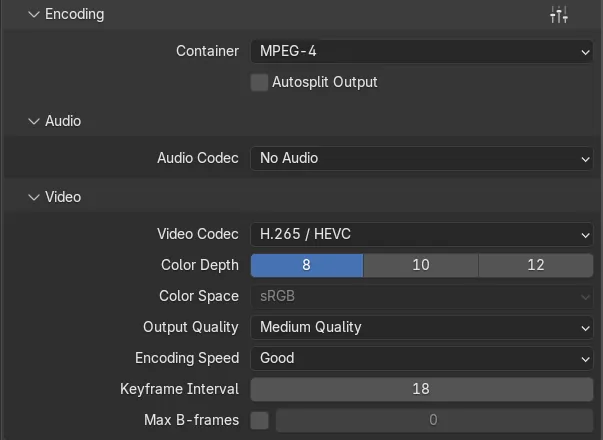
Same setting, different result
In Blender 5.3, H.265 at Medium Quality kept less detail than H.264 at Medium Quality. In Blender 5.4 it kept more.
Fixed in Blender 5.4
The H.265 quality levels were rebalanced, so the same Output Quality name gives a similar picture across codecs.
Where to change it
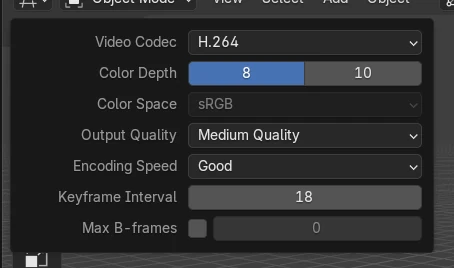
Properties › Output tab › Output › Encoding › Video: Video Codec, Output Quality and Encoding Speed.
Before and after

AI Scene Builder is a Blender add-on. You type what you want, and it builds it in your scene: buildings, neon signs, wet pavement, fog and lights. Nothing in this picture was modeled by hand.
On a phone now? The add-on runs in Blender on a computer. Send yourself the link and open it there.
Step by step (Blender 5.4 Alpha)
- Open the Output tab of the Properties editor. In the Output panel set Media Type to Video.
- Expand Encoding and choose a Container such as MPEG-4 or Matroska.
- In the Video subpanel set Video Codec to H.265 / HEVC.
- Choose an Output Quality. In Blender 5.4, Medium Quality is a good starting point for H.265.Blender 5.3: In Blender 5.3 and older, choose one step higher than you would use for H.264, for example High Quality instead of Medium Quality.
- Leave Encoding Speed at Good, or choose Slowest for a smaller file at the same quality. Then press Ctrl + F12 to render the animation.
Other ways to do it
- For a fixed file size instead of a fixed quality, set Output Quality to Constant Bitrate and enter a bitrate.
- To keep every detail for later editing, render an image sequence (for example PNG) and make the video from it in a second step.
Blender 5.3 vs Blender 5.4 Alpha
| What | Blender 5.3 | Blender 5.4 Alpha |
|---|---|---|
| H.265 at Medium Quality | Softer than H.264 at Medium Quality. In our test frame the error against the original render was higher than with H.264. | Sharper than before. In the same test frame H.265 was closer to the original render than H.264, and the file was about 40% larger than in 5.3. |
| H.264 at Medium Quality | Unchanged. | Unchanged: the same picture quality and file size as in 5.3. |
| Release status | Blender 5.3.0 is the current stable release. | Blender 5.4 is in Alpha until February 3, 2027, so menus and behaviour may still change before the final release. |
Common snags
My H.265 video looks blurry next to the H.264 version
In Blender 5.3 and older the same Output Quality name meant lower quality for H.265. Raise Output Quality one step, or update to Blender 5.4.
The H.265 file got bigger after updating to Blender 5.4
That is the quality fix: Medium Quality now keeps more detail, so it uses more data. Choose a lower Output Quality if file size matters more than detail.
I can't find the Video Codec setting
It only shows when Media Type is Video. Expand Output › Encoding › Video in the Output tab of the Properties editor.
An AI add-on for Blender
AI Scene Builder is a Blender add-on that builds and edits your scene from one typed request, such as “a small wooden table with two chairs”. Each request can be undone in one click.
 A log cabin room built with the add-on from 9 typed requests. See every request →
Questions
Why does my H.265 render look worse than H.264 in Blender?
In Blender 5.3 and older, H.265 at the same Output Quality used a lower quality level than H.264. Pick one step higher Output Quality for H.265, or use Blender 5.4, where the levels were rebalanced.
Which Output Quality should I use for H.265 in Blender?
In Blender 5.4, Medium Quality is a good default. Use High Quality for final videos with fine detail, and Low Quality for quick previews.
Is H.265 better than H.264 in Blender 5.4?
At Medium Quality, H.265 in Blender 5.4 kept slightly more detail than H.264 in our test, but the file was larger than in 5.3. Some older players and editors cannot open H.265, so H.264 is still the safer choice for sharing.
What the pictures show
- Tested build: Blender 5.4.0 Alpha (f9495703eb0b, 2026-11-10 build), compared with Blender 5.3.0.
- Same Workbench scene (640 x 360, 12 frames), MPEG-4 container, Medium Quality, Encoding Speed Good. We compared the first frame of each video with a PNG render of the same frame.
- Blender 5.4: H.265 scored a PSNR of 45.98 dB and H.264 44.20 dB, so H.265 was closer to the original render.
- Blender 5.3.0: H.265 scored 43.53 dB and H.264 44.11 dB, so H.265 was further from the original render than H.264.
- For a 48-frame version of the scene, the H.265 Medium Quality file from Blender 5.4 was about 40% larger than the one from 5.3, while the H.264 file was about the same size in both.