How to Make an Object Fall with Rigid Body in Blender
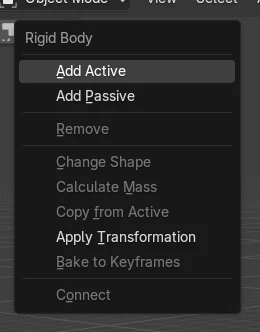
Select the object that should fall and choose Object › Rigid Body › Add Active. Then select the floor and choose Object › Rigid Body › Add Passive so the object has something to land on. Press Space to play the timeline: the object drops with gravity and comes to rest on the floor.
- Mode
- Object Mode, 3D Viewport
- Menu
- Object › Rigid Body › Add Active / Add Passive
- Shortcut
- Space to play
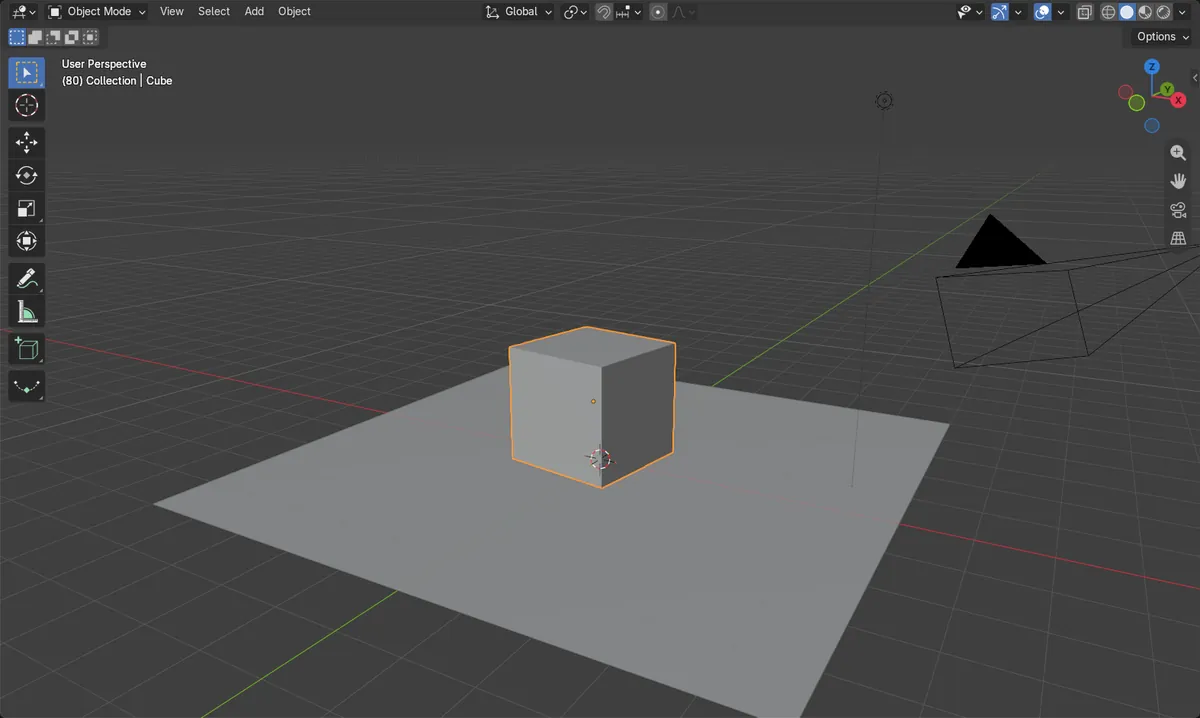
Add Active
The selected object falls and reacts to collisions.
Add Passive for the floor
Without a Passive floor the object falls forever.
Space plays it
The fall is simulated as the timeline plays from frame 1.
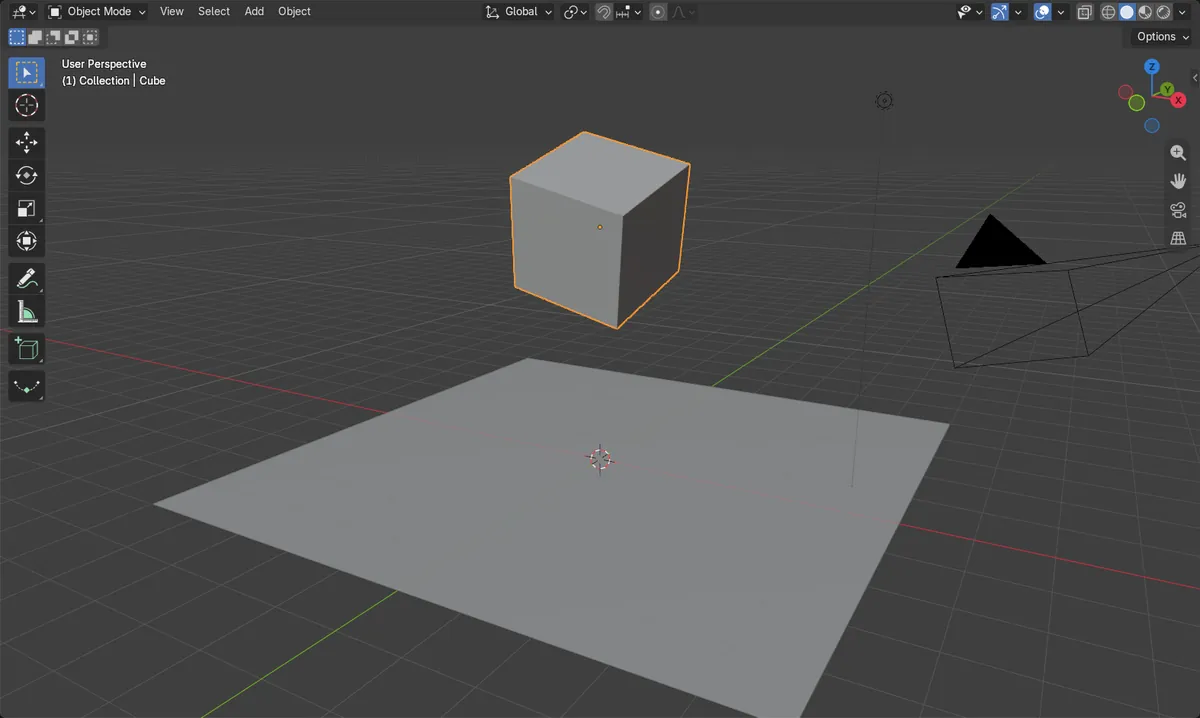
Before and after

AI Scene Builder is a Blender add-on. You type what you want, and it builds it in your scene: buildings, neon signs, wet pavement, fog and lights. Nothing in this picture was modeled by hand.
On a phone now? The add-on runs in Blender on a computer. Send yourself the link and open it there.
Step by step (Blender 5.x)
- Place the object above the floor, for example a cube a few metres up and a plane at the bottom.
- Select the object that should fall and choose Object › Rigid Body › Add Active in the 3D Viewport header.
- Select the floor and choose Object › Rigid Body › Add Passive.
- Go to frame 1 (Shift + Left Arrow) and press Space to play. Press Space again to stop.
- To change weight or shape, open the Physics Properties tab of the object and edit Mass and the Collisions › Shape setting.
Other ways to do it
- Physics Properties tab › Rigid Body, then set Type to Active or Passive
- Object › Rigid Body › Bake to Keyframes turns the finished fall into normal keyframes
Common snags
The object falls through the floor
The floor needs a rigid body too, set to Passive. In the test the cube had dropped to about -24.7 m by frame 60 when the floor had none.
Nothing moves when I press Space
The simulation starts from the scene start frame. Jump to frame 1 with Shift + Left Arrow, then play again.
The object bounces off in an odd way
A new rigid body uses the Convex Hull collision shape, which wraps the outside of the mesh. For a simple box or ball, choose Box or Sphere under Collisions › Shape.
An AI add-on for Blender
AI Scene Builder is a Blender add-on that builds and edits your scene from one typed request, such as “a small wooden table with two chairs”. Each request can be undone in one click.
 A log cabin room built with the add-on from 9 typed requests. See every request →
Questions
How do I make objects collide with rigid body in Blender?
Give each moving object Add Active and each static object, such as a floor or wall, Add Passive.
How do I keep the result without the simulation?
Select the objects and use Object › Rigid Body › Bake to Keyframes.
How do I make the object heavier?
Raise Mass in the Rigid Body panel of the Physics Properties tab. The default is 1 kg.
What the pictures show
- Before: the cube hung 4 m above the ground with no physics.
- At frame 80, with the cube set to Active and the ground to Passive, the cube rested on the ground with its centre at 1 m.
- Without the Passive ground, the cube had fallen to -24.73 m by frame 60.
- Results were identical in Blender 4.2 LTS and Blender 5.x.