How to See Your Texture While Sculpting with Multires in Blender 5.3
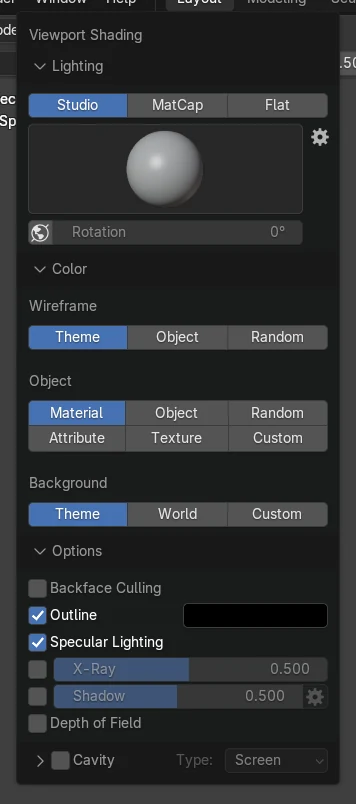
In Blender 5.3, stay in Sculpt Mode with Solid shading, open the Viewport Shading popover in the 3D Viewport header and set Color to Texture. The material's image texture is then drawn on a mesh with a Multires modifier while you sculpt, so you can follow painted details.
- Mode
- Sculpt Mode, 3D Viewport (Solid shading)
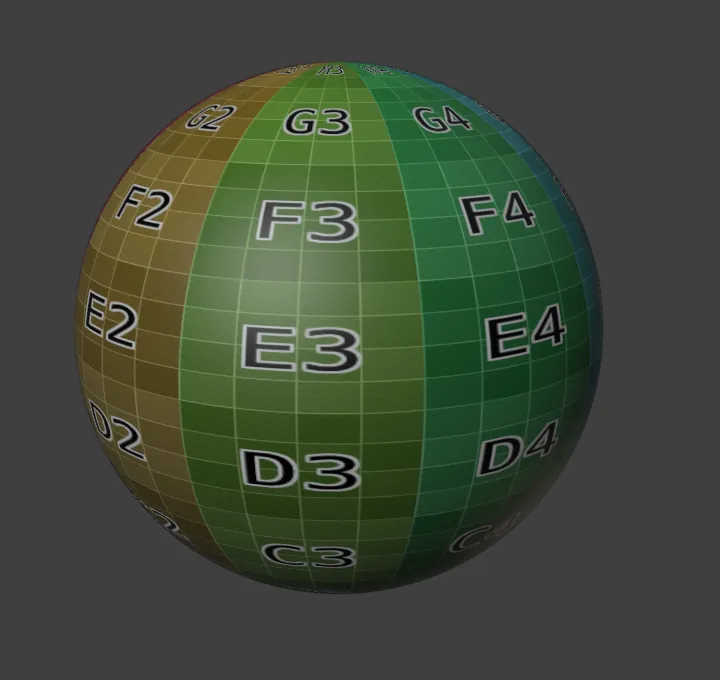
Color: Texture
The Color choice in the Viewport Shading popover now works for Multires meshes in Sculpt Mode.
Texture shows
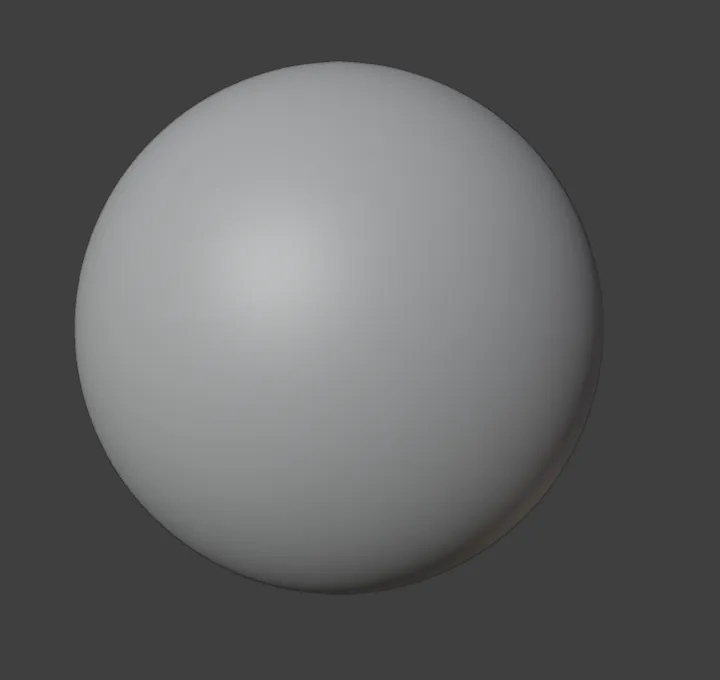
On a Multires sphere, 88% of the middle of the view showed the texture after the change, up from 0%.
New in 5.3
In Blender 5.2 LTS the Multires mesh stays plain in Sculpt Mode even with Color set to Texture.
Before and after

AI Scene Builder is a Blender add-on. You type what you want, and it builds it in your scene: buildings, neon signs, wet pavement, fog and lights. Nothing in this picture was modeled by hand.
On a phone now? The add-on runs in Blender on a computer. Send yourself the link and open it there.
Step by step (Blender 5.3)
- Give the mesh a material with an Image Texture node connected to Base Color, and add a Multires modifier with Subdivide.
- Switch to Sculpt Mode with the mode menu in the 3D Viewport header.
- Make sure the viewport uses Solid shading (the second of the four shading buttons at the top right).
- Click the small arrow next to the shading buttons to open the Viewport Shading popover.
- In the Color section, click Texture in the Object row. The image appears on the mesh and stays there while you sculpt.
Other ways to do it
- Set Color to Texture before you enter Sculpt Mode; the setting belongs to the viewport and is kept when you switch modes
- Use Material Preview shading to see the full material instead of only the image texture
Blender 5.2 LTS vs Blender 5.3
| What | Blender 5.2 LTS | Blender 5.3 |
|---|---|---|
| Texture color on Multires in Sculpt Mode | Not in Blender 5.2 LTS. With Color set to Texture, a Multires mesh in Sculpt Mode stays plain and shows no image. | Blender 5.3 draws the image texture on Multires meshes in Sculpt Mode when Solid shading Color is set to Texture. |
Common snags
The mesh is still grey
Color is set to Material or Object. Open the Viewport Shading popover and pick Texture under Color, with Solid shading active.
The wrong image shows
Solid shading draws the image of the active Image Texture node. Click the node you want in the Shader Editor to make it active.
The image is stretched or missing on parts
The mesh needs a UV map that the Image Texture node uses. Check the UV Maps list in the Object Data properties.
An AI add-on for Blender
AI Scene Builder is a Blender add-on that builds and edits your scene from one typed request, such as “a small wooden table with two chairs”. Each request can be undone in one click.
 A lighthouse island at sunset built with the add-on from 10 typed requests. See every request →
Questions
Why is my texture not showing in Sculpt Mode in Blender?
Open the Viewport Shading popover, keep Solid shading and set Color to Texture. In Blender 5.3 this also works on meshes with a Multires modifier.
Do I need Material Preview to see the texture?
No. Solid shading with Color set to Texture is enough and stays faster while you sculpt.
Does it work without Multires?
Yes, Color: Texture works on ordinary meshes too; Blender 5.3 adds it for Multires meshes in Sculpt Mode.
What the pictures show
- Before: a sphere with a Multires modifier (2 levels) and an image texture, in Sculpt Mode with Color set to Material; none of the middle of the view was colored.
- After setting Color to Texture while still in Sculpt Mode: 88% of the middle of the view showed the colored grid texture and about 1% was dark.
- In Blender 5.2 LTS the same change left the sphere plain, with 0% of the middle colored.