How to Switch Blender Back to OpenGL (Blender 5.3)
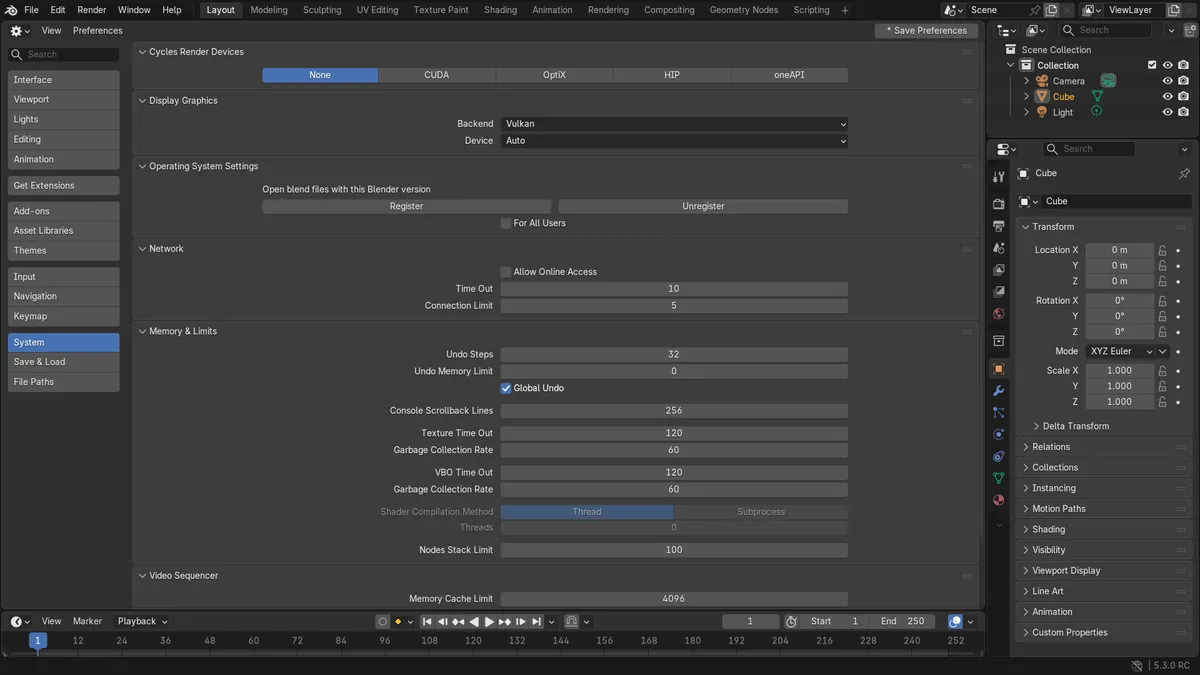
In Blender 5.3, open Edit › Preferences..., go to the System section and set Backend to OpenGL in the Display Graphics panel, then close Blender and start it again. Blender 5.3 uses Vulkan by default on Windows (except ARM) and Linux, and the new backend is used from the next start. In the test the Backend row read Vulkan in a fresh 5.3 setup; after choosing OpenGL the panel showed the message that a restart of Blender is required, and Blender kept running on Vulkan until that restart. Blender 5.2 LTS starts with OpenGL.
- Mode
- Preferences, System section
- Menu
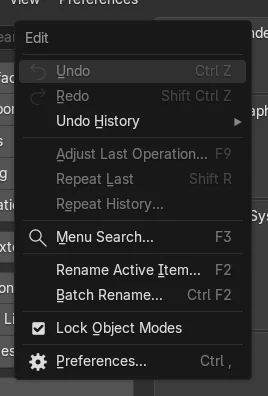
- Edit › Preferences... › System
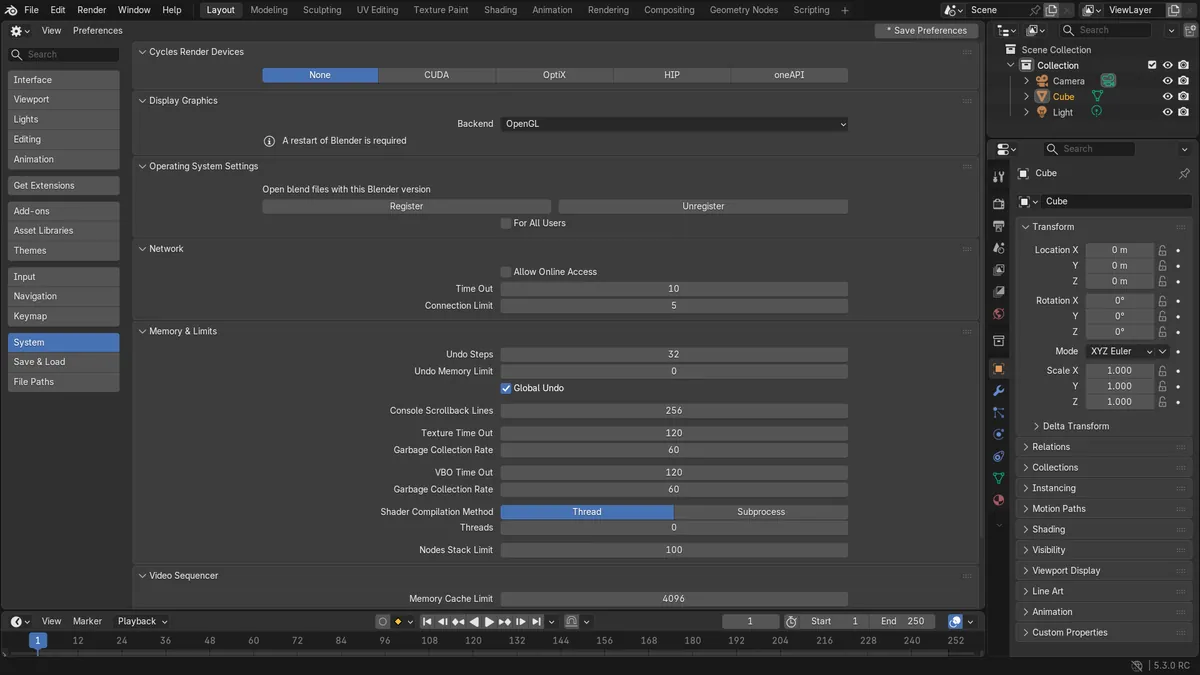
Backend in Display Graphics
The Backend row sits in the Display Graphics panel of the System section, with the choices OpenGL and Vulkan on Windows.
A restart is required
After choosing OpenGL the panel shows that a restart of Blender is required. The running session stays on Vulkan until Blender is started again.
Saved on exit by default
Auto-Save Preferences is on in a fresh setup, so the Backend choice is written when Blender closes.
Before and after

AI Scene Builder is a Blender add-on. You type what you want, and it builds it in your scene: buildings, neon signs, wet pavement, fog and lights. Nothing in this picture was modeled by hand.
On a phone now? The add-on runs in Blender on a computer. Send yourself the link and open it there.
Step by step (Blender 5.3)
- Open Edit › Preferences... from the top bar.
- Click System in the list on the left.
- In the Display Graphics panel, open the Backend row and choose OpenGL. The message that a restart of Blender is required appears under it.Blender 5.2 LTS: Blender 5.2 LTS starts with OpenGL already, so there is nothing to change.
- Close Blender and start it again. With Auto-Save Preferences on, as in a fresh setup, the choice is saved when Blender closes, and the next start uses OpenGL.
Other ways to do it
- Start Blender from a terminal with blender --gpu-backend opengl, or blender.exe --gpu-backend opengl in a Windows command prompt, to open one session on OpenGL without changing the Preferences
- If you turned Auto-Save Preferences off, open the Save & Load menu at the bottom left of the Preferences window and click Save Preferences before closing Blender
Blender 5.2 LTS vs Blender 5.3
| What | Blender 5.2 LTS | Blender 5.3 |
|---|---|---|
| Default GPU backend on Windows (except ARM) and Linux | Blender 5.2 LTS starts with OpenGL. | Blender 5.3 starts with Vulkan. |
| Where to change it | Blender 5.2 LTS has the Backend row in the same place, set to OpenGL. | Blender 5.3 keeps the Backend row in the Display Graphics panel of the System section, set to Vulkan. |
Common snags
The viewport still runs on Vulkan
The Backend setting is read when Blender starts. While the restart message is shown, the session is still on Vulkan. Close Blender and open it again.
The setting is back to Vulkan after a restart
Auto-Save Preferences was turned off, so the change was not written. Open the Save & Load menu at the bottom left of the Preferences window, click Save Preferences, then restart.
Blender does not open far enough to reach the Preferences
Start it once from a terminal with blender --gpu-backend opengl (blender.exe --gpu-backend opengl on Windows), then set Backend to OpenGL in the Preferences so later starts use it too.
An AI add-on for Blender
AI Scene Builder is a Blender add-on that builds and edits your scene from one typed request, such as “a small wooden table with two chairs”. Each request can be undone in one click.
 A lighthouse island at sunset built with the add-on from 10 typed requests. See every request →
Questions
Why does Blender 5.3 use Vulkan?
Blender 5.3 makes Vulkan the default GPU backend on Windows (except ARM) and Linux. You can switch back with the Backend row in the System section of the Preferences.
Do I have to restart Blender after changing the backend?
Yes. The panel shows that a restart of Blender is required, and the running session keeps its backend until Blender starts again.
Can I open Blender on OpenGL once without changing the setting?
Yes. Start it from a terminal with blender --gpu-backend opengl, or blender.exe --gpu-backend opengl on Windows. The Preferences stay as they are.
What the pictures show
- Before: a fresh Blender 5.3 setup on Windows. The Backend row in Display Graphics read Vulkan, and Blender was running on Vulkan.
- After choosing OpenGL in Blender 5.3: the Backend row read OpenGL, the panel showed that a restart of Blender is required, and the running session was still on Vulkan.
- In Blender 5.2 LTS the same row read OpenGL in a fresh setup and Blender was running on OpenGL.