How to Make Toon Shading in Blender EEVEE (Blender 5.3)
In Blender 5.3 with EEVEE, add a Light Evaluation node, run its Factor through a Color Ramp set to Constant, multiply it by the Color of a Light Info node with a Mix node and plug the result into the Diffuse Light input of a Light Accumulation node, which goes into the Surface input of the Material Output. The smooth light turns into a few flat cartoon bands, and they still follow the lamps in your scene.
- Mode
- Shader Editor, EEVEE
- Shortcut
- Shift + A
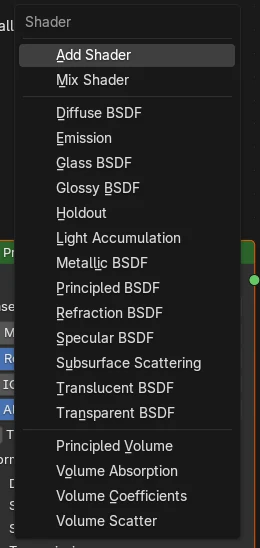
Three new nodes
Light Evaluation and Light Info are in the Input submenu of the Add menu; Light Accumulation is in the Shader submenu.
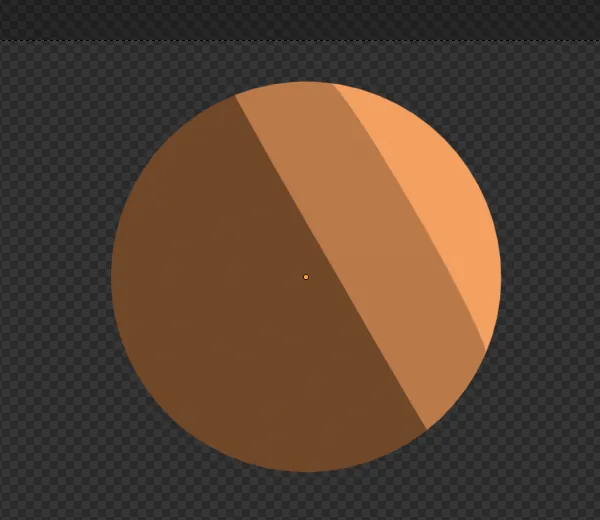
Flat bands
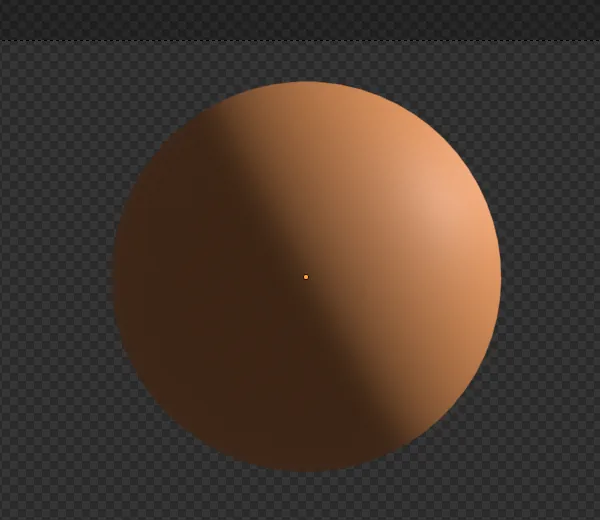
On a test ball, the three most common brightness levels covered 48% of it before and 87% after.
New in 5.3, EEVEE only
Blender 5.2 LTS has none of the three nodes, and they only appear while the Render Engine is EEVEE.
Before and after

AI Scene Builder is a Blender add-on. You type what you want, and it builds it in your scene: buildings, neon signs, wet pavement, fog and lights. Nothing in this picture was modeled by hand.
On a phone now? The add-on runs in Blender on a computer. Send yourself the link and open it there.
Step by step (Blender 5.3)
- Set Render Engine to EEVEE in the Render properties.
- Select your object and open its material in the Shader Editor; you can delete the Principled BSDF.
- Press Shift + A and add Light Evaluation from the Input submenu, then add a Color Ramp and connect Factor to its Fac input.
- On the Color Ramp, set the interpolation to Constant and place two or three color stops from dark to light; each stop becomes one band.
- Add Light Info from the Input submenu and a Mix node set to Color and Multiply; connect the Color Ramp to A and Light Info's Color to B.
- Add Light Accumulation from the Shader submenu, connect the Mix result to Diffuse Light, set Diffuse Color to your object's color and connect its Shader output to the Surface input of the Material Output.
Other ways to do it
- Type the node name into the search field at the top of the Add menu instead of opening the submenus
- Drag a link out of a node's output and let go over empty space to pick the next node from a search list
Blender 5.2 LTS vs Blender 5.3
| What | Blender 5.2 LTS | Blender 5.3 |
|---|---|---|
| Light Evaluation, Light Info and Light Accumulation nodes | Not in Blender 5.2 LTS. None of the three nodes are in the Add menu, so the light on a material cannot be split into bands this way. | Blender 5.3 adds Light Evaluation and Light Info (Input submenu) and Light Accumulation (Shader submenu) for EEVEE materials. |
Common snags
The nodes are not in the Add menu
They only show for object materials while the Render Engine is EEVEE. Switch the engine in the Render properties, then open the Add menu again.
The bands are soft or blurry
The Color Ramp is still set to Linear. Set its interpolation to Constant so each stop becomes a hard step.
Shiny highlights cut across the bands
Light Accumulation also adds glossy and transmission light. Set Glossy Color and Transmission Color to black for a pure flat look.
An AI add-on for Blender
AI Scene Builder is a Blender add-on that builds and edits your scene from one typed request, such as “a small wooden table with two chairs”. Each request can be undone in one click.
 An evening market street built with the add-on from 11 typed requests. See every request →
Questions
How do I make cel shading in Blender EEVEE?
In Blender 5.3, send Light Evaluation through a Color Ramp set to Constant and into the Diffuse Light input of Light Accumulation, then connect Light Accumulation to the Surface input of the Material Output.
Do the toon bands react to my lights?
Yes. Light Evaluation and Light Info read each light in the scene, so moving or recoloring a lamp moves and recolors the bands.
Does this work in Cycles?
No. The three nodes are only offered while the Render Engine is EEVEE.
What the pictures show
- Before: an EEVEE ball with the default Principled BSDF and one Sun light faded smoothly from bright to dark; its three most common brightness levels covered 48% of the ball.
- After wiring Light Evaluation through a Constant Color Ramp and Light Info into Light Accumulation: the same three levels covered 87% of the ball, with 4 brightness levels in all.
- In Blender 5.2 LTS the Light Evaluation, Light Info and Light Accumulation nodes did not exist; the ball stayed smooth.