How to Add the Render Layers Node in the Blender Compositor (Blender 5.3)
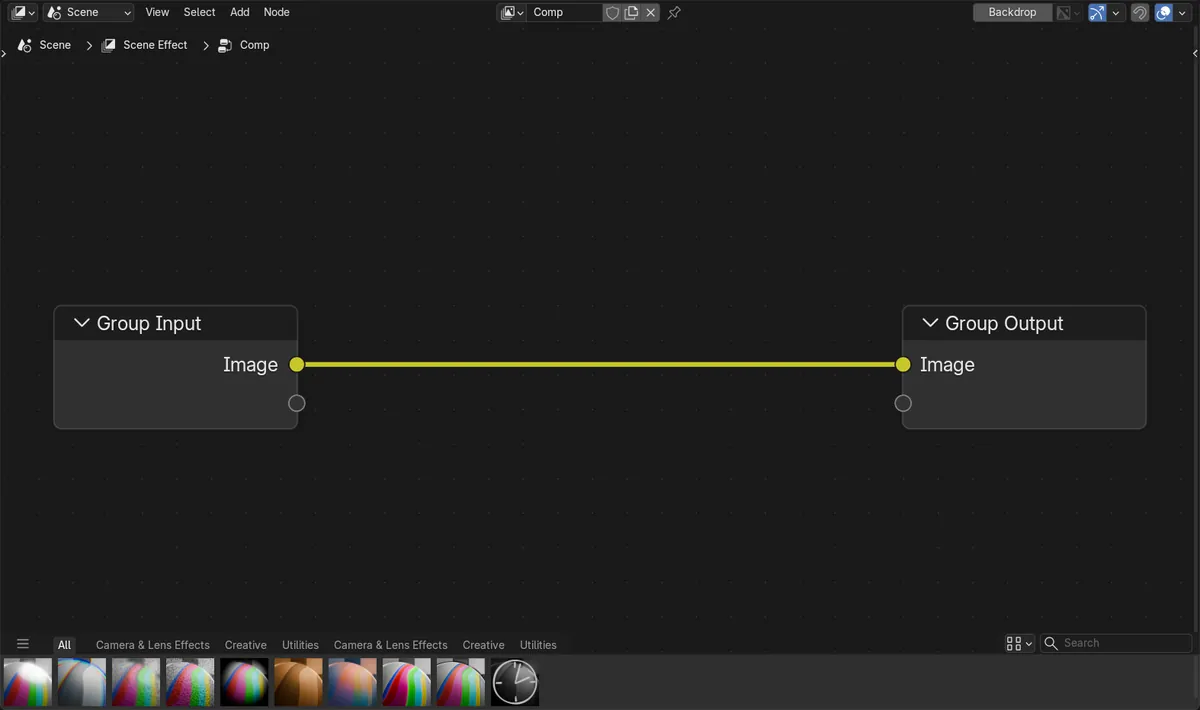
In Blender 5.3 a new compositor node tree holds a Group Input linked to a Group Output, with no Render Layers node; the render reaches the tree through Group Input. When you need a pass such as Alpha, Depth or a light pass, press Shift + A and add Render Layers from Add › Input › Scene › Render Layers, then link that output to Group Output. In the test, linking Render Layers Alpha to Group Output turned the orange render into a white cube shape on black.
- Mode
- Compositor (Node Editor)
- Menu
- Add › Input › Scene › Render Layers
- Shortcut
- Shift + A
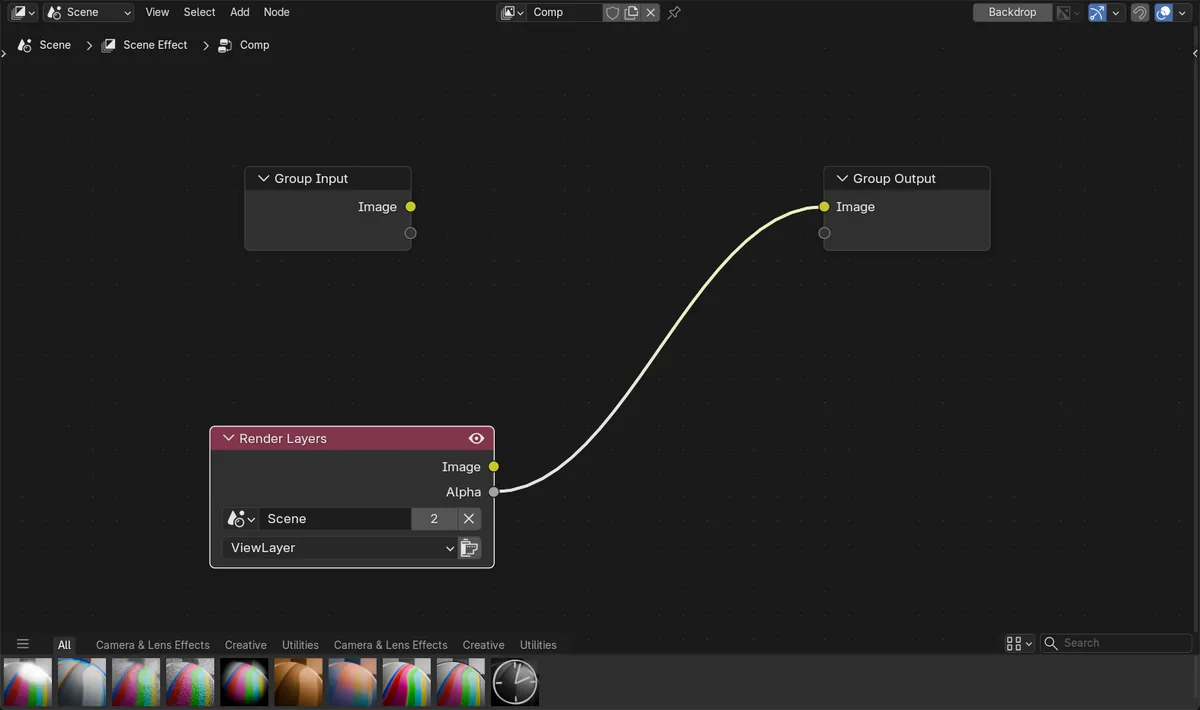
Where to find it
Render Layers is in the Scene submenu under Input in the Add menu of the compositor.
Alpha pass in one link
Linking Render Layers Alpha to Group Output changed the center of the render from orange to white, with the corners still black.
New default in 5.3
In Blender 5.2 LTS a new compositor tree starts with Render Layers, a Viewer and a Group Output already linked.
Before and after

AI Scene Builder is a Blender add-on. You type what you want, and it builds it in your scene: buildings, neon signs, wet pavement, fog and lights. Nothing in this picture was modeled by hand.
On a phone now? The add-on runs in Blender on a computer. Send yourself the link and open it there.
Step by step (Blender 5.3)
- Open a Node Editor and switch it to the Compositor, then click New in the header if the scene has no compositor tree yet. The new tree shows Group Input linked to Group Output.
- Press Shift + A with the mouse over the editor and pick Add › Input › Scene › Render Layers.
- On the Render Layers node, choose the scene and view layer to read from if you have more than one.
- Drag the output you need (for example Alpha) to the Image input of Group Output, or to the node that should use it.
- Render with F12 to see the result. Linking a pass to Group Output replaces the Group Input link; to use the rendered image and a pass together, link both into the node that combines them and link that node to Group Output.
Other ways to do it
- Type Render Layers into the search field at the top of the Add menu
Blender 5.2 LTS vs Blender 5.3
| What | Blender 5.2 LTS | Blender 5.3 |
|---|---|---|
| Default compositor node tree | In Blender 5.2 LTS a new compositor tree starts with Render Layers linked through a Reroute to a Viewer and a Group Output. | Blender 5.3 starts a new tree with Group Input linked to Group Output, and no Render Layers node. |
Common snags
There is no Alpha or Depth output
Group Input passes the combined image. Add a Render Layers node for the separate passes.
The Alpha output is all white
Transparent is off in the Film panel of the Render tab, so every pixel is solid. Turn it on and render again.
A pass you need is missing on Render Layers
Passes have to be turned on before rendering. Turn the pass on in the Passes panel of the View Layer tab, then render again.
Render Layers is not in the Input submenu
Open the Scene submenu inside Input; Render Layers sits there with the other scene inputs.
An AI add-on for Blender
AI Scene Builder is a Blender add-on that builds and edits your scene from one typed request, such as “a small wooden table with two chairs”. Each request can be undone in one click.
 A log cabin room built with the add-on from 9 typed requests. See every request →
Questions
Where is the Render Layers node in Blender 5.3?
In the compositor, press Shift + A and open Add › Input › Scene › Render Layers. New trees in 5.3 do not add it for you.
Why does my new compositor tree have no Render Layers node?
Blender 5.3 starts each new tree with Group Input linked to Group Output. Group Input already carries the render, so you add Render Layers when you need its passes.
How do I get the Alpha pass in the Blender 5.3 compositor?
Add a Render Layers node and link its Alpha output to Group Output or to the node that needs it.
What the pictures show
- Before: a new Blender 5.3 compositor tree held Group Input linked to Group Output (Image to Image) and no Render Layers node; an orange glowing cube on a transparent background (Transparent turned on in the Film panel of the Render tab) still came out orange in the render.
- After adding Render Layers from Add > Input > Scene and linking its Alpha output to Group Output: the center of the render turned white and the corners stayed black, a mask of the cube.
- In Blender 5.2 LTS the same New button made a tree with Render Layers, a Reroute, a Viewer and a Group Output already linked.