How to Paint an Exact Weight Value in Blender (Blender 5.3)
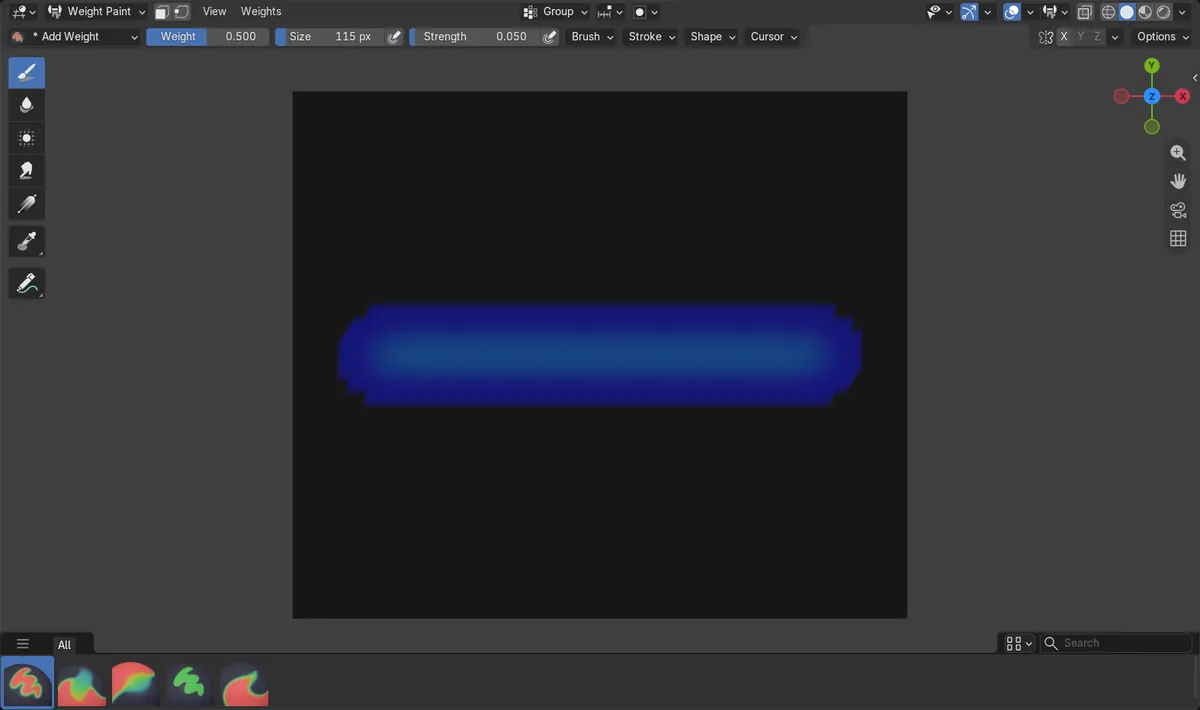
In Blender 5.3 the default Weight Paint brush is Add Weight, which adds a little weight per stroke. To give the vertices you paint an exact value, pick the Set Weight brush, set Weight (for example 0.5) and Strength 1.0, and paint. In the test, one stroke of Add Weight left 389 vertices at 0.098 or less; one stroke of Set Weight put 401 vertices at exactly 0.5.
- Mode
- Weight Paint mode
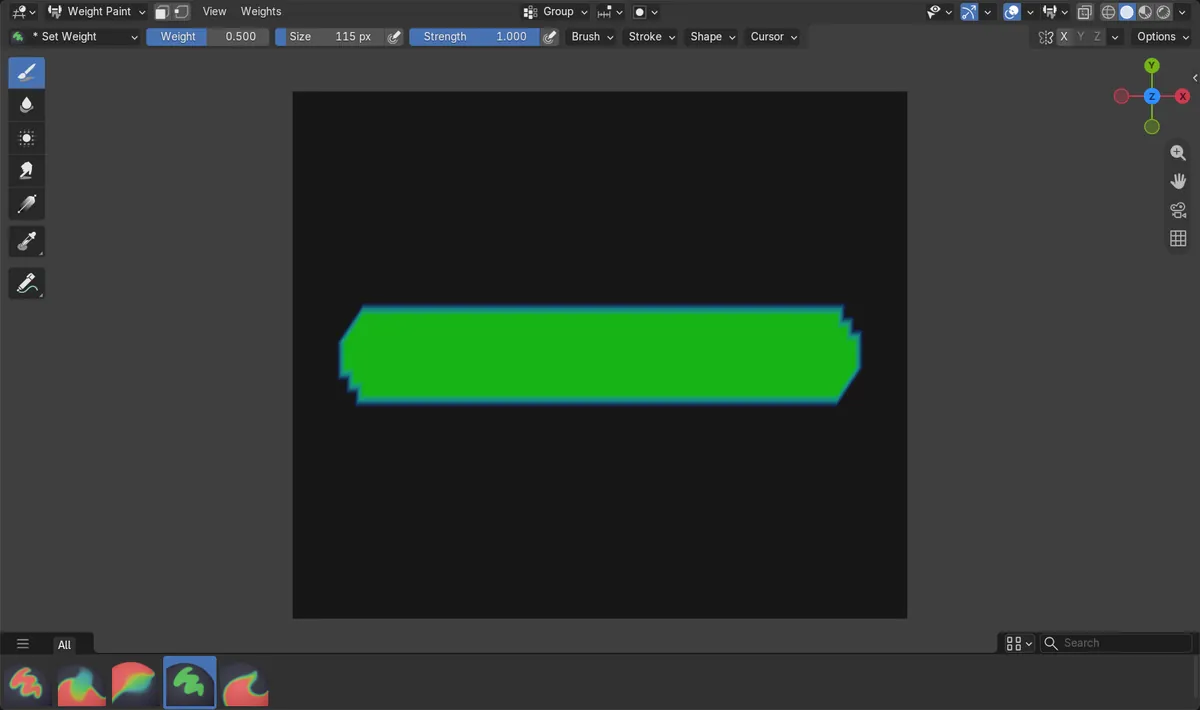
Set Weight brush
Pick Set Weight from the brush list in the tool header or the Brush Asset panel of the Tool tab in the sidebar.
Exactly 0.5
One stroke with Weight 0.5 put all 401 painted vertices at exactly 0.5; the default Add Weight stroke got none of them there.
Renamed in 5.3
In Blender 5.2 LTS this brush was called Paint and was the default; 5.3 renames it Set Weight and gives it a Constant falloff.
Before and after

AI Scene Builder is a Blender add-on. You type what you want, and it builds it in your scene: buildings, neon signs, wet pavement, fog and lights. Nothing in this picture was modeled by hand.
On a phone now? The add-on runs in Blender on a computer. Send yourself the link and open it there.
Step by step (Blender 5.3)
- Select the mesh, enter Weight Paint mode and pick the vertex group in the Vertex Groups list.
- Open the brush list in the tool header (or the Brush Asset panel in the Tool tab of the sidebar) and pick Set Weight.
- Set Weight to the value you want, for example 0.5, and leave Strength at 1.0.
- Paint over the vertices. Each vertex under the brush gets the Weight value; vertices outside the brush keep theirs.
- Switch back to Add Weight when you want to build up weight softly over several strokes.
Other ways to do it
- Press Shift + X with the mouse over the mesh to sample the weight under it into the Weight field
- Press Ctrl + X to fill the active vertex group with the Weight value in one go
Blender 5.2 LTS vs Blender 5.3
| What | Blender 5.2 LTS | Blender 5.3 |
|---|---|---|
| Set Weight brush | Not in Blender 5.2 LTS under this name. The default Paint brush gives a similar result but with a soft falloff; in the test 51 of 391 painted vertices reached exactly 0.5. | Blender 5.3 renames Paint to Set Weight, gives it a Constant falloff and makes the gentler Add Weight the default brush. |
Common snags
The weight barely changes
You are still on Add Weight, which starts at a low Strength of 0.05 and adds to the weight. Switch to Set Weight.
The painted weight stays below the Weight value
Strength is below 1.0. Set Strength back to 1.0 so every vertex under the brush gets the full Weight value.
Other bone groups dropped while painting
Auto Normalize is on by default in 5.3 and lowers the other groups. Turn it off in Options in the tool header if you want to keep them.
An AI add-on for Blender
AI Scene Builder is a Blender add-on that builds and edits your scene from one typed request, such as “a small wooden table with two chairs”. Each request can be undone in one click.
 An evening market street built with the add-on from 11 typed requests. See every request →
Questions
Why is weight painting so weak in Blender 5.3?
The new default brush is Add Weight, with a Strength of 0.05 that adds a little per stroke. Pick the Set Weight brush to paint the exact Weight value.
Where did the Paint brush go in Blender weight paint?
Blender 5.3 renamed it Set Weight and gave it a Constant falloff. It is in the same brush list as Add Weight.
How do I paint a weight of exactly 1.0?
Pick Set Weight, set Weight to 1.0 and Strength to 1.0, then paint over the vertices.
What the pictures show
- Before: in a new Blender 5.3 file the Weight Paint brush was Add Weight (Add blend, Strength 0.05, Smooth falloff). One stroke with Weight 0.5 over a group at 0.0 painted 389 vertices, the highest at 0.098 and none at 0.5.
- After switching to Set Weight (Mix blend, Strength 1.0, Constant falloff), the same stroke painted 401 vertices, all at exactly 0.5 and none above.
- In Blender 5.2 LTS there was no Set Weight brush; the default Paint brush (Strength 1.0, Custom falloff) put 51 of 391 painted vertices at exactly 0.5.