How to Turn Radial Symmetry On in Blender 5.4 Sculpt Mode
In Blender 5.4 Sculpt Mode, open the Symmetry settings (the arrow next to the X Y Z buttons in the tool header, or the Symmetry panel in the Tool tab of the Sidebar (N)), tick Radial Symmetry, then open it and set Count, for example Z = 6. Until the checkbox is ticked the Count is ignored, so one stroke makes only one mark. In Blender 5.3 there is no checkbox and the Radial numbers work as soon as they are above 1.
- Mode
- Sculpt Mode
- Menu
- Symmetry › Radial Symmetry
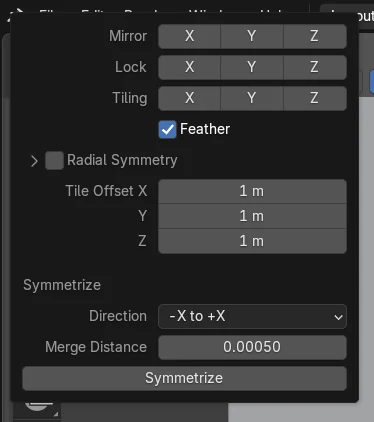
Where it is
Radial Symmetry sits under Feather in the Symmetry settings: the tool header arrow, or the Tool tab of the Sidebar (N).
Switch first, then Count
Tick Radial Symmetry, then set Count. Count is greyed out while the box is off.
New in 5.4
Blender 5.3 has no Radial Symmetry checkbox, only the Radial numbers.
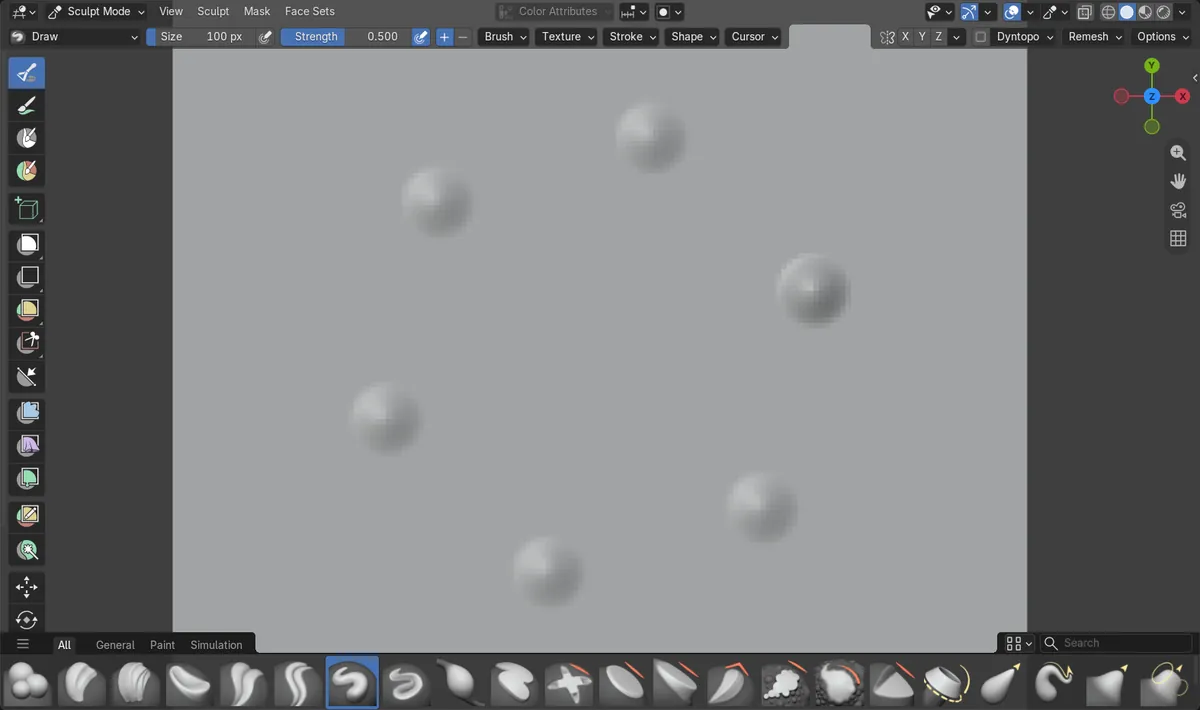
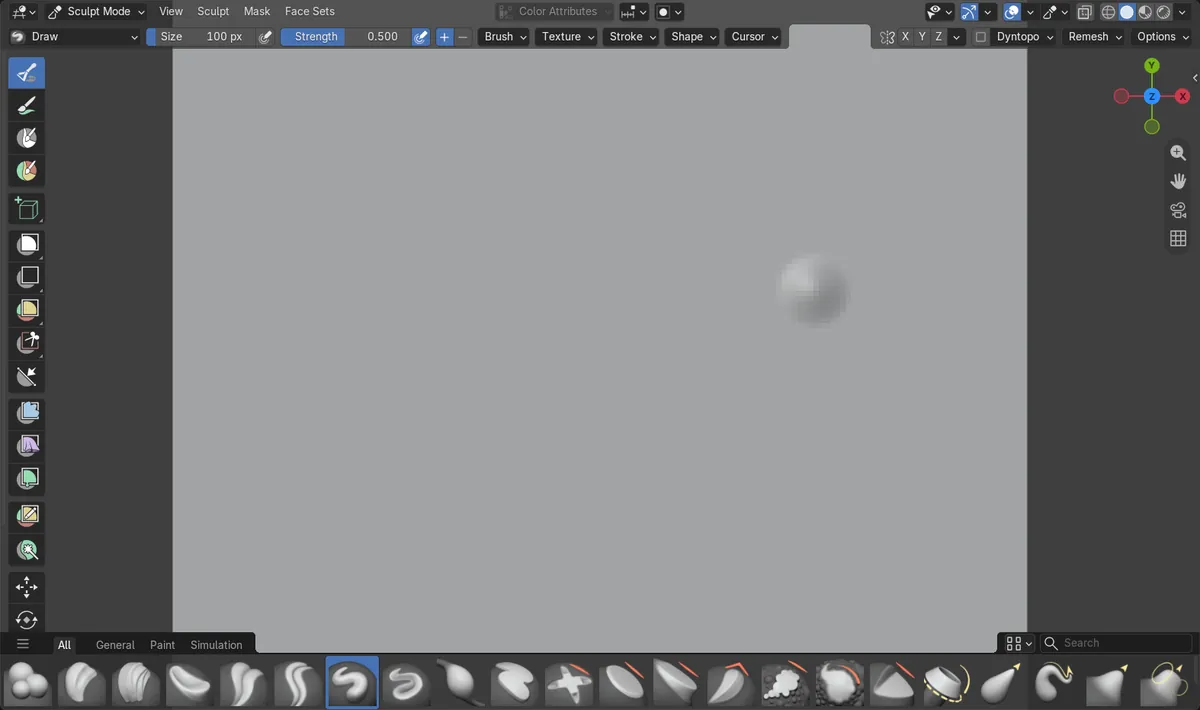
Before and after

AI Scene Builder is a Blender add-on. You type what you want, and it builds it in your scene: buildings, neon signs, wet pavement, fog and lights. Nothing in this picture was modeled by hand.
On a phone now? The add-on runs in Blender on a computer. Send yourself the link and open it there.
Step by step (Blender 5.4 Alpha)
- Select a mesh and switch to Sculpt Mode.
- Click the small arrow next to the X Y Z mirror buttons in the tool header to open the Symmetry settings. The Symmetry panel in the Tool tab of the Sidebar (N) shows the same settings.
- Tick the Radial Symmetry checkbox below Feather.Blender 5.3: Blender 5.3 has no Radial Symmetry checkbox. Skip this step.
- Click the arrow beside Radial Symmetry to open it, then set Count for the axis you want. Z = 6 repeats each stroke 6 times around the Z axis.Blender 5.3: In Blender 5.3 set the Radial X, Y and Z numbers directly in the Symmetry panel.
- Sculpt. Each stroke is now repeated around the axis. Untick Radial Symmetry to stop the repeats while keeping your Count for later.Blender 5.3: In Blender 5.3, set the Radial number back to 1 to stop the repeats.
Other ways to do it
- The Symmetry panel in the Tool tab of the 3D Viewport Sidebar (N) shows the same Radial Symmetry checkbox and Count as the tool header arrow.
- Weight Paint, Vertex Paint and Texture Paint have the same Radial Symmetry checkbox in their own Symmetry panels.
Blender 5.3 vs Blender 5.4 Alpha
| What | Blender 5.3 | Blender 5.4 Alpha |
|---|---|---|
| Radial symmetry switch | No checkbox. The Radial X, Y and Z numbers act as soon as one of them is above 1. | A Radial Symmetry checkbox turns the repeats on and off. Count only acts while it is ticked. |
| Where Count is shown | Radial is a row of three numbers in the Symmetry panel. | Count sits inside the Radial Symmetry sub-panel, which is closed by default. |
| Release status | Blender 5.3.0 is the current stable release. | Blender 5.4 is in Alpha until February 3, 2027, so menus and behaviour may still change before the final release. |
Common snags
Count is set but strokes are not repeated
In Blender 5.4 the Radial Symmetry checkbox is off. Tick it. In our run, Count Z = 6 with the box off gave one mark per dab.
Count is greyed out
Count can only be edited while Radial Symmetry is ticked. Tick the box first.
There is no Count field
The Radial Symmetry sub-panel is closed by default. Click the arrow beside its checkbox to open it.
There is no Radial Symmetry checkbox
You are on Blender 5.3 or older. There, use the Radial numbers in the Symmetry panel instead.
An AI add-on for Blender
AI Scene Builder is a Blender add-on that builds and edits your scene from one typed request, such as “a small wooden table with two chairs”. Each request can be undone in one click.
 A lighthouse island at sunset built with the add-on from 10 typed requests. See every request →
Questions
Why does radial symmetry not work in Blender 5.4?
Blender 5.4 adds a Radial Symmetry checkbox, and Count does nothing until it is ticked. In our run, Count Z = 6 gave 1 bump with the box off and 6 bumps with it on.
Where is radial symmetry in Blender 5.4?
In Sculpt Mode, open the arrow next to the X Y Z buttons in the tool header, or the Symmetry panel in the Tool tab of the Sidebar (N). Radial Symmetry is below Feather.
Does Blender 5.3 have a radial symmetry checkbox?
No. In Blender 5.3.0 the Radial X, Y and Z numbers work on their own: with Z = 6 the first dab made 6 bumps.
How do I turn radial symmetry off without losing my count?
In Blender 5.4, untick Radial Symmetry. Count keeps its value: in our run Z stayed 6 while the box was off.
What the pictures show
- Tested build: Blender 5.4.0 Alpha (f9495703eb0b, 2026-11-10 build), compared with Blender 5.3.0.
- Mesh: a flat grid of 160 x 160 subdivisions, Draw brush, one dab at the same spot each time, Radial Count Z = 6.
- 5.4 with Radial Symmetry off: one dab made 1 bump (69 vertices raised).
- 5.4 after ticking Radial Symmetry: the same dab made 6 bumps around the Z axis (478 vertices raised in total).
- 5.3.0 with Radial Z = 6: the first dab already made 6 bumps (450 vertices raised). 5.3.0 has no Radial Symmetry checkbox.