How to Play Only the Scene Strip Range in Blender 5.4
In Blender 5.4, open the Playback menu of the Timeline and tick Use Scene Strip Range in its Sequencer section. When you play a shot scene that is used by a scene strip in your edit, playback then stays inside the frames that strip uses and loops back to its first frame, instead of running through the whole frame range of the scene. Blender 5.3 has no such option.
- Mode
- Timeline or Dope Sheet of the shot scene (Playback menu, Sequencer section), with an edit in the Video Sequencer
- Menu
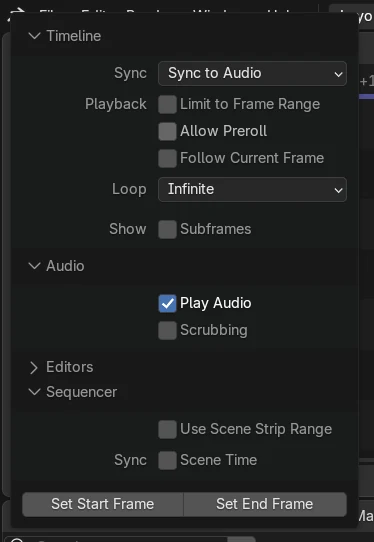
- Playback › Use Scene Strip Range
- Shortcut
- Space (play)
Where to find it
The Playback menu of the Timeline, in its Sequencer section.
Loops the frames the edit uses
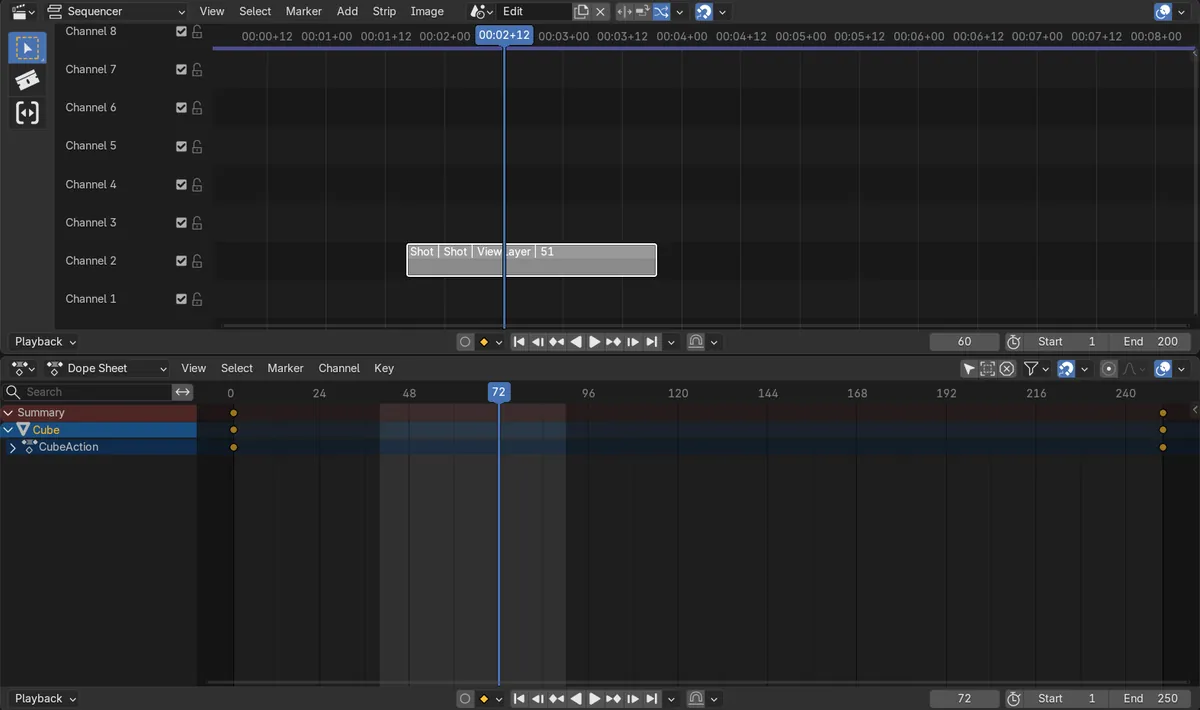
Our strip used frames 40 to 90 of a 250-frame shot. With the option on, playback from frame 80 looped between 40 and 90.
New in 5.4
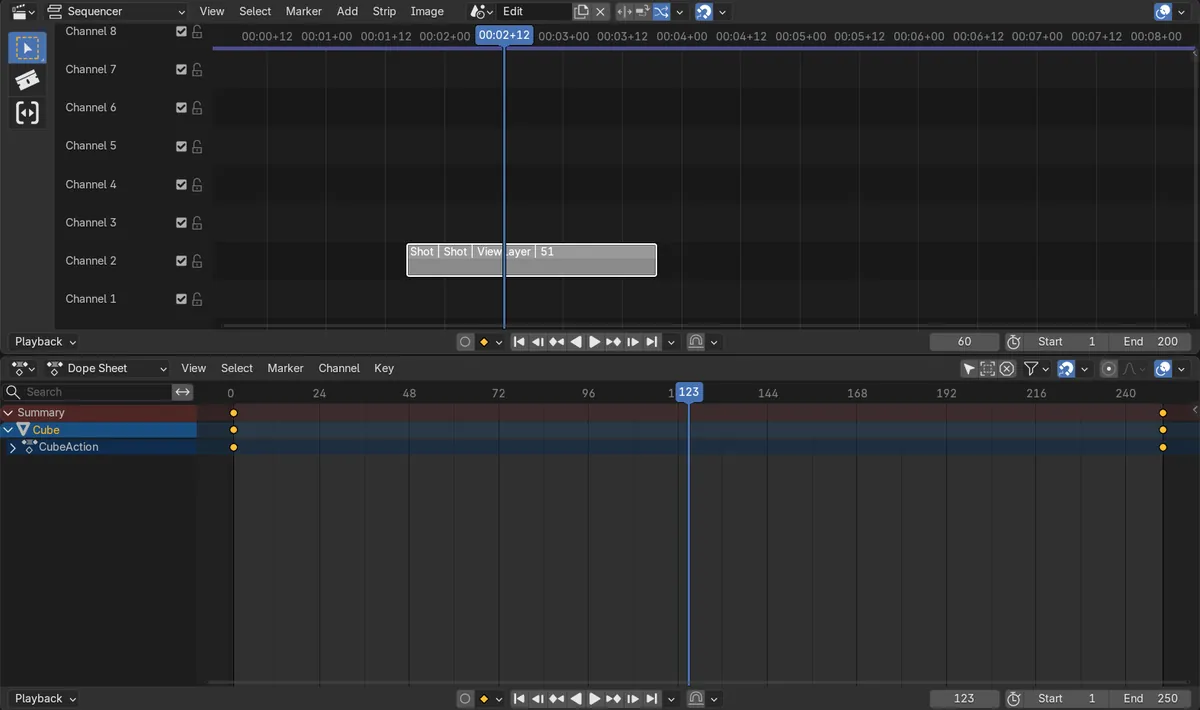
Blender 5.3 has no Use Scene Strip Range option; playback ran on to frame 123 and beyond.
Before and after

AI Scene Builder is a Blender add-on. You type what you want, and it builds it in your scene: buildings, neon signs, wet pavement, fog and lights. Nothing in this picture was modeled by hand.
On a phone now? The add-on runs in Blender on a computer. Send yourself the link and open it there.
Step by step (Blender 5.4 Alpha)
- Set up your edit: a scene for the Video Sequencer (for example 'Edit') with a scene strip that uses your shot scene ('Shot'). Trim the strip to the frames you want.
- In the Video Sequencer header, make sure your edit scene is chosen as the sequencer scene, and put the edit's playhead over the scene strip.
- In the Timeline, open the Playback menu and tick Use Scene Strip Range in its Sequencer section.Blender 5.3: Blender 5.3 has no Use Scene Strip Range in the Playback menu.
- With the mouse over the Timeline or Dope Sheet of the shot scene, press Space. Playback now stays inside the frames the strip uses and loops back to the strip's first frame.
Other ways to do it
- In the Storyboarding workspace the option is on by default.
- Sync: Scene Time, just below it in the same Sequencer section, is a separate option and can stay off.
Blender 5.3 vs Blender 5.4 Alpha
| What | Blender 5.3 | Blender 5.4 Alpha |
|---|---|---|
| Use Scene Strip Range | Not in Blender 5.3.0. Playing a shot always runs through the scene's own frame range. | Blender 5.4 adds Use Scene Strip Range to the Sequencer section of the Playback menu. |
| Release status | Blender 5.3.0 is the current stable release. | Blender 5.4 is in Alpha; the final release is planned for February 3, 2027. |
Common snags
Playback still runs through the whole scene
The edit's playhead is not over the scene strip. Blender uses the scene strip under the playhead of the sequencer scene, so move that playhead onto the strip first.
Nothing changes when I play in the Sequencer
Start playback from the Timeline or Dope Sheet of the shot scene. Playing inside the Video Sequencer plays the edit as usual.
It plays a different range
A preview range on the shot scene takes priority. Clear the preview range to use the strip's frames.
There is no Use Scene Strip Range option
You are on Blender 5.3 or older. The option is new in Blender 5.4.
Questions
How do I loop only the part of a scene used in my edit?
In Blender 5.4, open the Playback menu of the Timeline and tick Use Scene Strip Range, then play the shot scene. Playback stays inside the frames its scene strip uses.
Why does Use Scene Strip Range do nothing?
Put the playhead of the edit scene over the scene strip, and start playback from the shot's Timeline or Dope Sheet, not from the Video Sequencer.
Does Blender 5.3 have Use Scene Strip Range?
No. It is new in Blender 5.4. In our 5.3 test, playback ran on to frame 123, past the strip's last frame, 90.
Do I need to change the scene's start and end frames?
No. With the option on, the strip's frames set the loop, and the scene's own frame range stays as it is.
What the pictures show
- Tested build: Blender 5.4.0 Alpha (f9495703eb0b, 2026-11-10 build), compared with Blender 5.3.0.
- Scene: a 250-frame shot scene with an animated cube, used by one scene strip in an edit scene. The strip uses shot frames 40 to 90, and the edit's playhead is on the strip.
- Before: with Use Scene Strip Range off, playing the shot from frame 80 for about 2 seconds ran up to frame 123 and never looped.
- After ticking Use Scene Strip Range in 5.4: the same playback stayed between frames 40 and 90 and looped back to 40 (it stopped on frame 72).
- In Blender 5.3.0 the option does not exist, and playback from frame 80 again ran up to frame 123.