How to Set a Render Time Limit in EEVEE (Blender 5.3)
In Blender 5.3, open Render Properties › Sampling › Render and set Time Limit for EEVEE. The render stops adding samples once that time is used, even if it has not reached the sample count, and 0 turns the limit off.
- Mode
- Properties editor, Render tab (EEVEE)
- Menu
- Render Properties › Sampling › Render › Time Limit
- Shortcut
- F12
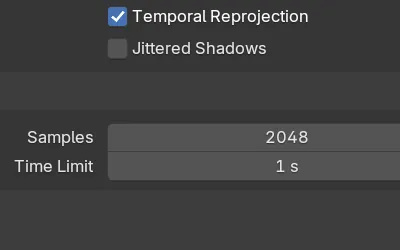
Time Limit
Under Sampling › Render, below Samples, when the engine is EEVEE.
Stops early
With 1 s, a 2048-sample frame stopped at 450 samples in about 1 second.
New in 5.3
Blender 5.2 LTS has no Time Limit for EEVEE; it always renders every sample.
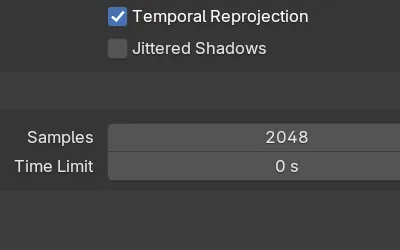
Before and after

AI Scene Builder is a Blender add-on. You type what you want, and it builds it in your scene: buildings, neon signs, wet pavement, fog and lights. Nothing in this picture was modeled by hand.
On a phone now? The add-on runs in Blender on a computer. Send yourself the link and open it there.
Step by step (Blender 5.3)
- Open the Properties editor and click the Render tab.
- Set Render Engine to EEVEE.
- Open Sampling › Render.
- Set Time Limit to the number of seconds a frame may take, for example 1 s.
- Render with F12. The frame stops sampling when the time is used up or when it reaches Samples, whichever comes first.
Other ways to do it
- Lower Samples under Sampling › Render to make every frame shorter by a fixed amount
- Set Time Limit back to 0 to render all samples again
- Ctrl + F12 renders the whole animation, and the limit applies to each frame
Blender 5.2 LTS vs Blender 5.3
| What | Blender 5.2 LTS | Blender 5.3 |
|---|---|---|
| EEVEE Time Limit | Not in Blender 5.2 LTS. Sampling › Render only has Samples. | Blender 5.3 adds Time Limit under Sampling › Render for EEVEE. |
Common snags
The image looks noisier than before
When the time runs out, EEVEE stops with fewer samples than set, so soft shadows and other sampled effects can look rougher. Give it more time or set it to 0.
The render took longer than the limit
Time Limit stops the sampling. Loading the scene and saving the file come on top of it.
The setting is missing
Time Limit for EEVEE is new in Blender 5.3. In Blender 5.2 LTS the Render panel only shows Samples.
An AI add-on for Blender
AI Scene Builder is a Blender add-on that builds and edits your scene from one typed request, such as “a small wooden table with two chairs”. Each request can be undone in one click.
 A lighthouse island at sunset built with the add-on from 10 typed requests. See every request →
Questions
How do I limit EEVEE render time per frame?
In Blender 5.3, set Time Limit under Render Properties › Sampling › Render. Each frame stops sampling after that many seconds.
What does Time Limit 0 mean?
0 turns the limit off, so EEVEE renders all the samples you set.
Does Cycles have the same setting?
Yes, Cycles has its own Time Limit under Sampling › Render when Cycles is the render engine.
What the pictures show
- Before: EEVEE with Samples at 2048 and Time Limit at 0 rendered all 2048 samples in 4.49 seconds.
- After setting Time Limit to 1 s: the same frame stopped at 450 of 2048 samples, in 0.98 seconds.
- Samples stayed at 2048; only the sampling time was cut.
- In Blender 5.2 LTS there was no Time Limit for EEVEE, and the frame rendered all 2048 samples in 6.94 seconds.