How to Fit a Scene Strip to the Frame in the Video Editor (Blender 5.3)
In Blender 5.3, select the scene strip in the Video Editor timeline and choose Image › Apply › Scale To Fit in the Preview header. In the test a 1280 x 720 scene strip sat in the middle of a 1920 x 1080 edit at scale 1.0; after Scale To Fit its scale was 1.5 and it filled the frame. Strip › Set Render Size works on scene strips too, and in the test it set the edit to 1280 x 720 instead. In Blender 5.2 LTS Scale To Fit left the scene strip at scale 1.0, and Set Render Size did not run on it.
- Mode
- Video Editor, Preview header
- Menu
- Image › Apply › Scale To Fit
Scale To Fit for scene strips
Image › Apply › Scale To Fit now reads the size of the scene a scene strip shows and scales the strip to the frame.
1280 x 720 to 1920 x 1080
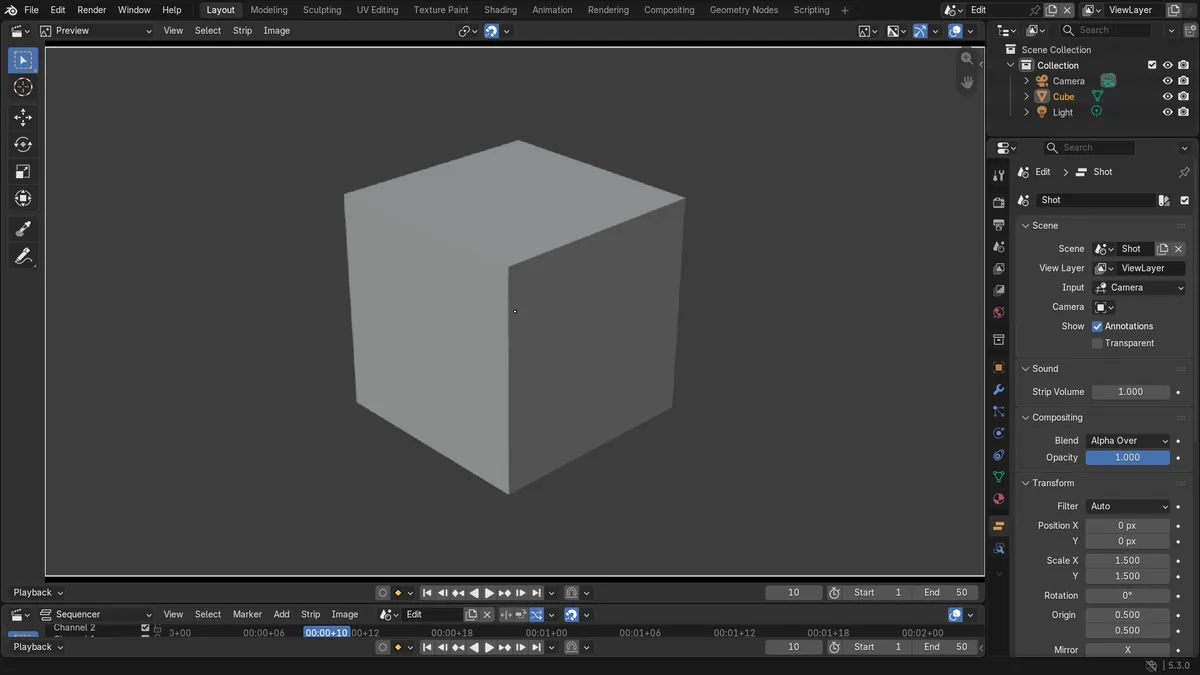
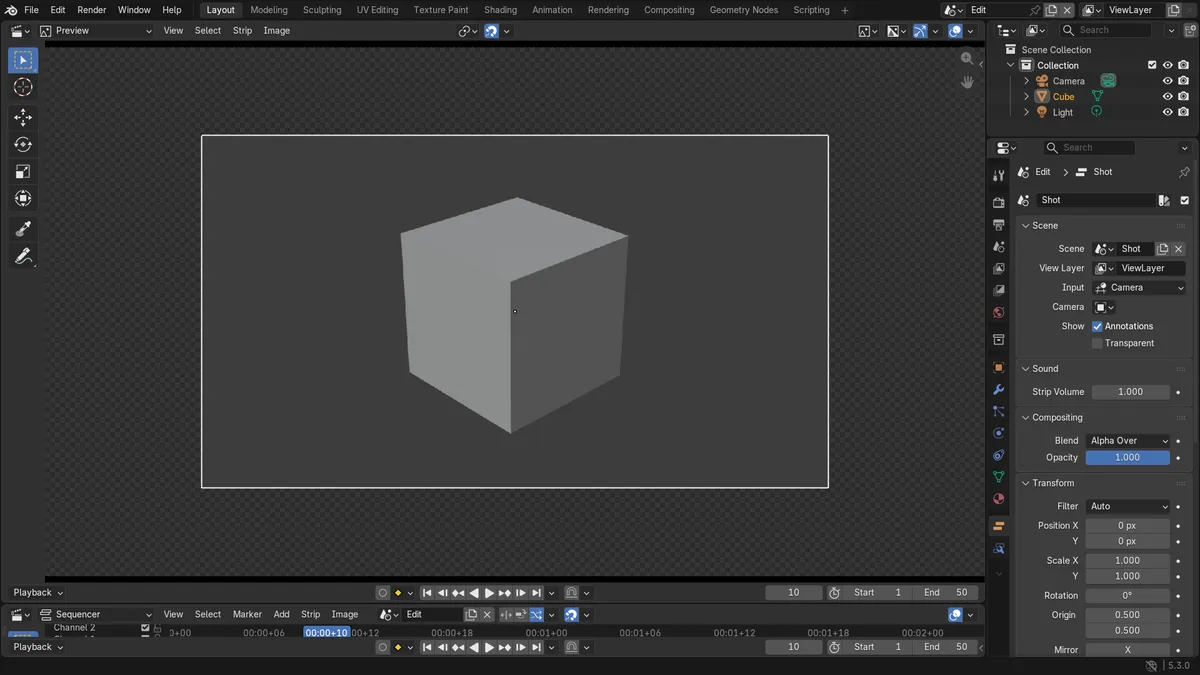
A 1280 x 720 scene strip went from scale 1.0 to 1.5 and filled a 1920 x 1080 edit, with its offset still at 0.
New in 5.3
In Blender 5.2 LTS Scale To Fit keeps a scene strip at 1.0, and Set Render Size works on movie and image strips.
Before and after

AI Scene Builder is a Blender add-on. You type what you want, and it builds it in your scene: buildings, neon signs, wet pavement, fog and lights. Nothing in this picture was modeled by hand.
On a phone now? The add-on runs in Blender on a computer. Send yourself the link and open it there.
Step by step (Blender 5.3)
- Open the Video Editing workspace, or any Video Editor with a Preview area, and add the scene strip if it is not there yet.
- Click the scene strip in the timeline so it is selected and active.
- In the Preview header, open Image › Apply › Scale To Fit.Blender 5.2 LTS: Blender 5.2 LTS runs this on a scene strip but leaves its scale at 1.0.
- Check the Preview: the strip now fills the frame without stretching. Its Scale X and Scale Y in the Strip tab of the Sidebar read 1.5 for a 1280 x 720 strip in a 1920 x 1080 edit.
Other ways to do it
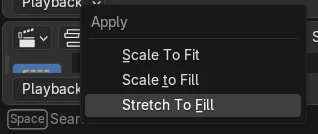
- Use Image › Apply › Scale to Fill to cover the whole frame and crop the edges that do not fit
- Use Image › Apply › Stretch To Fill to fill the frame and change the proportions
- Use Strip › Set Render Size to change the edit resolution to the size of the scene strip instead
Blender 5.2 LTS vs Blender 5.3
| What | Blender 5.2 LTS | Blender 5.3 |
|---|---|---|
| Scale To Fit on a scene strip | In Blender 5.2 LTS Scale To Fit leaves a scene strip at scale 1.0. | In Blender 5.3 Scale To Fit scales a scene strip to the frame, 1.5 for 1280 x 720 in 1920 x 1080. |
| Set Render Size on a scene strip | In Blender 5.2 LTS Set Render Size does not run on a scene strip, and the edit stays 1920 x 1080. | In Blender 5.3 Set Render Size runs on a scene strip and set the edit to 1280 x 720. |
Common snags
The Image menu is missing
The Image menu is in the Preview header. If the editor shows the timeline alone, switch the view type to Sequencer & Preview or use the Video Editing workspace.
Nothing changed after Scale To Fit
Another strip was active, or the scene strip was not selected. Click the scene strip first, then run Scale To Fit again.
The edit size changed instead
Strip › Set Render Size changes the resolution of the edit, not the strip. Undo it and use Image › Apply › Scale To Fit to keep the edit at 1920 x 1080.
An AI add-on for Blender
AI Scene Builder is a Blender add-on that builds and edits your scene from one typed request, such as “a small wooden table with two chairs”. Each request can be undone in one click.
 A log cabin room built with the add-on from 9 typed requests. See every request →
Questions
How do I make a scene strip fill the frame in Blender's video editor?
In Blender 5.3, select the scene strip and choose Image › Apply › Scale To Fit in the Preview header. It scales the strip to the frame without stretching.
What is the difference between Scale To Fit, Scale to Fill and Stretch To Fill?
Scale To Fit makes the whole strip visible inside the frame. Scale to Fill covers the frame and crops what does not fit. Stretch To Fill fills the frame and changes the proportions.
How do I set the project resolution to the size of a strip?
Select the strip and use Strip › Set Render Size. In Blender 5.3 this works on scene strips too.
What the pictures show
- Before: a 1920 x 1080 edit in Blender 5.3 with a scene strip showing a 1280 x 720 scene at scale 1.0 and offset 0, so it covered the middle of the frame.
- After Image > Apply > Scale To Fit: the strip's scale was 1.5 on both axes and it filled the frame. Strip > Set Render Size on the same strip set the edit to 1280 x 720.
- In Blender 5.2 LTS Scale To Fit left the strip at scale 1.0, and Set Render Size was cancelled and the edit stayed 1920 x 1080.