How to Search the Sidebar in Blender 5.3 (Ctrl + F in the N Panel)
In Blender 5.3, move the mouse over the sidebar (the N panel) and press Ctrl + F. A search field opens at the top of the sidebar; type part of a setting name, such as clip, and the sidebar switches to the tab that has it and highlights the match. Press Alt + F over the sidebar to clear the search. Sidebar search is new in Blender 5.3; Blender 5.2 LTS has no search field in the sidebar.
- Mode
- 3D Viewport sidebar (N panel), any mode (Object Mode shown)
- Shortcut
- Ctrl + F to search, Alt + F to clear (mouse over the sidebar)
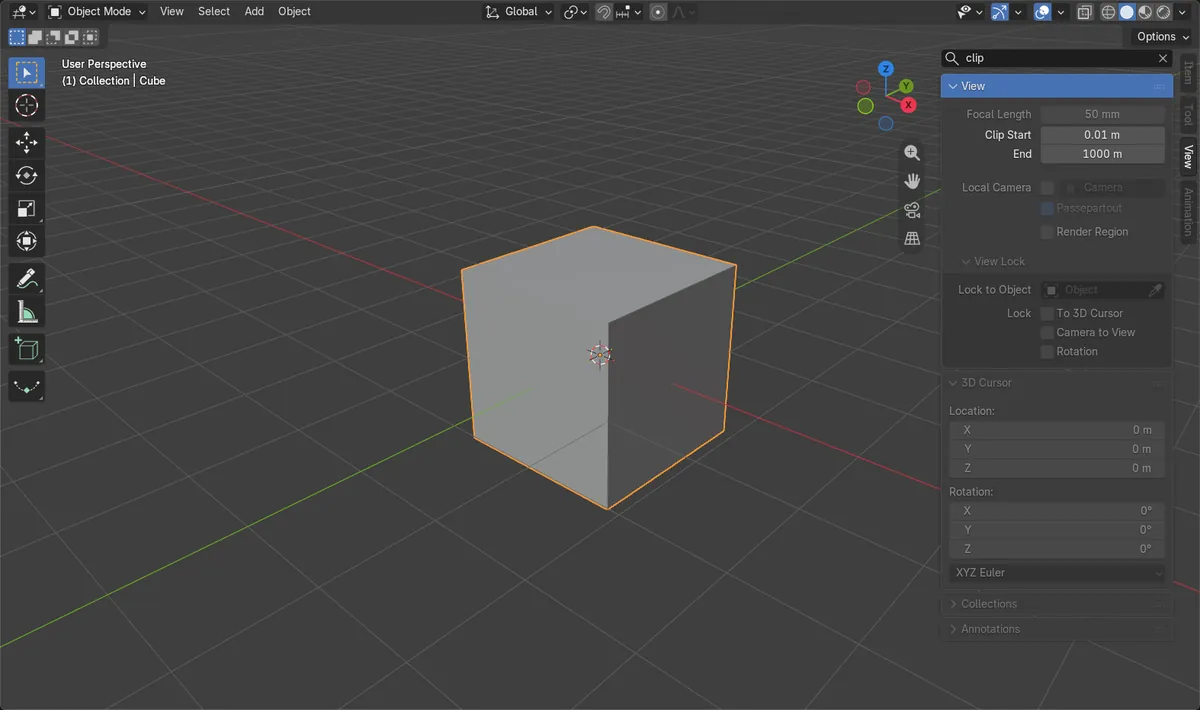
Hover, then Ctrl + F
The mouse must be over the sidebar.
Searches every tab
It jumps to the tab with the match.
New in 5.3
Blender 5.2 LTS has no sidebar search.
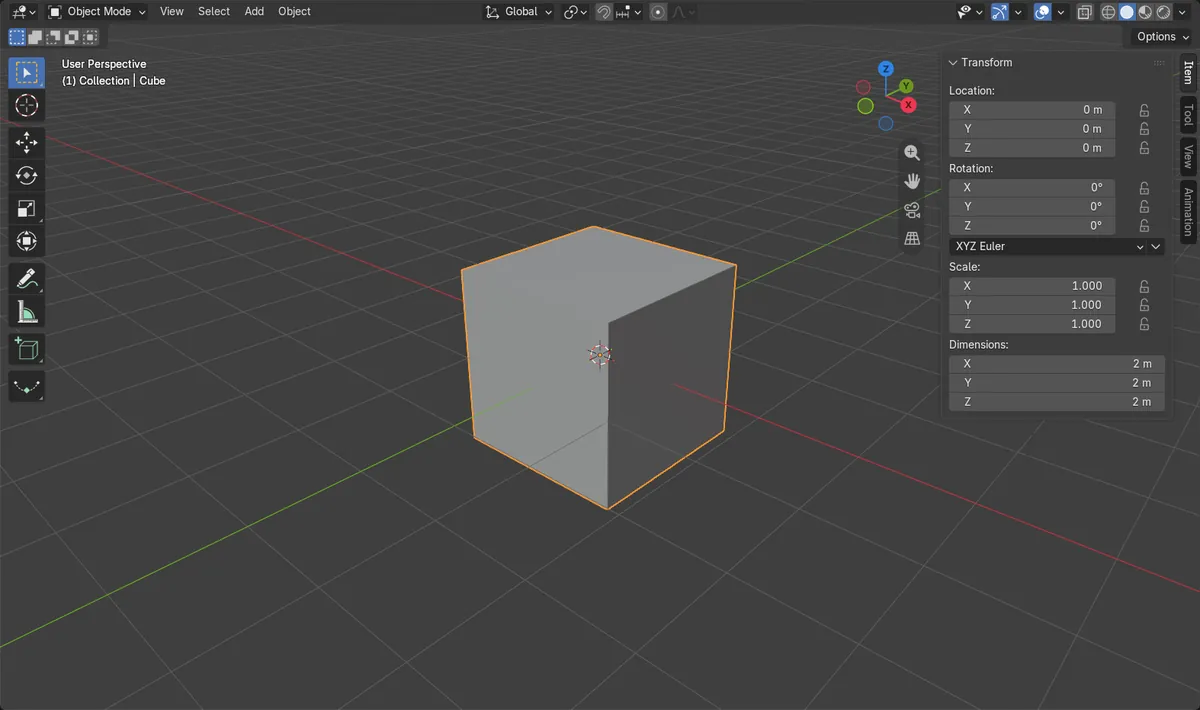
Before and after

AI Scene Builder is a Blender add-on. You type what you want, and it builds it in your scene: buildings, neon signs, wet pavement, fog and lights. Nothing in this picture was modeled by hand.
On a phone now? The add-on runs in Blender on a computer. Send yourself the link and open it there.
Step by step (Blender 5.3)
- Show the sidebar in the 3D Viewport by pressing N with the mouse over the viewport.
- Move the mouse over the sidebar.
- Press Ctrl + F. A search field appears at the top of the sidebar, ready for typing.
- Type part of the setting name, for example clip, then confirm the text.
- The sidebar switches to the tab that holds the setting and highlights it. In the picture, typing clip opened the View tab with Clip Start and End.
- To show everything again, hover the sidebar and press Alt + F, or click the X at the end of the search field.
Other ways to do it
- Click the search field at the top of the sidebar once it is shown, and type there.
- The Properties Editor has its own search with the same keys: Ctrl + F to search and Alt + F to clear while the mouse is over it.
Blender 5.2 LTS vs Blender 5.3
| What | Blender 5.2 LTS | Blender 5.3 |
|---|---|---|
| Sidebar search | Not in Blender 5.2 LTS. The sidebar has no search field, so you click through the Item, Tool and View tabs. | Blender 5.3 adds a search field to the sidebar: Ctrl + F to search, Alt + F to clear. |
Common snags
Ctrl + F does nothing
Put the mouse over the sidebar first. The key works on the area under the mouse. In Blender 5.2 LTS there is no sidebar search at all.
My other tabs look empty or greyed out
The search is still active. Hover the sidebar and press Alt + F to clear it, and every tab shows its settings again.
Does the search change my settings?
No. It only filters what the sidebar shows. Values such as Location, Scale and Clip Start stay the same.
An AI add-on for Blender
AI Scene Builder is a Blender add-on that builds and edits your scene from one typed request, such as “a small wooden table with two chairs”. Each request can be undone in one click.
 A lighthouse island at sunset built with the add-on from 10 typed requests. See every request →
Questions
How do I search the N panel in Blender 5.3?
Hover the sidebar, press Ctrl + F and type part of the setting name. The sidebar switches to the tab that has it.
How do I clear the sidebar search?
Hover the sidebar and press Alt + F, or click the X in the search field.
Can I search the sidebar in Blender 5.2 LTS?
No. Sidebar search is new in Blender 5.3. In 5.2 LTS, open the Item, Tool and View tabs one by one.
What the pictures show
- Before: the 3D Viewport sidebar was open on the Item tab with an empty search.
- With the mouse over the sidebar, Ctrl + F opened a search field at the top of the sidebar.
- After typing clip and Enter, the sidebar search held clip and the sidebar showed the View tab with Clip Start and End.
- In Blender 5.2.2 LTS the sidebar has no search filter, and the Show Filter operator behind Ctrl + F does not exist.