How to See the Dimensions of Selected Vertices in Edit Mode (Blender 5.3)
In Blender 5.3, select the vertices, edges or faces in Edit Mode, press N to open the Sidebar and look at the Item tab. The Transform panel now lists the Dimensions of the selection (X, Y and Z) under Median, so you can read the exact size of a part of the mesh.
- Mode
- Edit Mode, 3D Viewport
- Shortcut
- N
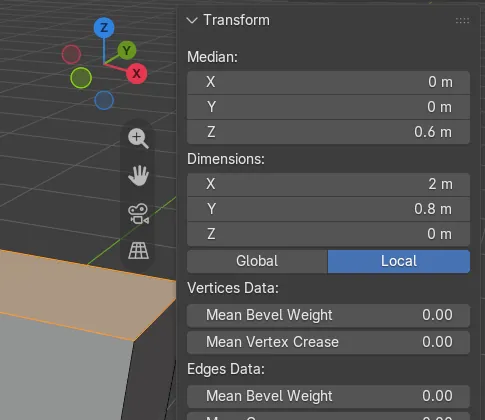
N, then Item
The Sidebar opens with N; the Transform panel sits on its Item tab.
Exact size
With the top face of a 2 x 0.8 x 1.2 m box selected, it read X 2 m, Y 0.8 m, Z 0 m.
New in 5.3
In Blender 5.2 LTS the Edit Mode Transform panel shows only the Median, without Dimensions.
Before and after

AI Scene Builder is a Blender add-on. You type what you want, and it builds it in your scene: buildings, neon signs, wet pavement, fog and lights. Nothing in this picture was modeled by hand.
On a phone now? The add-on runs in Blender on a computer. Send yourself the link and open it there.
Step by step (Blender 5.3)
- Select the object and press Tab to enter Edit Mode.
- Select the vertices, edges or faces you want to measure.
- Press N with the mouse over the 3D Viewport to open the Sidebar, then click the Item tab.
- In the Transform panel, read Dimensions under Median: X, Y and Z are the size of the selection.
- To resize the selection to an exact size, type a new value into a Dimensions field.
Other ways to do it
- Open the Sidebar by ticking Sidebar in the View menu of the 3D Viewport instead of pressing N
Blender 5.2 LTS vs Blender 5.3
| What | Blender 5.2 LTS | Blender 5.3 |
|---|---|---|
| Dimensions in the Edit Mode Transform panel | Not in Blender 5.2 LTS. The Transform panel in Edit Mode shows only the Median of the selection. | Blender 5.3 adds Dimensions under Median, showing the size of the selection on X, Y and Z. |
Common snags
Z shows 0 m
A flat selection, like a single face lying flat, has no height. Select vertices on different levels to measure along Z.
The size does not match what you expect
Use the Global and Local buttons below the fields: Local measures in the object's own space, Global in the scene's space, which differ when the object is scaled or rotated.
The Transform panel is missing
The Sidebar is on another tab. Click the Item tab, with the mouse over the 3D Viewport when you press N.
An AI add-on for Blender
AI Scene Builder is a Blender add-on that builds and edits your scene from one typed request, such as “a small wooden table with two chairs”. Each request can be undone in one click.
 A log cabin room built with the add-on from 9 typed requests. See every request →
Questions
How do I measure selected vertices in Blender?
In Blender 5.3, press N in Edit Mode and open the Item tab. The Transform panel shows the Dimensions of the selection under Median.
Can I set an exact size for part of a mesh?
Yes. In Blender 5.3, type a value into a Dimensions field in the Edit Mode Transform panel to resize the selection.
Where are Dimensions in Blender 5.2 LTS?
Only in Object Mode, for the whole object. The Edit Mode panel there shows only the Median.
What the pictures show
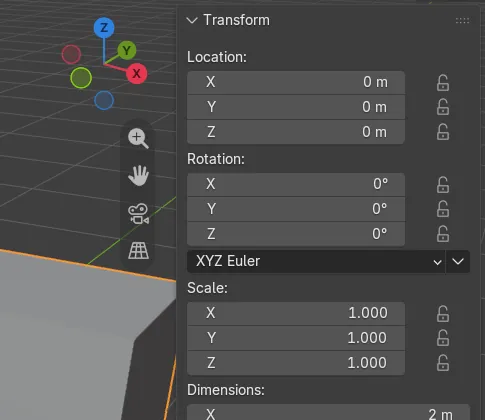
- Before: a box of 2 x 0.8 x 1.2 m in Object Mode with the Sidebar open on the Item tab; the Transform panel listed the whole object's Location, Rotation, Scale and Dimensions.
- After entering Edit Mode and selecting only the top face (4 vertices): the panel showed Median and, under it, Dimensions X 2 m, Y 0.8 m and Z 0 m.
- In Blender 5.2 LTS the same selection showed only Median in the panel, with no Dimensions fields.