How to See the Active Keying Set in the Blender 5.4 Viewport
In Blender 5.4 the active Keying Set appears in the top-left Text Info of the 3D Viewport, on its own row after the frame number, for example "1 | Location". Set it with Shift + K or Object › Animation › Change Keying Set..., and the row updates at once. Blender 5.3 does not show the Keying Set in the viewport.
- Mode
- Object Mode (3D Viewport)
- Menu
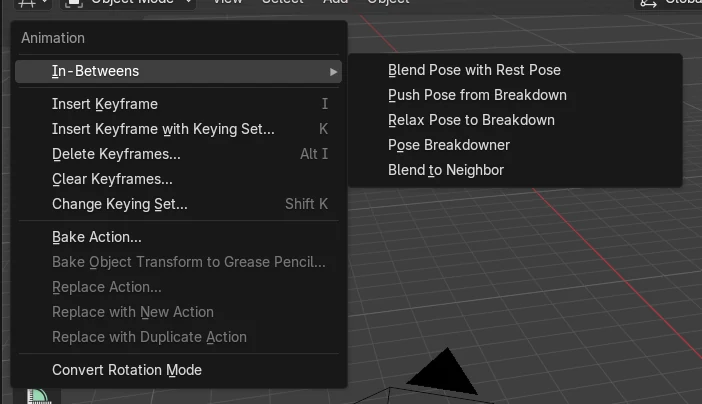
- Object › Animation › Change Keying Set...
- Shortcut
- Shift + K
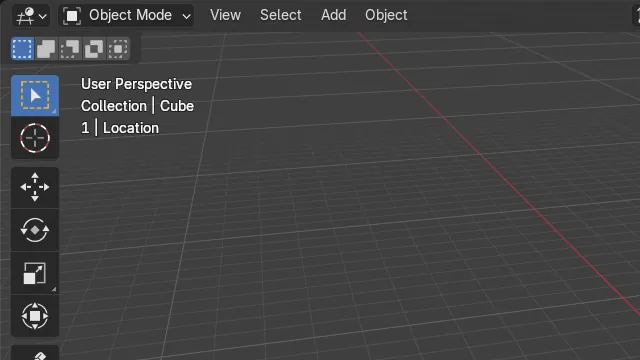
Always in view
The animation row of the Text Info shows the current frame and the active Keying Set, so you know what I will key before you press it.
Where to set it
Object › Animation › Change Keying Set... in the 3D Viewport, or press Shift + K and pick one such as Location.
New in 5.4
Blender 5.3 shows the frame in brackets before the collection name and never shows the Keying Set in the viewport.
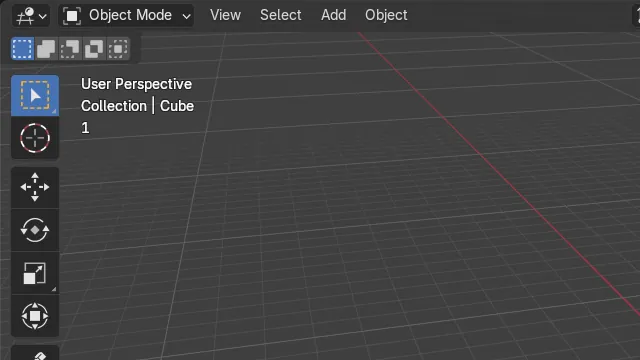
Before and after

AI Scene Builder is a Blender add-on. You type what you want, and it builds it in your scene: buildings, neon signs, wet pavement, fog and lights. Nothing in this picture was modeled by hand.
On a phone now? The add-on runs in Blender on a computer. Send yourself the link and open it there.
Step by step (Blender 5.4 Alpha)
- In the 3D Viewport, make sure overlays are on and Text Info is ticked in the Overlays drop-down. It is on by default.
- Select your object in Object Mode and press Shift + K. The menu route is Object › Animation › Change Keying Set... in the viewport header.
- Pick a Keying Set from the list, for example Location.
- Look at the top left of the viewport: the row under the object name now reads the frame and the Keying Set, such as 1 | Location.Blender 5.3: Blender 5.3 keeps showing only (1) Collection | Cube, so the active Keying Set is not visible in the viewport.
- Press I to insert a keyframe with that Keying Set, or K to choose a different one just for this key.
Other ways to do it
- Object › Animation › Change Keying Set... in the 3D Viewport header opens the same list as Shift + K.
- Press K in Object Mode to open Insert Keyframe with Keying Set and choose one for a single key without changing the active one.
Blender 5.3 vs Blender 5.4 Alpha
| What | Blender 5.3 | Blender 5.4 Alpha |
|---|---|---|
| Keying Set in the viewport Text Info | Not shown. The frame number appears in brackets before the collection name. | The frame number has its own row, followed by the active Keying Set, for example 1 | Location. |
| Release status | Blender 5.3.0 is the current stable release. | Blender 5.4 is in Alpha until February 3, 2027, so menus and behaviour may still change before the final release. |
Common snags
The row shows only the frame number
No Keying Set is active yet. Press Shift + K in Object Mode and choose one, for example Location.
There is no text in the top left at all
Text Info or all overlays are turned off. Open the Overlays drop-down in the viewport header and tick Text Info.
Pressing I keys more channels than you expected
Check the Keying Set on the animation row first. I uses the active Keying Set, so a set such as Location, Rotation & Scale keys all three.
An AI add-on for Blender
AI Scene Builder is a Blender add-on that builds and edits your scene from one typed request, such as “a small wooden table with two chairs”. Each request can be undone in one click.
 A log cabin room built with the add-on from 9 typed requests. See every request →
Questions
How do I see which Keying Set is active in Blender?
In Blender 5.4 it is shown in the top-left Text Info of the 3D Viewport, after the frame number, for example 1 | Location. In our run the row changed as soon as the Keying Set was set.
How do I change the active Keying Set?
Press Shift + K in Object Mode, or use Object › Animation › Change Keying Set..., and choose one from the list.
Why does my viewport show the frame number on its own row in Blender 5.4?
Blender 5.4 moved the animation information of the Text Info overlay to its own row. It holds the frame number and, when one is active, the Keying Set. Blender 5.3 shows the frame in brackets before the collection name.
What the pictures show
- Tested build: Blender 5.4.0 Alpha (f9495703eb0b, 2026-11-10 build), compared with Blender 5.3.0.
- Test scene: the default Cube in Object Mode at frame 1, Text Info overlay on, no active Keying Set.
- 5.4: the Text Info showed User Perspective, Collection | Cube and a third row with 1. After Change Keying Set to Location, the third row read 1 | Location.
- 5.3.0: the Text Info showed (1) Collection | Cube before and after the same change, with no Keying Set in the viewport.