How to Make Node Links Straight in Blender 5.4 (Noodle Curving)
In Blender 5.4, open Edit › Preferences, click Editing, open the Node Editor panel and set Noodle Curving to 0. Every link in the Shader, Geometry Nodes and Compositor editors is then drawn as a straight line. The default is 4 and the range is 0 to 10. In Blender 5.3 the same setting is part of the theme, under Themes › Node Editor.
- Mode
- Preferences (Edit > Preferences)
- Menu
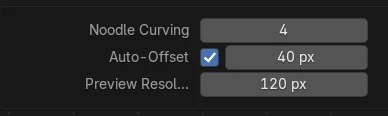
- Editing › Node Editor › Noodle Curving
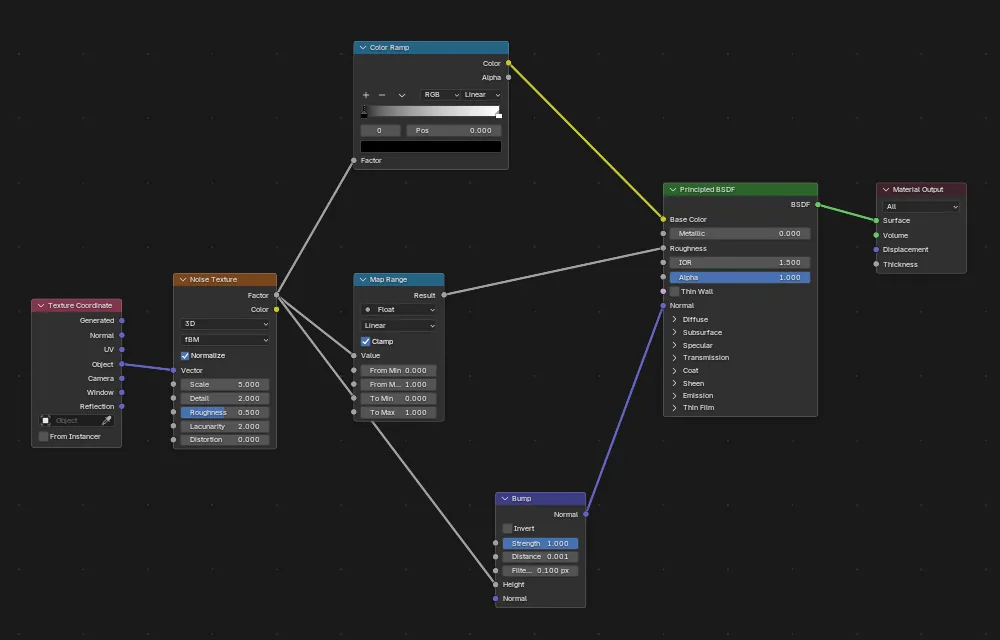
Where it is in 5.4
Edit › Preferences › Editing › Node Editor › Noodle Curving. 0 gives straight links, 10 gives the roundest curves.
It stays when you change themes
In 5.4 Noodle Curving is a normal preference. Switching to the Blender Light theme and back kept the value at 0.
Blender 5.3 keeps it in the theme
In 5.3 you set it under Themes › Node Editor, and loading the Blender Light theme put our value of 0 back to 4.
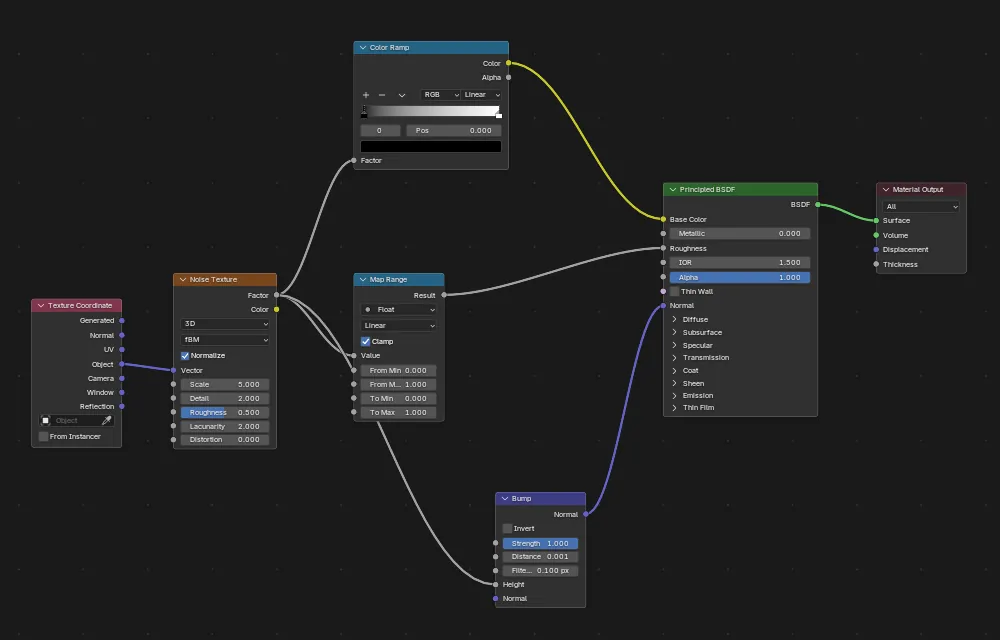
Before and after

AI Scene Builder is a Blender add-on. You type what you want, and it builds it in your scene: buildings, neon signs, wet pavement, fog and lights. Nothing in this picture was modeled by hand.
On a phone now? The add-on runs in Blender on a computer. Send yourself the link and open it there.
Step by step (Blender 5.4 Alpha)
- Open Edit › Preferences from the top bar.
- Click Editing in the list on the left and open the Node Editor panel.Blender 5.3: In Blender 5.3, click Themes instead and open the Node Editor section.
- Set Noodle Curving to 0 for straight links, or to a value between 1 and 10 for softer or rounder curves.
- Go back to your Shader Editor or Geometry Nodes editor. All links are now redrawn with the new shape. With Auto-Save Preferences on (the default), the value is kept for the next session.
Other ways to do it
- Open the Preferences from any editor with Edit › Preferences... in the top bar.
- If Auto-Save Preferences is off, click the menu at the bottom left of the Preferences window and choose Save Preferences.
Blender 5.3 vs Blender 5.4 Alpha
| What | Blender 5.3 | Blender 5.4 Alpha |
|---|---|---|
| Noodle Curving | Part of the theme: Preferences › Themes › Node Editor. Loading a theme preset changes it. | A regular preference: Preferences › Editing › Node Editor. Switching themes does not change it. |
| Release status | Blender 5.3.0 is the current stable release. | Blender 5.4 is in Alpha until February 3, 2027, so menus and behaviour may still change before the final release. |
Common snags
I can't find Noodle Curving in Themes anymore
Blender 5.4 moved it out of the theme. Look in Preferences › Editing › Node Editor; the panel is closed by default, so click its header to open it.
My straight links became curved again after changing the theme
That happens in Blender 5.3, where the value belongs to the theme: loading Blender Light set it back to 4. Set it again after loading the theme, or use Blender 5.4, where the theme does not touch it.
The setting is lost after restarting Blender
Auto-Save Preferences is turned off. Open the menu at the bottom left of the Preferences window and click Save Preferences.
An AI add-on for Blender
AI Scene Builder is a Blender add-on that builds and edits your scene from one typed request, such as “a small wooden table with two chairs”. Each request can be undone in one click.
 A log cabin room built with the add-on from 9 typed requests. See every request →
Questions
How do I make node links straight in Blender?
Set Noodle Curving to 0. In Blender 5.4 it is in Edit › Preferences › Editing › Node Editor; in Blender 5.3 it is under Preferences › Themes › Node Editor.
Where did Noodle Curving go in Blender 5.4?
It moved from the theme to Preferences › Editing › Node Editor. It is now a regular preference, so switching themes keeps your value.
Why do my node links change shape when I switch themes?
In Blender 5.3 and older, Noodle Curving is part of the theme. In our run, loading Blender Light reset a value of 0 to 4. Blender 5.4 keeps the value when you switch themes.
What the pictures show
- Tested build: Blender 5.4.0 Alpha (f9495703eb0b, 2026-11-10 build), compared with Blender 5.3.0.
- Test scene: the default cube's material with Texture Coordinate, Noise Texture, Color Ramp, Map Range and Bump nodes feeding a Principled BSDF (7 nodes, 8 links) in the Shader Editor.
- 5.4: Noodle Curving was 4 by default, stored in the Editing preferences (range 0 to 10). Setting it to 0 drew every link as a straight line. After loading the Blender Light theme and then Blender Dark, the value was still 0.
- 5.3.0: the value is stored in the theme (Themes > Node Editor). We set it to 0, loaded the Blender Light theme, and it went back to 4.